
1. Safety Information
WARNING: Improper installation, adjustment, alteration, service, or maintenance can cause property damage, injury, or death. Read the installation, operating, and maintenance instructions thoroughly before installing or servicing this equipment.
This product must be installed and serviced by a qualified pool professional in accordance with all applicable local codes and ordinances. Before performing any service, ensure the main power to the heater is disconnected at the circuit breaker.
- Always disconnect power before working on electrical components.
- Wear appropriate personal protective equipment.
- Ensure all wiring connections are secure and correct.
- Keep the control board dry and protected from moisture.
2. Product Overview
The Pentair 472100 Digital Display Temperature Controller Board is a replacement circuit board designed for MiniMax NT Series Pool and Spa Heaters. It features a digital display for temperature readings and various buttons for controlling heater functions.
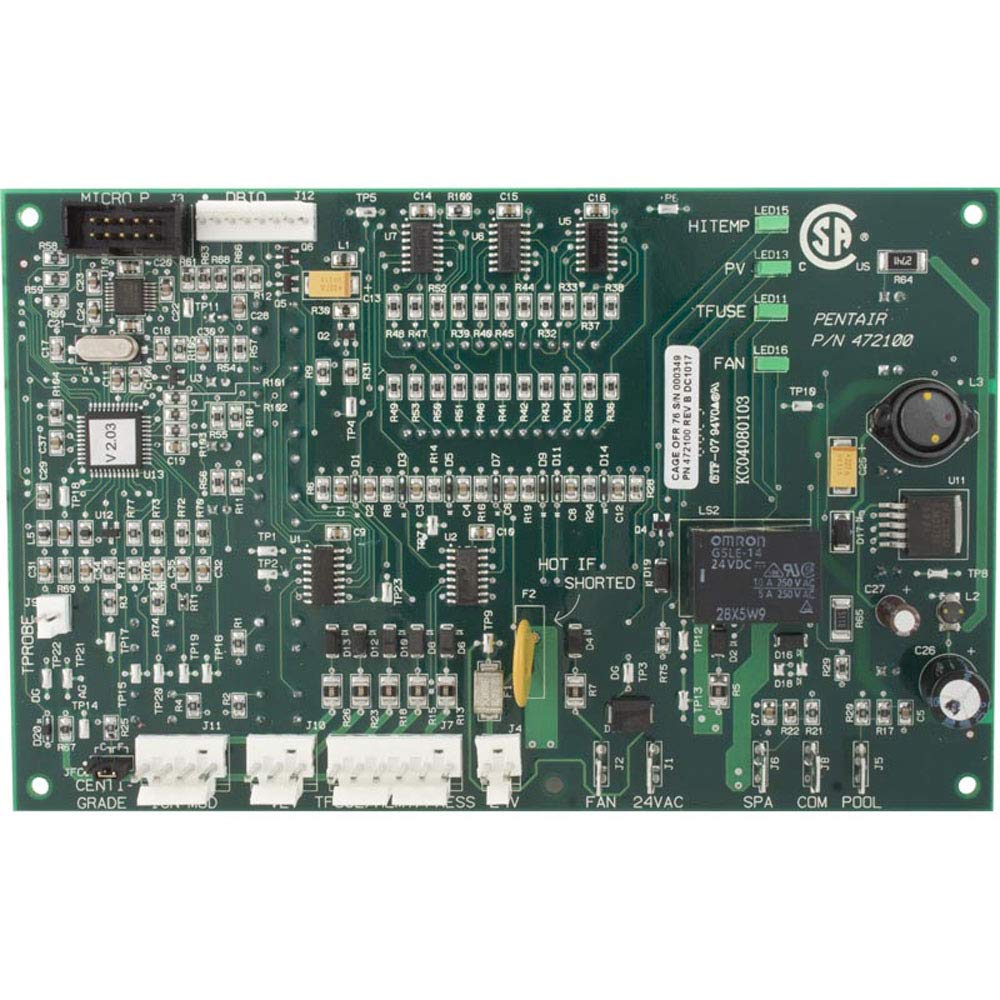
Figure 1: Pentair 472100 Digital Display Temperature Controller Board. This image shows the green circuit board with a central digital display, various push buttons, and indicator LEDs. Key labels visible include POWER, PRESS, TSTAT, HEAT, SERVICE, REMOTE, POOL, SPA, OFF, POOL UP, POOL DN, SPA UP, and SPA DN.
Key Features:
- Digital temperature display.
- Dedicated buttons for Pool, Spa, and Off modes.
- Temperature adjustment buttons (Up/Down) for Pool and Spa.
- Indicator LEDs for Power, Press, Tstat, Heat, Service, Remote, Pool, and Spa.
- Direct replacement for MiniMax NT Series heaters.
3. Installation Instructions
Before beginning, ensure you have the necessary tools (e.g., screwdriver) and that the main power to the heater is completely disconnected. It is highly recommended to take photographs of all existing wiring connections before removal to aid in correct re-installation.
- Disconnect Power: Turn off the main power supply to the pool/spa heater at the circuit breaker. Verify power is off using a voltage tester.
- Access Control Panel: Open the heater's control panel cover to expose the existing controller board.
- Document Connections: Carefully photograph or diagram all wire connections to the old board. Note the position and color of each wire.
- Remove Old Board: Disconnect all wires from the old controller board. Unscrew any mounting screws holding the old board in place and carefully remove it.
- Install New Board: Position the new Pentair 472100 controller board in the same location as the old one. Secure it with the mounting screws.
- Connect Wiring: Reconnect all wires to the new board, referring to your photographs or diagrams. Ensure each connection is firm and correctly placed.
- Close Panel: Once all connections are verified, close and secure the heater's control panel cover.
- Restore Power: Turn on the main power supply to the heater at the circuit breaker.
- Test Operation: Follow the operating instructions to test the heater's functions.
4. Operating the Digital Display Controller
The controller board features a digital display and several push buttons for managing your pool and spa heater settings.
Button Functions:
- POWER (LED22): Indicates the unit is receiving power.
- PRESS (LED14): Indicates pressure switch status.
- TSTAT (LED12): Indicates thermostat activity.
- HEAT (LED17): Indicates the heater is actively heating.
- SERVICE (LED21): Illuminates to indicate a service issue or error code.
- REMOTE (LED23): Indicates if the heater is controlled by a remote system.
- POOL (LED20): Press to select Pool heating mode. The LED will illuminate when active.
- SPA (LED18): Press to select Spa heating mode. The LED will illuminate when active.
- OFF: Press to turn off the heater.
- POOL UP (SH1) / POOL DN (SH2): Adjusts the desired temperature for Pool mode.
- SPA UP (SH3) / SPA DN (SH4): Adjusts the desired temperature for Spa mode.
Digital Display:
The central 3-digit digital display shows the current water temperature or error codes. When adjusting temperature, it will temporarily show the set point.
5. Maintenance
The Pentair 472100 controller board is designed for durability. Regular maintenance of the heater unit itself is crucial for the longevity of all components, including the control board.
- Keep Dry: Ensure the control panel area remains dry and free from water splashes or leaks.
- Cleanliness: Periodically inspect the board for dust or debris accumulation. If cleaning is necessary, disconnect power and use a soft, dry brush or compressed air. Do not use liquids.
- Visual Inspection: During routine heater maintenance, visually inspect the board for any signs of damage, corrosion, or loose connections.
6. Troubleshooting
This section provides solutions to common issues you might encounter with your heater's control board.
| Problem | Possible Cause | Solution |
|---|---|---|
| Heater does not turn on / No display. | No power to the unit, faulty wiring, or board failure. | Check circuit breaker. Verify all power connections to the board. If power is present and board is unresponsive, professional diagnosis may be required. |
| Error for temperature sensor. | Faulty temperature sensor or connection. | Inspect temperature sensor wiring for damage. Test or replace the temperature sensor. |
| Control lights flashing rapidly. | Indicates an internal error or communication issue. | Disconnect power for 5 minutes, then restore to attempt a reset. If flashing persists, contact a qualified service technician. |
| Incorrect temperature reading. | Faulty temperature sensor or calibration issue. | Verify sensor placement. If problem persists, the temperature sensor may need replacement. |
For issues not listed here or if troubleshooting steps do not resolve the problem, contact Pentair Customer Support or a qualified service professional.
7. Specifications
| Brand | Pentair |
| Model Number | 472100 |
| Part Number | 472100 |
| UPC | 788379686376 |
| Display Type | Digital |
| Item Weight | 5.92 ounces |
| Item Length | 8.25 inches |
| Included Components | Circuit board |
8. Warranty Information
This Pentair product is covered by a manufacturer's warranty. Specific warranty terms and conditions may vary. Please refer to the warranty documentation included with your original heater purchase or visit the official Pentair website for detailed information regarding warranty coverage and claims.
Retain your proof of purchase for warranty purposes.
9. Customer Support
For technical assistance, replacement parts, or further inquiries regarding your Pentair 472100 Digital Display Temperature Controller Board, please contact Pentair Customer Support.
Visit the official Pentair website for contact information and additional resources.


