1. Introduction
Thank you for purchasing the Audio-Technica DMK-32 Monaural Earphone. This earphone is designed for clear audio reproduction, particularly suitable for radio and other monaural audio sources. Please read this manual carefully before using the product to ensure proper operation and longevity.
2. Product Overview
The Audio-Technica DMK-32 is a lightweight, dynamic monaural earphone featuring a 3.5mm gold-plated L-type mini plug. It is designed for comfortable, extended use.
2.1. Components
- DMK-32 Monaural Earphone with attached cable and 3.5mm plug
- Silicone ear tips (Small, Medium, Large)
2.2. Product Diagram

Figure 1: The Audio-Technica DMK-32 Monaural Earphone, showing the earbud and the L-shaped 3.5mm gold-plated plug.
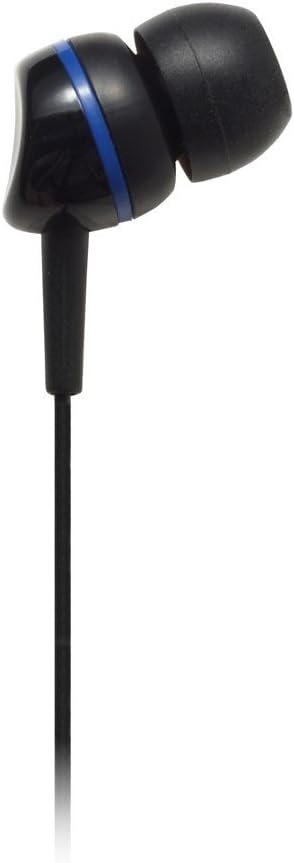
Figure 2: A close-up view of the DMK-32 earbud, highlighting the silicone ear tip for in-ear placement.
3. Setup
3.1. Selecting and Installing Ear Tips
- The DMK-32 comes with three sizes of silicone ear tips (Small, Medium, Large).
- Choose the ear tip size that provides the most comfortable and secure fit in your ear canal. A good seal is crucial for optimal sound quality and bass response.
- Gently remove the pre-installed ear tip by pulling it off the earphone nozzle.
- Push the desired ear tip onto the earphone nozzle until it is securely seated. Ensure it is not loose and will not detach easily.
3.2. Connecting to a Device
- Locate the 3.5mm audio output jack on your audio device (e.g., radio, portable media player).
- Insert the DMK-32's 3.5mm L-type mini plug firmly into the audio output jack.
- Ensure the plug is fully inserted to prevent intermittent sound or poor connection.
4. Operating Instructions
4.1. Basic Usage
- After connecting the earphone to your device, place the earbud gently into one ear.
- Start audio playback on your device.
- Adjust the volume using your audio device's volume controls to a comfortable listening level.
Note: This is a monaural earphone, meaning it delivers sound to only one ear. It does not feature inline volume or media controls; all adjustments must be made on the connected audio device.
5. Maintenance
Proper maintenance ensures the longevity and performance of your earphone.
5.1. Cleaning
- Ear Tips: Regularly remove the silicone ear tips and wash them with mild soap and water. Rinse thoroughly and allow them to dry completely before reattaching.
- Earphone Body: Wipe the earphone body with a soft, dry cloth. Do not use harsh chemicals or abrasive cleaners.
- Cable and Plug: Keep the cable and plug clean and free of dust.
5.2. Cable Care
The DMK-32 features a thin cable. To prevent damage:
- Avoid pulling the cable forcefully or subjecting it to sharp bends.
- Do not wrap the cable tightly around objects.
- When disconnecting, always pull the plug itself, not the cable.
5.3. Storage
When not in use, store the earphone in a clean, dry place, away from extreme temperatures and direct sunlight. Avoid tangling the cable.
6. Troubleshooting
If you encounter issues with your DMK-32 earphone, refer to the following common solutions:
6.1. No Sound or Intermittent Sound
- Check Connection: Ensure the 3.5mm plug is fully inserted into your audio device's jack.
- Volume Level: Verify that the volume on your audio device is turned up and not muted.
- Test with Another Device: Connect the earphone to a different audio device to determine if the issue is with the earphone or the original device.
- Inspect Cable: Check the cable for any visible damage or kinks.
6.2. Poor Sound Quality
- Ear Tip Fit: Ensure the ear tip provides a good seal in your ear. Try different sizes if necessary.
- Clean Ear Tips: Accumulated earwax or debris on the ear tips or earphone nozzle can affect sound. Clean them as described in the Maintenance section.
- Audio Source Quality: The sound quality is also dependent on the audio source. Test with high-quality audio if possible.
6.3. Earphone Discomfort
- Ear Tip Size: Experiment with different ear tip sizes to find the most comfortable fit.
- Proper Insertion: Ensure you are inserting the earbud gently and not too deeply into your ear canal.
7. Specifications
| Feature | Specification |
|---|---|
| Type | Dynamic |
| Driver Diameter | 11.5 mm |
| Frequency Response | 18 Hz - 22,000 Hz |
| Output Sound Pressure Level | 102 dB/mW |
| Maximum Input Power | 40 mW |
| Impedance | 16 Ohms |
| Cable Length | 1.2 m (approximately 47 inches) |
| Plug | 3.5 mm gold-plated monaural mini (L-type) |
| Weight (without cable) | 4 g (approximately 0.14 oz) |
| Ear Placement | In Ear |
| Material | Plastic |
Note: Specifications are subject to change without notice for improvement.
8. Warranty and Support
Audio-Technica products are manufactured to high-quality standards. For information regarding warranty coverage, please refer to the warranty card included with your purchase or visit the official Audio-Technica website for your region. If you require technical support or have questions not covered in this manual, please contact Audio-Technica customer service or your authorized dealer.
Audio-Technica Official Website: www.audio-technica.com


