
1. Introduction
The BOSCH D126 Security Device Battery is a maintenance-free, sealed lead-acid battery designed to provide reliable standby and auxiliary power. It offers a long service life and dependable performance, making it suitable for backup power in fire, security, and access control systems during AC power failures.
Key Features:
- 12 VDC sealed lead-acid construction.
- Designed for long service life and dependability.
- Fully rechargeable for continuous use.
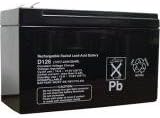
Figure 1: BOSCH D126 Security Device Battery. This image displays the compact, black casing of the sealed lead-acid battery, with product labels visible on the front surface indicating model number D126 and safety symbols.
2. Setup and Installation
Proper installation ensures optimal performance and safety. This battery is intended for use with charging circuits specifically calibrated for lead-acid batteries.
- Safety Precautions: Before handling, ensure the power to the security or access control system is disconnected. Wear appropriate personal protective equipment, such as gloves and eye protection.
- Inspect the Battery: Visually inspect the D126 battery for any signs of damage, such as cracks, leaks, or swollen casing. Do not install a damaged battery.
- Prepare the System: Refer to your security or access control system's manual for specific battery compartment location and connection instructions.
- Connect the Battery: Connect the positive (+) terminal of the D126 battery to the positive terminal of the system's battery connector. Connect the negative (-) terminal of the D126 battery to the negative terminal of the system's battery connector. Ensure connections are secure and correct polarity is maintained.
- Secure the Battery: Place the battery securely within its designated compartment to prevent movement.
- Initial Charge: After installation, allow the system to charge the battery fully. The initial charge time may vary depending on the system's charging circuit.
3. Operating Instructions
The BOSCH D126 battery operates as a standby power source. It automatically provides power to the connected system during an AC power failure and recharges when AC power is restored.
- Automatic Operation: Once installed and charged, the battery functions automatically. No user intervention is typically required for its primary operation.
- Power Outage: In the event of an AC power loss, the D126 battery will seamlessly supply power to the connected security or access control system, ensuring continuous operation for a specified duration, depending on the system's power consumption.
- Recharging: When AC power is restored, the system's charging circuit will automatically begin recharging the D126 battery.
4. Maintenance
The D126 is a maintenance-free battery, but periodic checks can help ensure its longevity and reliability.
- Visual Inspection: Periodically inspect the battery for any physical damage, corrosion on terminals, or swelling. Replace the battery if any damage is observed.
- Terminal Cleaning: If corrosion is present on the terminals, disconnect the battery from the system and carefully clean the terminals using a wire brush and a baking soda solution. Ensure terminals are dry before reconnecting.
- Temperature: Store and operate the battery within recommended temperature ranges (typically 20°C to 25°C or 68°F to 77°F) to maximize service life. Extreme temperatures can reduce battery life.
- Disposal: Dispose of spent batteries according to local regulations. Lead-acid batteries are recyclable. Do not dispose of them in household waste.
5. Troubleshooting
If you experience issues with your BOSCH D126 battery, consider the following troubleshooting steps:
| Problem | Possible Cause | Solution |
|---|---|---|
| Battery not providing backup power. | Battery discharged or faulty. Incorrect connection. | Verify AC power is restored and the system is charging. Check battery connections for correct polarity and security. If issues persist, the battery may need replacement. |
| System indicates low battery or battery fault. | Battery nearing end of life. Charging circuit fault. | Allow sufficient time for charging. If the problem persists, test the battery with a suitable battery tester. Consult your system's manual for charging circuit diagnostics. |
| Battery appears swollen or leaking. | Overcharging, internal fault, or physical damage. | Immediately disconnect the battery from the system. Do not attempt to use or recharge. Replace the battery and ensure the system's charging circuit is functioning correctly. Dispose of the faulty battery safely. |
6. Specifications
| Feature | Detail |
|---|---|
| Brand | Bosch |
| Model Number | D126 |
| Battery Cell Composition | Sealed Lead Acid |
| Voltage | 12 Volts |
| Unit Count | 1 Count |
| Product Dimensions | 6 x 4 x 2.75 inches |
| Item Weight | 4.65 pounds |
| Recommended Uses | Security, Fire, and Access Control Systems (Backup Power) |
7. Warranty and Support
For warranty information and technical support regarding your BOSCH D126 Security Device Battery, please refer to the documentation provided with your security system or contact Bosch customer service directly. Keep your purchase receipt as proof of purchase.
Bosch Customer Service: For assistance, visit the official Bosch website or consult your product's packaging for contact details.