
finder 12.22.8.230.0000
Instruction Manual for Finder Electronic Time Switch 12.22.8.230.0000
Model: 12.22.8.230.0000
1. Product Overview
The Finder 12.22.8.230.0000 is an electronic time switch designed for daily and weekly programming within modular distribution boards. This device offers precise control over electrical circuits, making it ideal for various applications requiring automated switching.
It features 30 programmable memory locations, allowing for flexible scheduling. The minimum switching time is 1 minute, providing granular control. With a robust design, it handles significant loads, including incandescent, halogen, and fluorescent lamps.
2. Safety Information
Please read and understand all safety instructions before installing or operating this device. Failure to comply with these instructions may result in electric shock, fire, or serious injury.
- Installation must be performed by a qualified electrician in accordance with all local and national electrical codes.
- Ensure the power supply is disconnected before any installation, wiring, or maintenance work.
- Do not expose the device to moisture, extreme temperatures, or corrosive environments.
- Verify that the voltage and current ratings of the device match your application requirements.
- Do not attempt to open or repair the device. Refer all servicing to qualified personnel.
3. Product Features
- Electronic time switch with daily and weekly programming.
- 30 programmable memory locations.
- Minimum switching time: 1 minute.
- Power reserve: 6 years (approximately 52,596 hours).
- Automatic summer/winter time changeover.
- Two independent changeover contacts (channels).
- Nominal switching current at 250 V AC: 16 A.
- Suitable for DIN rail mounting.
- IP20 protection rating.
4. Components and Controls
The Finder 12.22.8.230.0000 time switch features a clear display and intuitive control buttons for easy programming.

Figure 4.1: Front View of the Time Switch. This image shows the front of the Finder 12.22.8.230.0000 electronic time switch, highlighting its digital display and control buttons (M, A, B, OK) at the bottom. Terminal connections are visible at the top and bottom for power input and output.
- Display: Shows current time, date, and programming information.
- M (Menu) Button: Accesses the main menu for settings and programming.
- A (-) Button: Decreases values or navigates backward in menus.
- B (+) Button: Increases values or navigates forward in menus.
- OK Button: Confirms selections and saves settings.
- Terminals: Connections for power supply and load circuits.
5. Setup and Installation
5.1. Mounting
The time switch is designed for mounting on a standard DIN rail (35mm). Ensure sufficient space for ventilation and wiring connections.
5.2. Wiring Diagram
Refer to the following diagram for correct wiring connections. Always ensure power is disconnected before wiring.
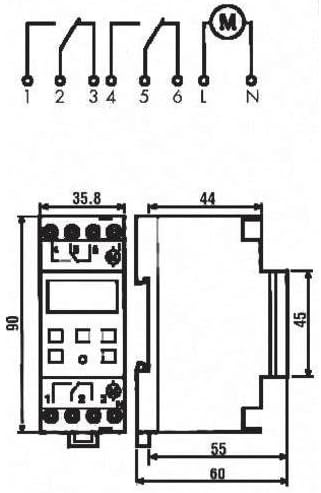
Figure 5.1: Wiring Diagram and Dimensions. This diagram illustrates the electrical connections for the Finder 12.22.8.230.0000 time switch, showing input (L, N) and output terminals (1, 2, 3, 4, 5, 6). It also provides detailed dimensions of the device in millimeters, crucial for installation planning.
Input Power: Connect the main power supply (230V AC, 50-60 Hz) to the designated input terminals (L and N).
Output Channels: The device has two independent changeover contacts. Connect your loads to terminals 1, 2, 3 (for Channel 1) and 4, 5, 6 (for Channel 2) as per your application's requirements. Refer to the diagram for common (C), normally open (NO), and normally closed (NC) connections.
6. Operating Instructions
6.1. Initial Setup (Time and Date)
- Upon first power-up or after a long power outage, the display may prompt for time and date settings.
- Use the A (-) and B (+) buttons to adjust the values (year, month, day, hour, minute).
- Press OK to confirm each setting and move to the next.
- The device supports automatic summer/winter time changeover, which can be enabled or disabled in the settings menu.
6.2. Programming Switching Times
The time switch allows for daily and weekly programming with up to 30 memory locations.
- Press the M (Menu) button to enter the programming mode.
- Navigate through the menu options using A (-) and B (+). Look for "PROGRAM" or "SCHED".
- Press OK to select. You will typically be prompted to select a program number (e.g., P01, P02).
- Set the desired ON time (hour and minute) for the program using A (-) and B (+), then OK.
- Set the desired OFF time (hour and minute) for the program using A (-) and B (+), then OK.
- Select the days of the week for which this program should be active (e.g., Mon-Fri, Sat-Sun, or individual days). Use A (-) and B (+) to toggle days, and OK to confirm.
- Repeat for additional programs as needed.
- Exit the programming menu by pressing M repeatedly until the main display is shown.
6.3. Manual Override
The device typically allows for a temporary or permanent manual override of the programmed schedule. Consult the on-screen prompts or a quick press of a specific button (often OK or M in standby mode) to cycle through ON/OFF/AUTO modes.
7. Maintenance
The Finder 12.22.8.230.0000 time switch requires minimal maintenance. Keep the device clean and free from dust. Use a soft, dry cloth for cleaning. Do not use abrasive cleaners or solvents. Ensure proper ventilation around the device to prevent overheating.
8. Troubleshooting
| Problem | Possible Cause | Solution |
|---|---|---|
| Display is blank. | No power supply. | Check power connections and circuit breaker. Ensure 230V AC is supplied. |
| Device not switching at programmed times. | Incorrect programming; Manual override active; Incorrect time/date. | Verify programming steps. Check if manual override is engaged. Correct time and date settings. |
| Time is inaccurate. | Internal clock drift (minimal); Power reserve depleted. | The device has a 6-year power reserve. If power has been off for extended periods, reset the time. Accuracy is 1.5 seconds per day. |
| Buttons are unresponsive. | Temporary software glitch. | Disconnect power for a few minutes, then reconnect. If problem persists, contact support. |
9. Specifications
| Parameter | Value |
|---|---|
| Model Number | 12.22.8.230.0000 |
| Brand | Finder |
| Mounting Type | DIN Rail |
| Number of Channels | 2 |
| Supply Voltage | 230V AC |
| Supply Frequency | 50-60 Hz |
| Power Reserve | 6 years (approx. 52,596 hours) |
| Accuracy per day | 1.5 seconds |
| Minimum Switching Time | 1 minute |
| Number of Memory Locations | 30 |
| Automatic Summer/Winter Time Changeover | Yes |
| Switching Contact Type | Changeover contact (potential-free) |
| Nominal Switching Current (250V AC) | 16 A |
| Breaking Capacity (AC1) | 4000 VA |
| Breaking Capacity (AC15, 230V) | 750 VA |
| Incandescent/Halogen Lamp Load | 2000 W |
| Compensated Fluorescent Lamp Load | 420 W |
| Uncompensated Fluorescent Lamp Load | 1000 W |
| Protection Rating | IP20 |
| Width (in division units) | 2 |
| Dimensions (L x W x H) | 1 x 1 x 1 cm (Product); 35.8 mm (W) x 90 mm (H) x 63 mm (D) (Device) |
| Weight | 7 Kilograms |
| Material | Polyester |
10. Warranty and Support
For warranty information and technical support, please contact your local Finder distributor or visit the official Finder website. Keep your purchase receipt as proof of purchase.
Information regarding spare parts availability is currently unavailable. For any issues not covered in this manual, please seek assistance from qualified technical personnel.
Related documents12.22.8.230.0000


Ask a question about this manual
Ask about setup, troubleshooting, compatibility, parts, safety, or missing instructions. Manuals+ will review the question and use this page’s manual context to help answer it.