
1. Introduction
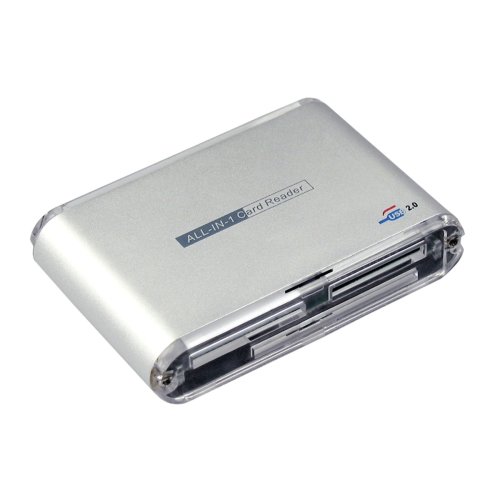
Thank you for choosing the APM 29-in-1 USB 2.0 Memory Card Reader. This device provides a convenient and efficient way to read and write data to various memory card formats. Its plug-and-play design ensures easy setup and operation with compatible computer systems.
2. Setup
2.1 Package Contents
- APM 29-in-1 USB 2.0 Memory Card Reader
- User Manual (this document)
2.2 System Requirements
- Operating System: Microsoft Windows 98SE/2000/ME/XP, MacOS 10.0 and higher, Linux OS 2.4 and higher
- Available USB 2.0 port
2.3 Connecting the Device
- Locate an available USB port on your computer.
- Insert the USB connector of the APM Card Reader into the USB port.
- The operating system will automatically detect and install the necessary drivers. No additional software installation is required for most modern operating systems.
3. Operating Instructions
3.1 Inserting Memory Cards
The APM 29-in-1 Card Reader features multiple slots designed for different memory card formats. Ensure you insert the memory card into the correct slot with the correct orientation.
- CF Slot: For CompactFlash Type I and Type II cards.
- MD Slot: For Microdrive cards.
- MS Slot: For Memory Stick, Memory Stick PRO, Memory Stick Duo, Memory Stick PRO Duo, Memory Stick MagicGate, Memory Stick PRO MagicGate, and Memory Stick ROM cards.
- SD/MMC Slot: For Secure Digital (SD), MultiMediaCard (MMC), MMCII, Mini-SD (with adapter), and RS-MMC (with adapter) cards.
- T-Flash Slot: For TransFlash (MicroSD) cards.
- Smart Media Slot: For SmartMedia cards.
Gently push the card into the slot until it is fully seated. Do not force the card, as this may damage the card or the reader.
3.2 Accessing Data
- Once a memory card is inserted, your computer's operating system will typically recognize it as a removable disk drive.
- Navigate to 'My Computer' or 'This PC' (Windows) or 'Finder' (macOS).
- Locate the new removable disk drive(s) corresponding to the inserted memory card.
- Double-click the drive icon to access the files on the memory card.
- To safely remove the card, always use the 'Safely Remove Hardware' option in Windows or drag the drive icon to the Trash/Eject icon in macOS before physically removing the card.
3.3 Supported Card Formats
The APM 29-in-1 Card Reader supports a wide range of memory card formats, including:
- CF I / CF II
- MD (Microdrive)
- MS / MS-PRO / MS-DUO / MS-PRO-DUO
- MS-MG / MS-PRO-MG / MS-ROM
- SD / MMC / MMCII
- Mini-SD (requires adapter)
- RS-MMC (requires adapter)
- T-Flash (MicroSD)
- Smart Media
4. Maintenance
4.1 Cleaning
To maintain optimal performance, keep the card reader clean. Use a soft, dry cloth to wipe the exterior. Do not use liquid cleaners or solvents. Avoid inserting foreign objects into the card slots.
4.2 Storage
Store the card reader in a cool, dry place away from direct sunlight and extreme temperatures. When not in use, it is recommended to disconnect it from your computer.
5. Troubleshooting
If you encounter issues with your APM Card Reader, please refer to the table below for common problems and solutions.
| Problem | Possible Cause | Solution |
|---|---|---|
| Card reader not detected by computer. | Loose USB connection, faulty USB port, driver issue. | Try a different USB port. Reconnect the card reader. Restart your computer. |
| Memory card not recognized. | Card not fully inserted, incorrect slot, damaged card, unsupported format. | Ensure card is fully inserted into the correct slot. Test with another card. Check card compatibility. |
| Slow data transfer speed. | Using a USB 1.1 port, old card, system performance issues. | Ensure connected to a USB 2.0 port. Use a high-speed memory card. Close other demanding applications. |
6. Specifications
| Brand | APM |
| Model Number | 571201 |
| Interface | USB 2.0 |
| Hardware Interface | USB Key |
| Compatible Devices | Computer |
| Supported Operating Systems | Microsoft Windows 98SE/2000/ME/XP, MacOS 10.0 and higher, Linux OS 2.4 and higher |
| Supported Media Types | CF I/II, MD, MS, MS-PRO, MS-DUO, MS-PRO-DUO, MS-MG, MS-PRO-MG, MS-ROM, SD, MMC, MMCII, Mini-SD, RS-MMC, T-Flash, Smart Media |
| Connectivity Technology | USB 2.0 |
| First Available Date | January 1, 2007 |
7. Warranty Information
For detailed warranty information regarding your APM 29-in-1 USB 2.0 Memory Card Reader, please refer to the product packaging or visit the official APM website. Warranty terms and conditions may vary by region and purchase date.
8. Support
If you require further assistance or have questions not covered in this manual, please visit the APM official website or contact APM customer support through the contact information provided on the product packaging or website.