
Leviton 43080-1S2
Contents

Leviton Stainless Steel QUICKPORT Wallplate
Model: 43080-1S2 User Manual
Introduction
This manual provides comprehensive instructions for the installation, operation, and maintenance of your Leviton Stainless Steel QUICKPORT Wallplate, Single Gang, 2-Port, Model 43080-1S2. Please read this manual thoroughly before installation to ensure proper function and safety.
Product Overview
The Leviton 43080-1S2 is a durable, single-gang wallplate designed to accommodate two QuickPort modules. Constructed from brushed stainless steel, it offers a clean and professional appearance suitable for various residential and commercial environments. Its design allows for easy snap-in installation of compatible QuickPort connectors and adapters, providing flexible configuration options for your electrical and data networking needs.
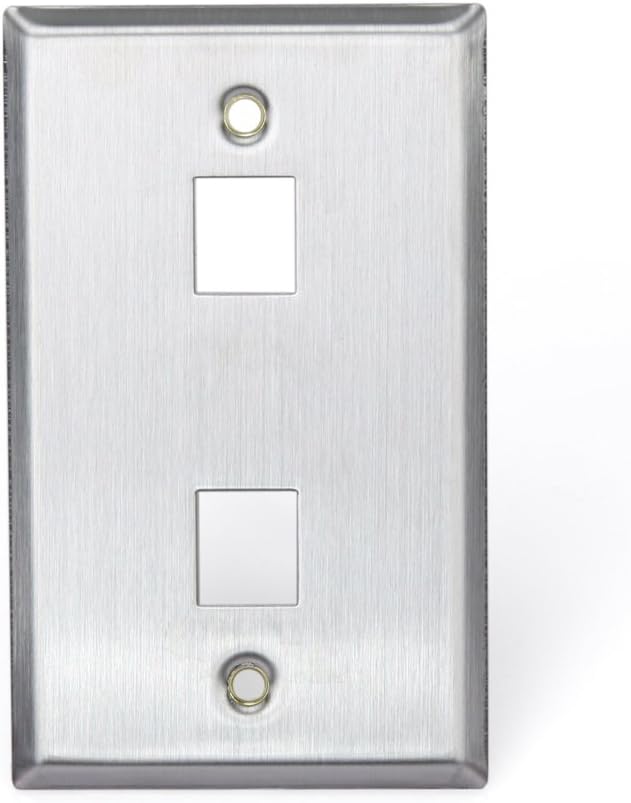
Front view of the Leviton 43080-1S2 QuickPort Wallplate, showcasing its brushed stainless steel finish and two QuickPort openings.
Features
- Material: Brushed stainless-steel finish for durability and aesthetic appeal.
- Compatibility: Designed to fit standard NEMA electrical boxes.
- Modularity: Compatible with all individual Leviton QuickPort connectors and adapters.
- Configurability: Individual port configurability allows for flexible specification and customization.
- Design: Single gang, 2-port configuration.
- Installation: Snap-On installation type for ease of use.
Setup and Installation
The Leviton QuickPort Wallplate is designed for straightforward installation. Ensure power is off at the circuit breaker before beginning any electrical work.
- Prepare the Electrical Box: Ensure the electrical box is properly installed and secured in the wall.
- Install QuickPort Modules: Gently snap your desired QuickPort connectors or adapters into the two available ports on the wallplate. Ensure they are fully seated and secure.
- Position the Wallplate: Align the wallplate with the electrical box, ensuring any cables or wires connected to the modules are neatly tucked into the box.
- Secure the Wallplate: Use the provided screws to fasten the wallplate to the electrical box. Do not overtighten.
- Verify Installation: Once secured, ensure the wallplate is flush with the wall and the QuickPort modules are stable.

Dimensions of the Leviton 43080-1S2 QuickPort Wallplate: 2.78 inches wide by 4.5 inches high.
Operation
The Leviton QuickPort Wallplate serves as a housing for your QuickPort modules. Once installed, its primary function is to provide a secure and aesthetically pleasing finish for your electrical or data connections. There are no active operational controls on the wallplate itself.
Maintenance
To maintain the appearance and integrity of your stainless steel wallplate, follow these simple guidelines:
- Cleaning: Wipe the surface with a soft, damp cloth. For stubborn marks, a mild, non-abrasive stainless steel cleaner can be used. Always wipe in the direction of the grain.
- Avoid: Do not use abrasive cleaners, scouring pads, or harsh chemicals, as these can scratch or damage the stainless steel finish.
- Inspection: Periodically check the wallplate for any signs of damage or loose screws. Tighten screws if necessary, but do not overtighten.
Troubleshooting
| Problem | Possible Cause | Solution |
|---|---|---|
| Wallplate does not sit flush. | Electrical box not properly recessed or debris behind the plate. | Ensure the electrical box is correctly installed. Remove any obstructions behind the wallplate. |
| QuickPort modules are loose. | Modules not fully snapped into place. | Press firmly on the QuickPort modules until they audibly click into position. |
| Mounting screws feel loose or don't tighten. | Screws may be too short for the electrical box, or threads are stripped. | Ensure screws are appropriate length. If threads are stripped, consider using a different screw or repairing the electrical box mounting tabs. |
Specifications
| Attribute | Detail |
|---|---|
| Model Number | 43080-1S2 |
| Brand | Leviton |
| Material | Stainless Steel |
| Finish Type | Brushed |
| Color | Image (Brushed Stainless Steel) |
| Product Dimensions (W x H) | 2.78" x 4.5" |
| Item Weight | 3.2 ounces |
| Configuration | Single Gang, 2-Port |
| Installation Type | Snap-On |
| Approvals | UL (Canada and US), UL 1863, CAN/CSA C22.2 |
| UPC | 078477394984 |
Warranty Information
This Leviton product is covered by a manufacturer's warranty. For specific details regarding the warranty period, coverage, and claims process, please refer to the official Leviton website or contact Leviton customer support directly. Keep your purchase receipt as proof of purchase.
Customer Support
For technical assistance, product inquiries, or support, please contact Leviton customer service. You can find contact information and additional resources on the official Leviton website:
You may also visit the Leviton Store on Amazon for more products and information.
Documents and downloads
Ask a question about this manual
Ask about setup, troubleshooting, compatibility, parts, safety, or missing instructions. Manuals+ will review the question and use this page’s manual context to help answer it.