
Introduction
This manual provides essential information for the installation, operation, and maintenance of your Leviton 2-Gang 1-Decora/GFCI Centered Device Decora Wallplate, Model S746-N. This stainless steel wallplate is designed to cover a single Decora/GFCI device centered within a 2-gang electrical box, providing a clean and finished appearance.
Safety Information
Always prioritize safety when working with electrical components. Failure to follow these instructions may result in electric shock, fire, or serious injury.
- Turn Off Power: Before beginning any installation, always turn off power to the electrical box at the circuit breaker or fuse box. Verify that power is off using a voltage tester.
- Qualified Personnel: If you are unsure about any part of the installation process, consult a qualified electrician.
- Proper Tools: Use appropriate insulated tools for electrical work.
- Inspect Components: Before installation, inspect the wallplate for any damage. Do not install damaged components.
- Local Codes: Ensure all installations comply with local electrical codes and regulations.
Product Overview
The Leviton S746-N is a durable stainless steel wallplate designed for a single Decora/GFCI device in a 2-gang configuration. Its smooth finish and non-magnetic properties ensure a sleek and functional addition to your electrical setup.

Image: Front view of the Leviton S746-N Stainless Steel Wallplate, showing the single Decora opening and screw holes.
Specifications
| Feature | Detail |
|---|---|
| Brand | Leviton |
| Model Number | S746-N |
| Material | Stainless Steel |
| Color | Stainless Steel |
| Configuration | 2-Gang, 1-Decora/GFCI Centered Device |
| Product Dimensions (W x H) | 4.56" x 4.5" |
| Item Weight | 0.18 Pounds (2.88 ounces) |
| Installation Type | Screw-In |
| Approvals | UL, CSA |

Image: Diagram showing the dimensions of the Leviton S746-N Wallplate, indicating a width of 4.56 inches and a height of 4.5 inches.
Setup and Installation
Follow these steps to properly install your Leviton wallplate:
- Prepare the Area: Ensure the electrical device (e.g., GFCI outlet, Decora switch) is already installed and securely mounted in the 2-gang electrical box.
- Remove Protective Film: The wallplate may come with a thin blue protective film to prevent scratches during shipping and handling. Carefully peel this film off before installation.
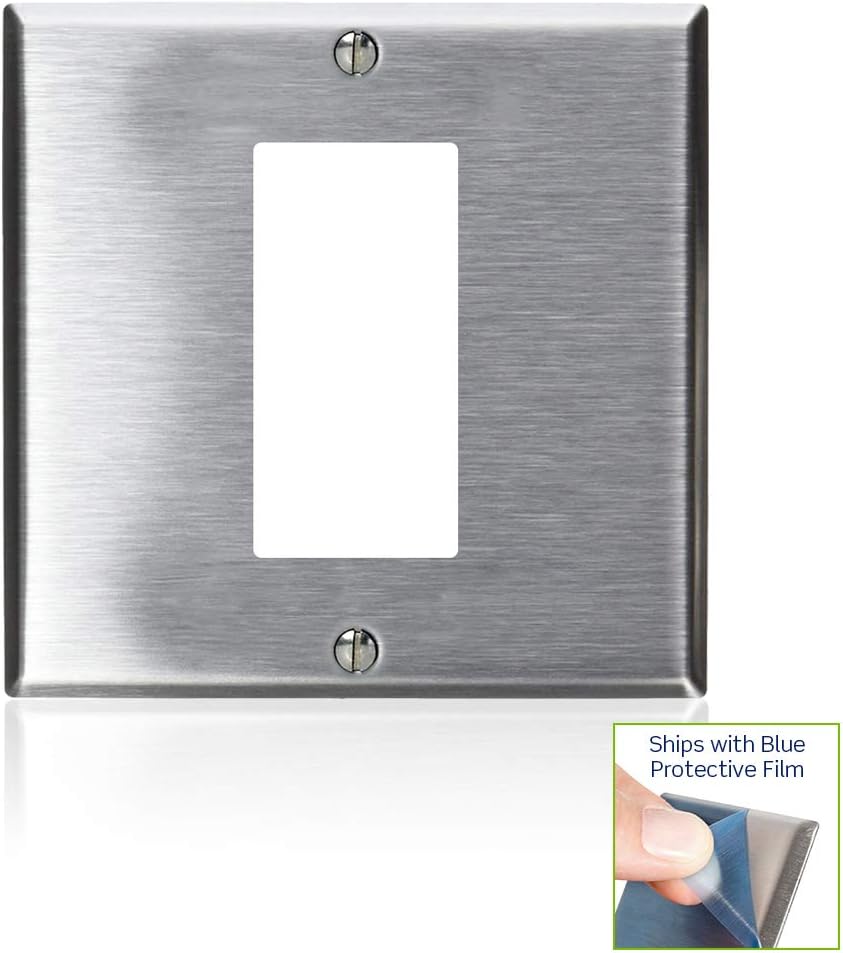
Image: Leviton wallplate showing a corner with a blue protective film and a note indicating its presence.

Image: Close-up of a hand peeling off the blue protective film from the edge of the stainless steel wallplate.
- Position the Wallplate: Align the single Decora opening of the wallplate over the installed electrical device. Ensure the screw holes on the wallplate align with the mounting holes on the device.
- Secure the Wallplate: Use the provided screws to attach the wallplate to the electrical device. Do not overtighten the screws, as this can damage the wallplate or the device. Tighten until snug.
- Final Check: Once installed, ensure the wallplate is flush against the wall and the device is securely covered.
Operation
The Leviton S746-N wallplate is a passive component designed to provide a protective and aesthetic cover for your electrical device. Its operation is limited to its function as a cover, allowing access to the device's controls (e.g., switch toggle, GFCI reset button) through its opening.
Maintenance
To maintain the appearance and integrity of your stainless steel wallplate:
- Cleaning: Wipe the surface with a soft, damp cloth. For stubborn marks, a mild, non-abrasive cleaner suitable for stainless steel can be used. Avoid harsh chemicals or abrasive scrubbing pads, which can scratch the finish.
- Inspection: Periodically check the wallplate for any signs of damage or loosening. If the wallplate becomes loose, gently retighten the screws.
Troubleshooting
If you encounter issues with your wallplate, consider the following:
- Wallplate Does Not Sit Flush:
- Ensure the electrical device is properly seated and secured within the electrical box.
- Check for any obstructions behind the wallplate or around the device.
- Scratches on Surface:
- If the protective film was not removed, remove it.
- Minor scratches on stainless steel can sometimes be buffed out with specialized stainless steel polish, following product instructions.
- Screws Do Not Tighten:
- Ensure you are using the correct screws provided with the wallplate or compatible screws.
- Check if the mounting holes on the electrical device are stripped. If so, the device itself may need replacement or repair.
Warranty Information
This Leviton product is covered by a manufacturer's warranty. For specific details regarding warranty coverage, terms, and conditions, please refer to the official Leviton website or contact Leviton customer support directly. Retain your proof of purchase for warranty claims.
Customer Support
For further assistance, technical support, or product inquiries, please visit the official Leviton website or contact their customer service department. You can find more information and products at the Leviton Store on Amazon.