
NIXON A050000-00
NIXON Men's Channel T Analog Watch A050000-00 User Manual
Model: A050000-00
Introduction
This manual provides essential instructions for the setup, operation, maintenance, and troubleshooting of your NIXON Men's Channel T Analog Watch, model A050000-00. Please read this guide thoroughly to ensure proper use and care of your timepiece.
Product Overview
The NIXON Channel T Analog Watch is designed for reliability and style, featuring a robust case, a comfortable strap, and an analog display with additional sub-dials.
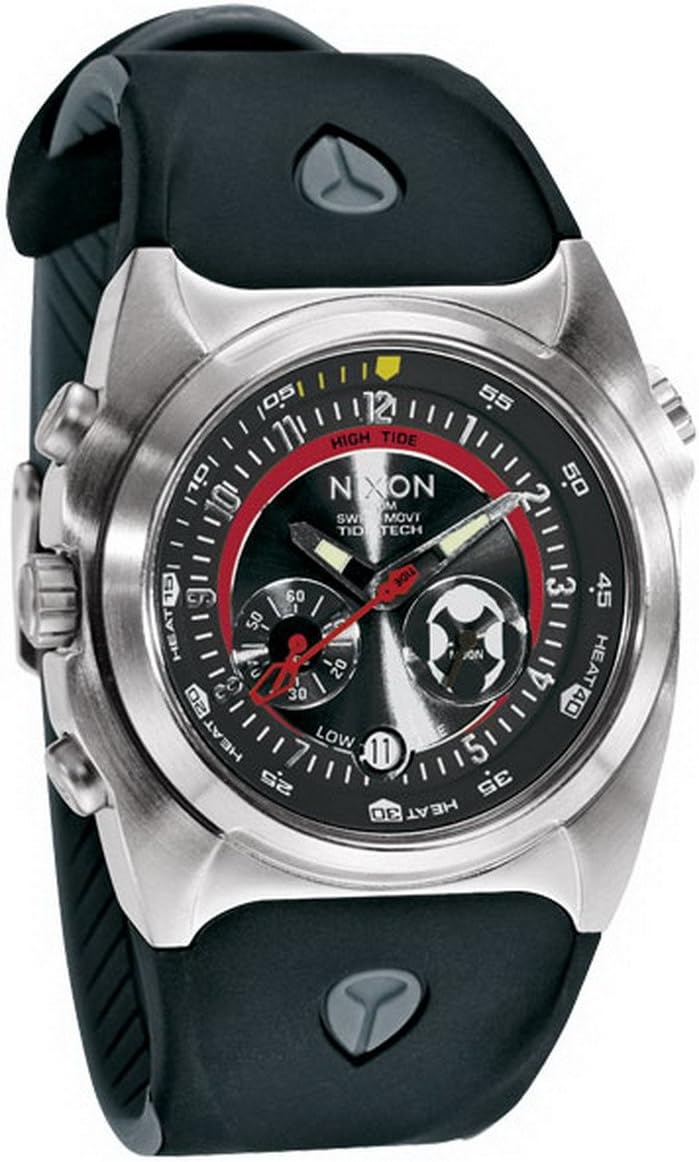
Image Description: A close-up front view of the NIXON Men's Channel T Analog Watch. It features a brushed stainless steel case, a black dial with red and white accents, and a black silicone strap. The dial displays hour, minute, and second hands, along with sub-dials indicating "HIGH TIDE" and "LOW TIDE" and a date window.
Setup
Setting the Time
- Locate the crown on the right side of the watch case.
- Gently pull the crown out to the furthest position (typically the second click). The second hand may stop moving.
- Turn the crown clockwise or counter-clockwise to adjust the hour and minute hands to the correct time.
- Once the time is set, push the crown back into its original position against the watch case. The second hand should resume movement.
Setting the Date
- Pull the crown out to the first position (typically the first click).
- Turn the crown clockwise or counter-clockwise to adjust the date display. Avoid setting the date between 9 PM and 3 AM, as this can interfere with the automatic date change mechanism.
- Once the date is set, push the crown back into its original position.
Operating the Watch
Your NIXON Channel T Analog Watch is designed for straightforward operation. Beyond setting the time and date, the watch features sub-dials for "HIGH TIDE" and "LOW TIDE" indications. These are typically pre-calibrated or linked to the main timekeeping mechanism. For specific calibration or adjustment of these sub-dials, please refer to the detailed instructions provided with your watch at the time of purchase or consult the NIXON official support resources.
The watch also includes pushers on the side of the case, which may activate additional functions such as a chronograph or other specialized features. The exact function of these pushers depends on the specific movement installed in your watch.
Maintenance
Cleaning
- Wipe the watch case and strap regularly with a soft, dry cloth to remove dust and dirt.
- For more thorough cleaning, especially after exposure to saltwater or sweat, use a soft cloth dampened with mild soap and water. Ensure the crown is fully pushed in before cleaning. Rinse with clean water and dry thoroughly.
- Avoid using harsh chemicals, solvents, or abrasive cleaners, as these can damage the watch's finish or seals.
Water Resistance
While your NIXON watch is designed with a degree of water resistance, it is crucial to understand its limitations. Always ensure the crown is fully pushed in before any contact with water. Avoid operating the crown or pushers while the watch is wet or submerged. Exposure to hot water, steam, or sudden temperature changes can compromise water resistance. If the watch is exposed to saltwater, rinse it with fresh water and dry it thoroughly.
Battery Replacement
When the watch battery requires replacement, it is recommended to have this service performed by an authorized NIXON service center or a qualified watch technician. This ensures proper battery installation and re-sealing of the watch case to maintain its water resistance.
Troubleshooting
- Watch Not Running: Check if the crown is fully pushed in. If the watch still does not run, the battery may need replacement.
- Incorrect Time/Date: Refer to the "Setting the Time" and "Setting the Date" sections to reset. Ensure the crown is fully pushed in after adjustment.
- Condensation Under Crystal: If condensation appears under the watch crystal, it may indicate a breach in water resistance. Seek professional service immediately to prevent internal damage.
Specifications
| Model Number | A050000-00 |
| Brand | NIXON |
| Department | Men's |
| Clasp Type | Buckle |
| Manufacturer | Nixon |

Image Description: A white product box with the NIXON logo embossed on the side, indicating the watch's original packaging.
Warranty and Support
Your NIXON watch is covered by a manufacturer's warranty against defects in materials and workmanship. For detailed information regarding warranty terms, coverage, and how to obtain service, please refer to the warranty card included with your purchase or visit the official NIXON website.
For further assistance, technical support, or to locate an authorized service center, please visit NIXON Support.