
1. Introduction
This manual provides detailed instructions for the proper use and maintenance of your Chrysler 3-Button Keyless Entry Remote. This remote is designed to replace lost or damaged vehicle remotes, offering convenient keyless access to your vehicle.
Compatibility: This remote is compatible with the following vehicles, provided the FCC ID number (GQ43VT13T) and part number (4671641AE) match your vehicle's requirements:
- CHRYSLER: PT Cruiser (2001-2005)
- DODGE: Dakota (2001-2004)
Ensure that your original remote shares the same button configuration as this replacement unit.
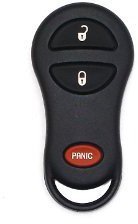
Image of the Chrysler 3-Button Keyless Entry Remote, featuring lock, unlock, and panic buttons. The remote is black with three oval-shaped buttons: two black buttons for lock and unlock, and one red button labeled 'PANIC' at the bottom.
2. Safety Information
Please read and understand all instructions before attempting to program or use the remote. Improper handling may result in damage to the remote or vehicle.
- Keep the remote away from water and extreme temperatures.
- Do not attempt to disassemble the remote beyond battery replacement.
- Store the remote out of reach of children.
3. Setup
3.1 Battery Installation
Your remote is equipped with a brand new Duracell battery for extended life. No initial battery installation is typically required upon receipt.
3.2 Initial Programming
This device may be self-programmable for listed vehicles. An information card with programming instruction websites will be included with your remote. Please verify online for your specific vehicle's year, make, and model before attempting self-programming.
Important Programming Notes:
- ONE or TWO of the vehicle's previous working remotes MAY BE required to self-program.
- If you do not have a previous working key fob, or if self-programming is unsuccessful, the device can be programmed by a dealership or a professional locksmith.
4. Operating Instructions
Once programmed, your keyless entry remote provides convenient access to your vehicle's locking functions.
- Lock Button: Press once to lock all vehicle doors.
- Unlock Button: Press once to unlock the driver's door, press twice to unlock all doors.
- Panic Button: Press and hold for a few seconds to activate the vehicle's alarm system. Press again to deactivate.
5. Maintenance
5.1 Battery Replacement
When the remote's range decreases or it stops responding, the battery may need replacement. Refer to the specific instructions provided with your remote or consult an automotive professional for battery replacement procedures.
6. Troubleshooting
| Problem | Possible Cause | Solution |
|---|---|---|
| Remote does not work after purchase. | Remote not programmed to vehicle. | Follow programming instructions or seek professional programming. |
| Remote range is poor or intermittent. | Low battery. | Replace the battery. |
| Remote not compatible with vehicle. | Incorrect FCC ID or Part Number. | Verify FCC ID (GQ43VT13T) and Part Number (4671641AE) match your vehicle's requirements. |
7. Specifications
| Feature | Detail |
|---|---|
| Manufacturer | REMOTE STORE |
| Brand | Chrysler |
| Item Weight | 3 ounces |
| Product Dimensions | 2 x 0.5 x 4 inches |
| Item Model Number | GQ43VT13T / 04671641 |
| Manufacturer Part Number | 4671641AE |
8. Warranty Information
This product comes with a 60-day parts warranty. We test every remote and key fob to ensure it is functioning perfectly before shipment. This warranty covers defects in materials and workmanship under normal use.
9. Support
For further assistance with programming, troubleshooting, or warranty claims, please refer to the contact information provided with your purchase or visit the official Chrysler store on Amazon for additional resources.
Chrysler Store: Visit the Chrysler Store on Amazon