
1. Product Overview
The Hudson Valley Lighting Milford 4444-PC is a 4-light bath and vanity fixture designed with a cubist aesthetic. It features a polished chrome finish and utilizes four G9 halogen bulbs (not included) to provide illumination. The fixture incorporates cast metal and blown glass components, offering a clean-lined design suitable for various interior bathroom settings.
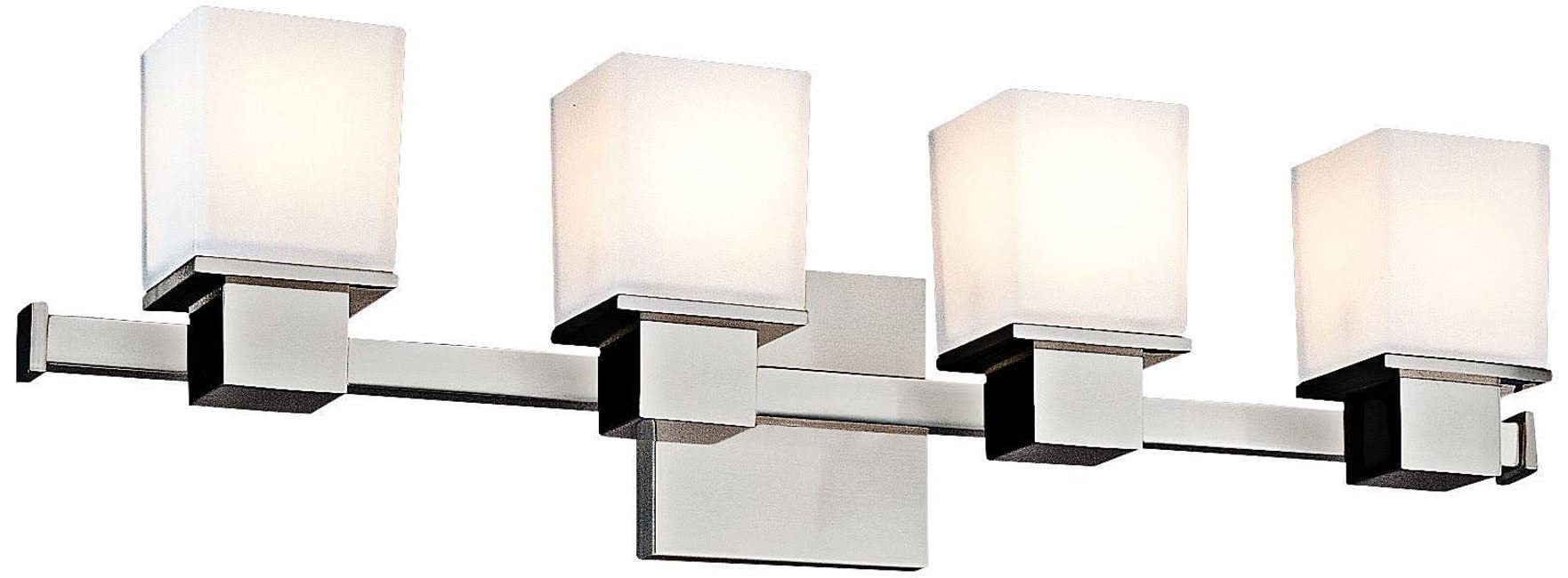
Image 1.1: The Hudson Valley Lighting Milford 4444-PC 4-Light Vanity Fixture. This image displays the complete fixture with four square, frosted glass shades mounted on a polished chrome bar, ready for installation.
2. Safety Information
- WARNING: Risk of electric shock. Disconnect power at the fuse box or circuit breaker before installation or servicing.
- All electrical connections must be in accordance with local codes, ordinances, and the National Electric Code (NEC).
- Consult a qualified electrician if you are unsure about proper installation.
- Use only G9 base bulbs with a maximum wattage of 75W per bulb. Do not exceed the recommended wattage.
- Do not install this fixture in wet locations. It is designed for indoor use only.
- Handle glass components with care to prevent breakage.
3. Package Contents
Verify that all components listed below are present before beginning installation. If any parts are missing or damaged, contact customer support.
- Milford 4-Light Vanity Fixture (Model 4444-PC)
- Glass Shades (4 units)
- Mounting Bracket/Crossbar
- Mounting Screws
- Wire Nuts (3 units)
- Ground Screw
- Instruction Manual
Note: G9 Halogen bulbs are not included and must be purchased separately.
4. Setup and Installation
4.1 Tools Required (Not Included)
- Phillips Head Screwdriver
- Flathead Screwdriver
- Wire Strippers
- Electrical Tape
- Safety Glasses
4.2 Installation Steps
- Turn Off Power: Locate the circuit breaker or fuse box and turn off the power to the junction box where the fixture will be installed. Verify power is off using a voltage tester.
- Prepare Mounting Bracket: Attach the mounting bracket/crossbar to the junction box using the provided mounting screws. Ensure the bracket is securely fastened.
- Wiring Connections:
- Connect the bare copper (ground) wire from the fixture to the ground wire from the junction box (usually bare copper or green) using a wire nut. Secure the ground wire to the mounting bracket with the ground screw.
- Connect the white (neutral) wire from the fixture to the white (neutral) wire from the junction box using a wire nut.
- Connect the black (hot) wire from the fixture to the black (hot) wire from the junction box using a wire nut.
- Ensure all wire connections are tight and secure. Wrap electrical tape around wire nuts for added security.
- Mount the Fixture: Carefully align the fixture body with the mounting bracket and secure it in place using the fixture mounting screws.
- Install Glass Shades: Gently slide each glass shade over its respective bulb socket and secure it according to the fixture's design (e.g., with retaining rings or set screws).
- Install Bulbs: Insert four G9 base halogen bulbs (max 75W each) into the sockets. Do not overtighten.
- Restore Power: Once installation is complete, turn the power back on at the circuit breaker or fuse box.
5. Operating Instructions
The Hudson Valley Lighting Milford 4444-PC fixture is designed for operation via a standard wall switch connected to the electrical circuit. Simply toggle the wall switch to turn the fixture on or off.
Note on Control Method: While some product specifications may indicate 'App' control, this fixture primarily operates through a conventional wall switch. If advanced control features are desired, consult a qualified electrician for smart switch integration options.
6. Maintenance
6.1 Cleaning
- Always turn off power to the fixture before cleaning.
- Wipe the polished chrome finish with a soft, dry, or slightly damp cloth. Avoid abrasive cleaners, solvents, or polishes as they may damage the finish.
- Clean glass shades with a mild glass cleaner and a soft cloth. Ensure shades are completely dry before restoring power.
6.2 Bulb Replacement
- Turn off power to the fixture at the circuit breaker.
- Allow bulbs to cool completely before handling.
- Carefully remove the glass shade.
- Gently pull out the old G9 bulb.
- Insert a new G9 halogen bulb (max 75W). Avoid touching the new bulb directly with bare hands, as oils can reduce bulb life. Use a cloth or glove.
- Reattach the glass shade.
- Restore power.
7. Troubleshooting
| Problem | Possible Cause | Solution |
|---|---|---|
| Fixture does not light up | No power to the fixture Loose wiring connection Faulty bulb | Check circuit breaker/fuse. Verify all wire connections are secure (with power off). Replace bulb(s). |
| Lights flicker | Loose bulb Loose wiring connection Incompatible dimmer switch (if applicable) | Ensure bulbs are securely seated. Check wiring connections (with power off). Consult an electrician to verify dimmer compatibility with halogen bulbs. |
| Glass shade is loose | Retaining ring/set screw not tightened | Gently tighten the retaining ring or set screw that secures the shade. Do not overtighten. |
8. Specifications
| Brand | Hudson Valley Lighting |
| Model Name | Milford 4444-PC |
| Product Dimensions | 24"L x 24"W x 6.5"H |
| Material | Alloy Steel, Glass |
| Finish Type | Chrome |
| Shade Material | Glass |
| Number of Light Sources | 4 |
| Light Source Type | Halogen (Bulbs not included) |
| Bulb Base | G9 |
| Max Wattage per Bulb | 75 watts |
| Voltage | 120 Volts |
| Room Type | Bathroom |
| Indoor/Outdoor Usage | Indoor |
| Control Method | App (Primary control via wall switch) |
| Item Weight | Approximately 0.1 lbs (1.6 ounces) |
| UPC | 806134018948 |
9. Warranty Information
This Hudson Valley Lighting fixture is covered by a 1-year limited warranty from the date of purchase. This warranty covers defects in materials and workmanship under normal use. It does not cover damage resulting from improper installation, accident, misuse, abuse, or unauthorized modifications. Please retain your proof of purchase for warranty claims.
10. Customer Support
For technical assistance, missing parts, or warranty inquiries, please contact Hudson Valley Lighting customer support. You can find contact information on the official Hudson Valley Lighting website or through the retailer where the product was purchased.
For additional product information, you may visit the Hudson Valley Lighting Store on Amazon.


