1. Introduction
The Omnitronic MSM-100 Pro Shotgun Microphone is designed for high-quality sound capture in various professional audio environments, including sound reinforcement, broadcasting, studio recording, and live performances. This manual provides essential information for the proper setup, operation, and maintenance of your microphone to ensure optimal performance and longevity.
Key features of the MSM-100 Pro include:
- Two 360° rotatable capsules for flexible sound capture.
- A power module for reliable operation.
- Narrow pickup angle for effective long-distance sound recording.
- Excellent rejection of unwanted sound from the sides and rear.
- Low inherent self-noise for clear audio.
- Operates on phantom power.
- Includes windscreens for outdoor or windy conditions.
2. Product Overview and Components
The Omnitronic MSM-100 Pro consists of several key components designed for versatile audio capture. Familiarize yourself with these parts before proceeding with setup.

Figure 2.1: The Omnitronic MSM-100 Pro Shotgun Microphone fully assembled with windscreens.
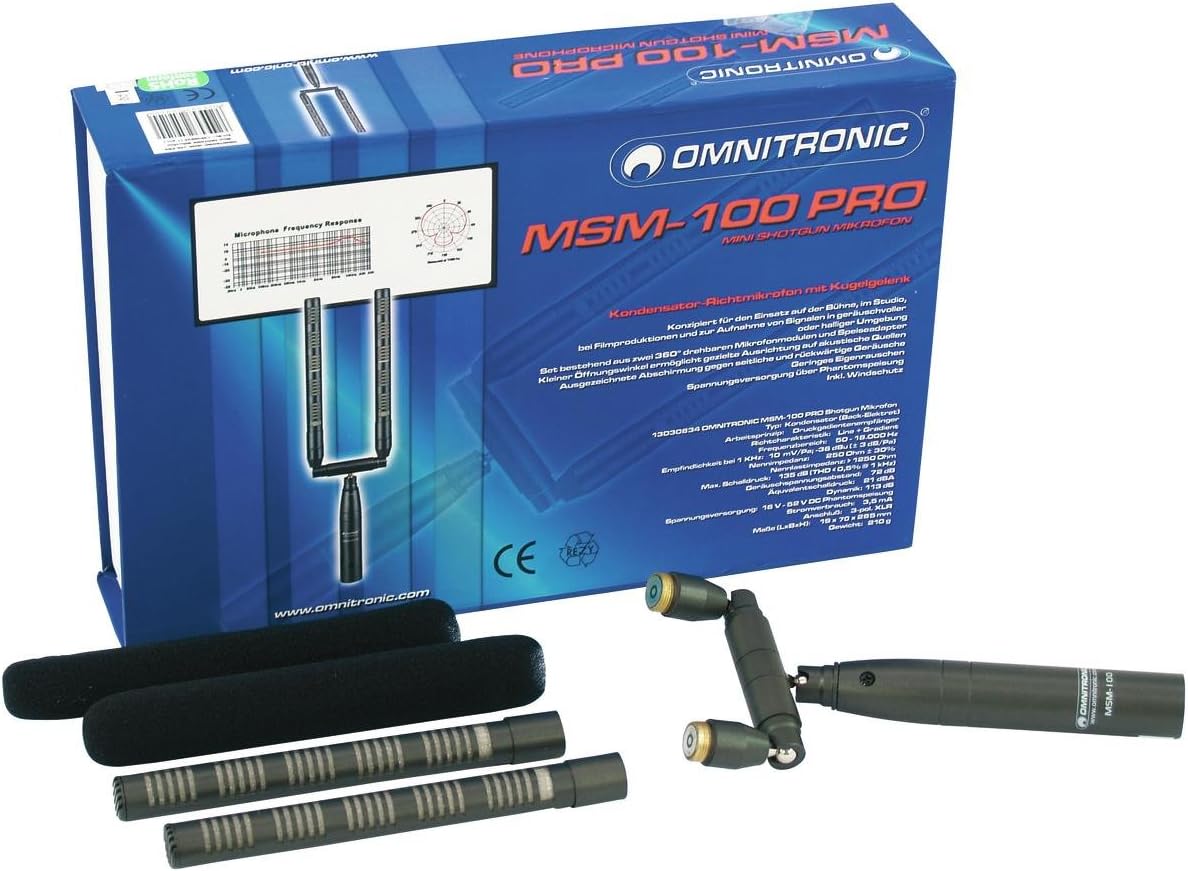
Figure 2.2: The product box displaying the microphone and its various components, including the two capsules, power module, and windscreens.

Figure 2.3: The Omnitronic MSM-100 Pro Shotgun Microphone assembled without the windscreens, showing the microphone elements.

Figure 2.4: The microphone components neatly arranged within its protective case, ready for transport or storage.

Figure 2.5: An alternative view of the Omnitronic MSM-100 Pro components inside the protective case, highlighting the individual parts.
3. Setup
Follow these steps to correctly set up your Omnitronic MSM-100 Pro Shotgun Microphone:
- Unpack Components: Carefully remove all components from the packaging: the main power module, two microphone capsules, and two foam windscreens.
- Attach Capsules: Screw each microphone capsule onto the designated connectors on the power module. Ensure they are securely fastened but do not overtighten. The capsules are designed to rotate 360 degrees for flexible positioning.
- Install Windscreens: Slide a foam windscreen over each microphone capsule. These are essential for reducing wind noise and plosives, especially in outdoor or live recording environments.
- Mounting: Attach the assembled microphone to a suitable microphone stand or boom pole using the integrated mounting point on the power module. Ensure the stand is stable and can support the microphone's weight.
- Connect to Audio Interface: Connect the microphone's XLR output to an audio mixer, preamplifier, or audio interface that provides phantom power (48V). The MSM-100 Pro requires phantom power to operate.
- Activate Phantom Power: Once connected, activate the phantom power on your mixer or audio interface. Refer to your audio equipment's manual for instructions on enabling phantom power.
4. Operating Instructions
The Omnitronic MSM-100 Pro is a condenser microphone with a Line + gradient polar pattern, optimized for directional sound capture.
- Phantom Power: Ensure phantom power (48V) is supplied by your connected audio device. The microphone will not function without it.
- Positioning: Due to its narrow pickup angle, aim the microphone directly at the sound source you wish to record. The 360° rotatable capsules allow for precise adjustment of the stereo image or sound field. Experiment with the angle of the two capsules to achieve the desired stereo width and focus.
- Distance: The shotgun design allows for effective sound capture at longer distances compared to standard microphones. However, optimal distance will depend on the environment and desired sound quality.
- Monitoring: Always monitor your audio through headphones or studio monitors to ensure proper levels and sound quality. Adjust gain levels on your mixer or interface to prevent clipping or distortion.
- Environmental Considerations: Use the included foam windscreens to minimize unwanted noise from wind or sudden air movements, especially when recording outdoors.
5. Maintenance
Proper maintenance will extend the life and performance of your microphone.
- Cleaning: Use a soft, dry cloth to clean the microphone body. Do not use liquid cleaners, solvents, or abrasive materials, as these can damage the finish or internal components.
- Windscreens: The foam windscreens can be gently hand-washed with mild soap and water if they become dirty. Allow them to air dry completely before reattaching.
- Storage: When not in use, store the microphone and its components in the provided protective case to shield them from dust, moisture, and physical damage.
- Handling: Avoid dropping or subjecting the microphone to strong impacts, as this can damage the sensitive internal condenser elements.
- Environmental Conditions: Do not expose the microphone to extreme temperatures, high humidity, or direct sunlight for extended periods.
6. Troubleshooting
If you encounter issues with your Omnitronic MSM-100 Pro, refer to the following common problems and solutions:
-
No Sound Output:
- Ensure phantom power (48V) is activated on your mixer or audio interface.
- Check all cable connections. Ensure the XLR cable is securely plugged into both the microphone and the audio input.
- Verify that the input gain on your audio device is turned up sufficiently.
- Test with a different XLR cable to rule out a faulty cable.
- Confirm that your audio interface or mixer is correctly configured and selected as the input device on your recording software.
-
Low or Distorted Sound:
- Adjust the input gain on your audio device. If the sound is low, increase gain; if distorted, decrease gain.
- Ensure the microphone is positioned correctly and not too far from the sound source.
- Check for any obstructions or damage to the microphone capsules.
- Verify that the phantom power supply is stable.
-
Excessive Background Noise or Hum:
- Ensure all cables are properly shielded and in good condition.
- Check for ground loops. Try connecting your audio equipment to a different power outlet or using a ground loop isolator.
- Move the microphone away from sources of electromagnetic interference (e.g., power supplies, monitors, fluorescent lights).
- Ensure windscreens are properly installed if recording in windy conditions.
7. Specifications
| Feature | Specification |
|---|---|
| Microphone Type | Condenser (back electret) |
| Operating Principle | Pressure gradient |
| Polar Pattern | Line + gradient |
| Frequency Range | 50 - 18,000 Hz |
| Sensitivity at 1 kHz | 10 mV / Pa |
| Dimensions (L x W x H) | 5.51 x 16.51 x 24.99 cm (2.17 x 6.5 x 9.84 inches) |
| Weight | 558 g (1.23 lbs) |
| Power Type | Phantom Power (48V) |
| Model Number | MSM-100 PRO Shotgun microphone |
8. Warranty and Support
Information regarding specific warranty terms and customer support for the Omnitronic MSM-100 Pro Shotgun Microphone is not available in the provided product data. Please refer to the official Omnitronic website or contact your retailer for detailed warranty information and support options.


