
Coca-Cola KWC-25
Coca-Cola 28 Can Portable Cooler Warmer
Model: KWC-25
User Instruction Manual
Introduction
This manual provides important information regarding the safe operation, maintenance, and troubleshooting of your Coca-Cola 28 Can Portable Cooler Warmer, Model KWC-25. This unit is designed for both cooling and warming functions, making it versatile for various environments such as home, office, dorm, or travel in a car, boat, or RV.
The unit features iconic Coca-Cola polar bear graphics, a vibrant red finish, and a clear display window. It utilizes efficient thermoelectric technology for reliable performance.

Image: Front view of the Coca-Cola 28 Can Portable Cooler Warmer, showcasing its red color, polar bear graphics, and digital display.
Important Safety Instructions
Please read all instructions carefully before operating the unit. Failure to follow these instructions may result in electric shock, fire, or serious injury.
- Ensure the power source matches the voltage requirements of the unit (AC 110-120V or DC 12V).
- Do not immerse the unit, cord, or plug in water or other liquids.
- Unplug the unit from the outlet when not in use and before cleaning.
- Do not operate the unit with a damaged cord or plug, or if the unit malfunctions or has been damaged in any manner.
- Keep ventilation openings clear and unobstructed. Do not block the fan or ventilation ports.
- Do not use the unit in direct sunlight or near heat sources.
- This appliance is not intended for use by persons (including children) with reduced physical, sensory, or mental capabilities, or lack of experience and knowledge, unless they have been given supervision or instruction concerning use of the appliance by a person responsible for their safety.
- Children should be supervised to ensure that they do not play with the appliance.
- Proposition 65 Warning: This product may contain chemicals known to the State of California to cause cancer and birth defects or other reproductive harm.
Package Contents
Verify that all items are present in the package:
- Coca-Cola 28 Can Portable Cooler Warmer Unit (Model KWC-25)
- AC Power Cord (for household outlets)
- 12V DC Power Cord (for vehicle outlets)
- Removable Shelf
- Instruction Manual (this document)
Setup
- Unpacking: Carefully remove the unit and all accessories from the packaging. Retain packaging for future storage or transport.
- Placement: Place the cooler warmer on a flat, stable surface. Ensure there is adequate ventilation around the unit (at least 4 inches of space on all sides, especially around the fan vents). Avoid placing it in direct sunlight or near heat-generating appliances.
- Shelf Installation: If desired, insert the removable shelf into the designated slots inside the unit to organize contents.
- Power Connection:
- For AC (Household) Use: Connect the AC power cord to the AC input port on the back of the unit, then plug the other end into a standard 110-120V AC wall outlet.
- For DC (Vehicle) Use: Connect the 12V DC power cord to the DC input port on the back of the unit, then plug the other end into a 12V DC outlet (cigarette lighter socket) in your vehicle.
Note: Do not connect both AC and DC power cords simultaneously.

Image: The cooler warmer positioned on a kitchen countertop, demonstrating typical placement.
Operating Instructions
Powering On/Off
Press the "ON/OFF" button located on the control panel to turn the unit on or off. The digital display will illuminate when the unit is on.
Cooling Function
To cool contents, ensure the unit is powered on. The thermoelectric technology will begin to cool the interior. The unit can cool to approximately 32°F (18°C) below the ambient room temperature.
- For optimal cooling, pre-chill beverages or items before placing them in the unit.
- Avoid frequently opening the door to maintain consistent internal temperature.
Warming Function
To warm contents, ensure the unit is powered on. The unit can warm contents up to 135°F (57°C).
- This function is suitable for keeping food warm, not for cooking or reheating cold food.
Temperature Control and Display
The unit features a digital display and LED temperature controls. Use the control buttons to adjust the desired temperature setting. The display shows the current internal temperature.
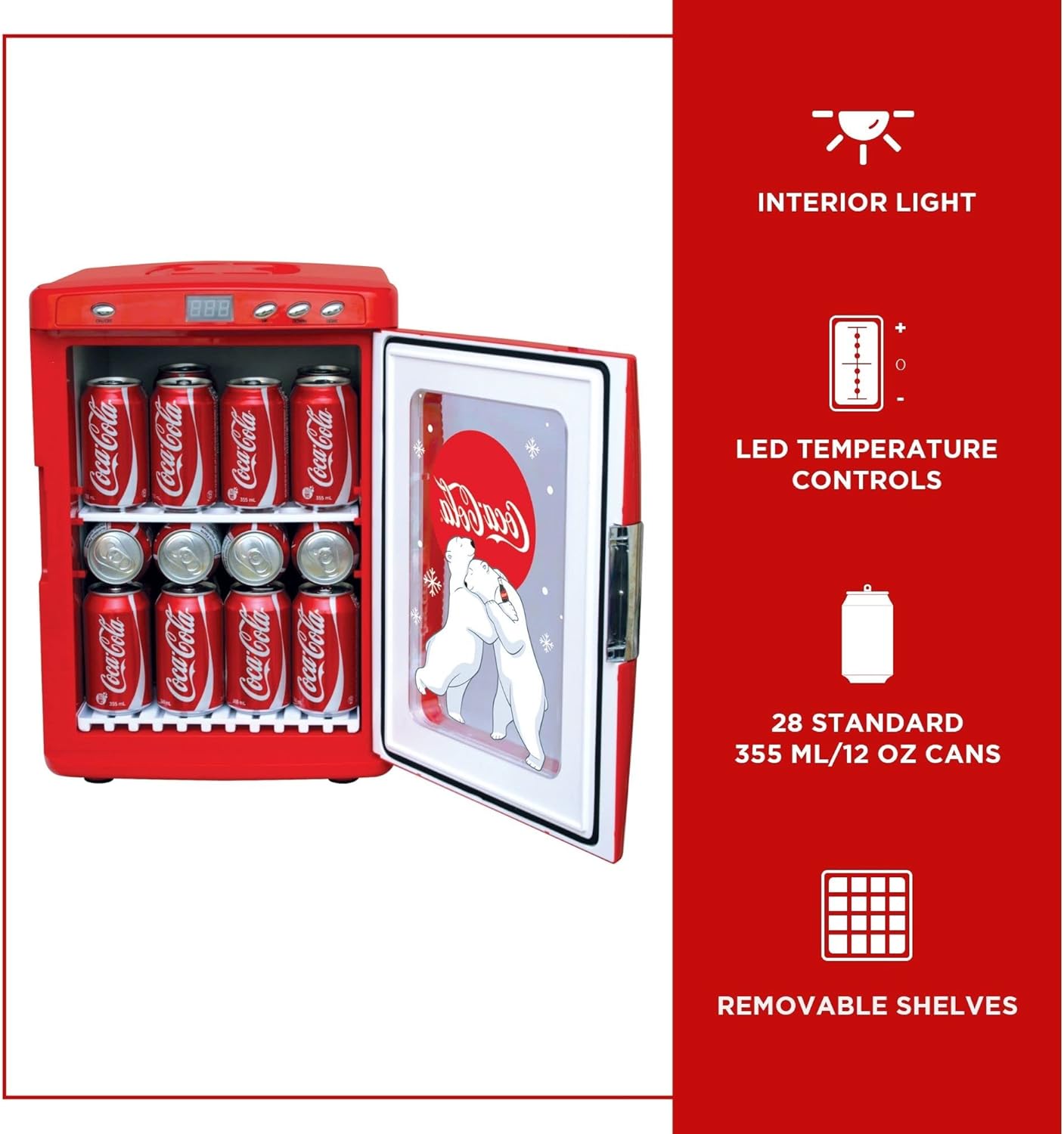
Image: Interior view of the cooler warmer showing cans, along with icons indicating interior light, LED temperature controls, 28 standard can capacity, and removable shelves.
Interior Lighting
The unit is equipped with an interior LED light. This light can be turned on or off using a dedicated button on the control panel, enhancing visibility of contents.

Image: The cooler warmer with its door open, revealing the interior filled with Coca-Cola cans and the removable shelf.
Maintenance
Cleaning
- Always unplug the unit before cleaning.
- Wipe the interior and exterior surfaces with a soft cloth dampened with mild soap and water.
- Do not use abrasive cleaners, solvents, or harsh chemicals, as these can damage the unit's finish.
- Ensure the unit is completely dry before plugging it back in.
- Clean the fan vents periodically to prevent dust buildup, which can affect performance. Use a soft brush or vacuum cleaner.
Storage
If storing the unit for an extended period, ensure it is clean and dry. Store it in a cool, dry place away from direct sunlight and extreme temperatures.
Troubleshooting
| Problem | Possible Cause | Solution |
|---|---|---|
| Unit does not power on. | No power supply; power cord not properly connected; outlet malfunction. | Check if the power cord is securely plugged into both the unit and the outlet. Test the outlet with another device. Ensure the ON/OFF button is pressed. |
| Unit is not cooling/warming effectively. | Blocked ventilation; ambient temperature too high/low; door not sealed properly; excessive contents. | Ensure adequate space around the unit for ventilation. Clean fan vents. Check door seal for obstructions. Do not overfill the unit. Allow sufficient time for temperature stabilization. |
| Excessive noise from the unit. | Fan obstruction; unit not on a level surface. | Check fan vents for obstructions and clean if necessary. Ensure the unit is placed on a flat, stable surface. |
| Digital display is erratic or not working. | Temporary electrical glitch. | Unplug the unit for a few minutes, then plug it back in to reset. If the problem persists, contact customer support. |
Specifications
- Model: KWC-25
- Capacity: 25 Liters (approx. 28 standard 355ml/12oz cans)
- Cooling Performance: Cools to 32°F (18°C) below ambient temperature
- Warming Performance: Warms up to 135°F (57°C)
- Power: AC 110-120V, DC 12V
- Wattage: 50 watts
- Dimensions (D x W x H): 15" x 13.5" x 19.25"
- Weight: 15.1 pounds
- Manufacturer: Koolatron
- Defrost System: Manual
- Installation Type: Countertop

Image: Diagram illustrating the dimensions of the cooler warmer: 15 inches deep, 13.5 inches wide, and 19.25 inches high, with a capacity for 28 cans.
Warranty and Support
Warranty Information
This product is manufactured by Koolatron. For specific warranty details, please refer to the warranty card included with your purchase or contact Koolatron customer service directly. Keep your proof of purchase for warranty claims.
Customer Support
If you encounter any issues not covered in the troubleshooting section or require further assistance, please contact the manufacturer's customer support. You may also refer to the official user manual PDF for additional details.
Official User Manual (PDF): Download PDF
Related documentsKWC-25


Ask a question about this manual
Ask about setup, troubleshooting, compatibility, parts, safety, or missing instructions. Manuals+ will review the question and use this page’s manual context to help answer it.