
1. Introduction
The Ibanez TS808 Original Tube Screamer Overdrive Pedal is a classic guitar effect pedal renowned for its warm, natural tube overdrive sound. This manual provides essential information for setting up, operating, and maintaining your TS808 pedal to ensure optimal performance and longevity.
2. Key Features
- Overdrive, Tone, and Level controls: Allows for precise shaping of your sound.
- Warm, natural tube overdrive sound: Delivers the iconic tone associated with the original Tube Screamer.
- Zinc die-cast construction: Ensures durability and road-worthiness.
- Rugged rubber stopper: Provides stability and protection.
- LED indicator: Shows the status of the effect (on/off) and battery condition.
3. Setup
Follow these steps to set up your Ibanez TS808 pedal:
- Power Connection: The TS808 can be powered by a 9V battery or an optional 9V DC power adapter (center negative). Connect the power adapter to the DC input jack located at the top of the pedal. If using a battery, ensure it is correctly installed in the battery compartment.
- Input Connection: Connect your guitar or other instrument to the INPUT jack on the right side of the pedal using a standard 1/4-inch instrument cable.
- Output Connection: Connect the OUTPUT jack on the left side of the pedal to your amplifier or the next effect pedal in your signal chain using a standard 1/4-inch instrument cable.
- Placement: Place the pedal on a stable surface or integrate it into your pedalboard.
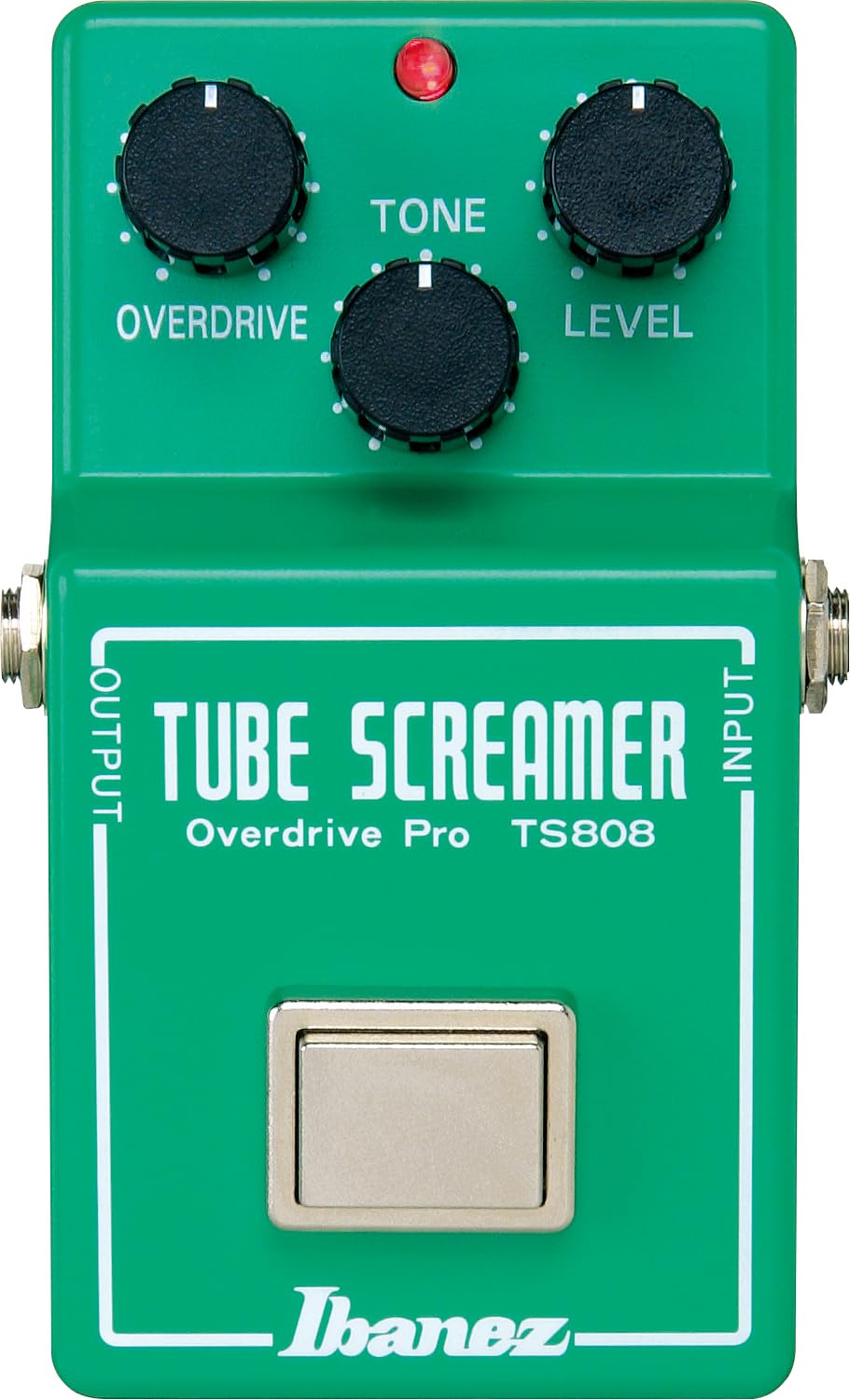
Image: The Ibanez TS808 pedal showing the input and output jacks, power input, and the three control knobs (Overdrive, Tone, Level) along with the footswitch.
4. Controls and Operation
The Ibanez TS808 features three primary control knobs and a footswitch for intuitive operation:
- OVERDRIVE Knob: This knob controls the amount of gain or distortion applied to your signal. Turning it clockwise increases the intensity of the overdrive effect, from a subtle boost to a rich, saturated tone.
- TONE Knob: The Tone knob adjusts the tonal character of the overdrive. Turning it clockwise brightens the sound, emphasizing higher frequencies, while turning it counter-clockwise produces a warmer, darker tone.
- LEVEL Knob: This knob controls the overall output volume of the pedal. Use it to balance the effect's volume with your amplifier's clean volume, or to provide a volume boost for solos.
- Footswitch: The large square footswitch engages or bypasses the overdrive effect. Pressing it once activates the effect (indicated by the LED), and pressing it again bypasses it.
Experiment with different settings of the Overdrive, Tone, and Level knobs to discover a wide range of sonic possibilities, from subtle bluesy crunch to classic rock lead tones.
5. Specifications
| Attribute | Value |
|---|---|
| Item Weight | 1.36 pounds |
| Product Dimensions | 6 x 2 x 3 inches |
| Item Model Number | TS808 |
| Batteries | 1 9V battery required |
| Body Material | Zinc Alloy |
| Color Name | Green |
| Connector Type | 1/4 inch (6.35mm) audio jack |
| Hardware Interface | 1/4-inch Audio |
| Signal Format | Analog |
| Power Source | Battery Powered |
| Voltage | 9 Volts |
6. What's in the Box
Upon opening your Ibanez TS808 package, you should find the following items:
- Ibanez TS808 Original Tube Screamer Overdrive Pedal
- Power Adapter (if included with specific retail package)
- Documentation (this manual, warranty information, etc.)
7. Maintenance
To ensure the longevity and optimal performance of your TS808 pedal:
- Cleaning: Wipe the pedal with a soft, dry cloth. Avoid using abrasive cleaners or solvents.
- Storage: Store the pedal in a cool, dry place away from direct sunlight and extreme temperatures.
- Battery Replacement: If using a 9V battery, replace it when the LED indicator dims or the effect performance degrades. To replace, unscrew the bottom plate.
- Connections: Periodically check all cable connections for wear and tear. Ensure jacks are clean and free of debris.
8. Troubleshooting
If you encounter issues with your TS808 pedal, consider the following:
- No Sound:
- Check all cable connections (guitar to input, output to amp).
- Ensure the power supply is connected and functioning correctly.
- If using a battery, check if it needs replacement.
- Verify that your amplifier is on and working.
- Weak or Distorted Sound (unintended):
- Check the power supply; insufficient power can cause poor performance.
- Ensure instrument cables are not faulty.
- Adjust the TONE and OVERDRIVE knobs to find a suitable setting.
- Excessive Noise/Hum:
- Ensure all cables are properly shielded.
- Try a different power outlet or power supply.
- Move the pedal away from other electronic devices that might cause interference.
9. Warranty and Support
For detailed warranty information and customer support, please refer to the documentation included with your product or visit the official Ibanez website. Keep your proof of purchase for warranty claims.