
Skil-Care 909367
Skil-Care ChairPro Safety Alarm Unit
Model: 909367
1. Introduction
The Skil-Care ChairPro Safety Alarm Unit is designed to provide a reliable and easy-to-use safety solution for patient monitoring. This unit helps caregivers by alerting them when a patient may be attempting to exit a chair, enhancing safety and peace of mind in various care environments.
This manual provides detailed instructions for the proper setup, operation, maintenance, and troubleshooting of your ChairPro Safety Alarm Unit. Please read it thoroughly before use to ensure optimal performance and safety.
2. Safety Information
Always prioritize patient safety. This alarm unit is an aid and does not replace direct supervision. Ensure the unit is functioning correctly before each use.
- Battery Safety: Use only the specified battery type (2 AA batteries). Do not mix old and new batteries, or different types of batteries. Dispose of used batteries responsibly.
- Placement: Position the alarm unit and associated cables securely to prevent entanglement or tripping hazards.
- Testing: Test the alarm unit before each use to confirm proper operation.
- Supervision: This device is intended to assist caregivers and should not be used as a substitute for continuous patient supervision.
3. Components
The Skil-Care ChairPro Safety Alarm Unit includes the following components:
- Electronic Alarm Unit
- Cable Accessories (e.g., sensor pad cable, if applicable)
- Batteries (2 AA batteries, typically included)
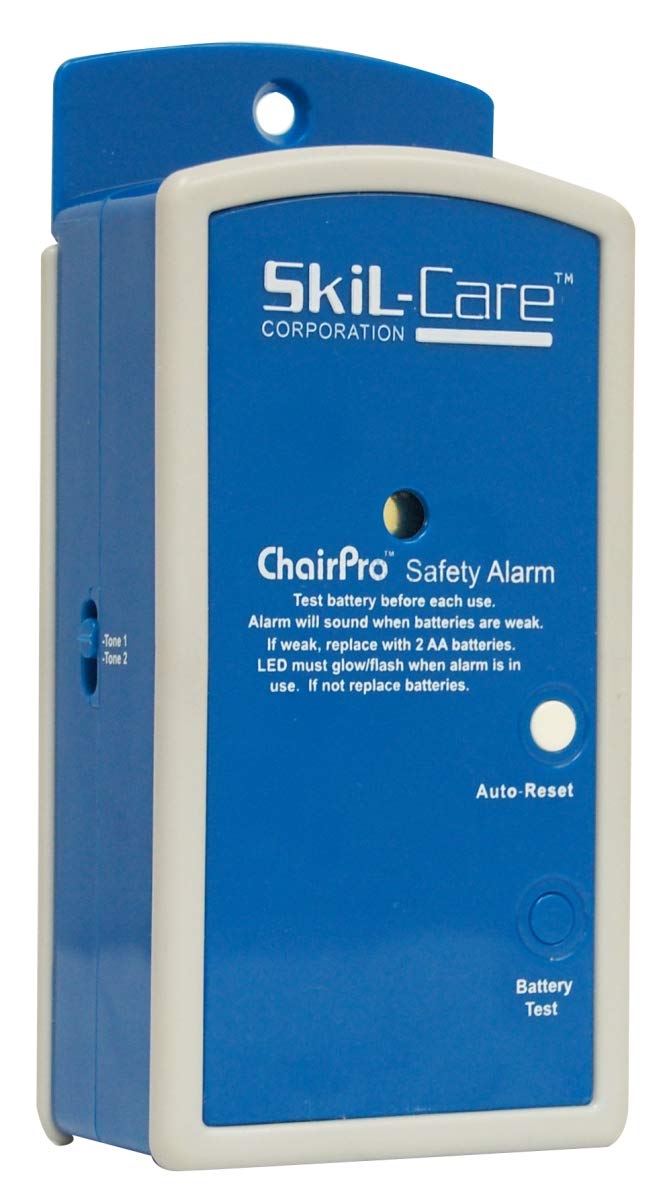
Figure 3.1: Skil-Care ChairPro Safety Alarm Unit. This image shows the main alarm unit with its front panel, including the Skil-Care logo, "ChairPro Safety Alarm" text, Auto-Reset button, Battery Test button, and an indicator light. The side of the unit shows "Tone 1" and "Tone 2" labels, indicating volume or tone settings.
4. Setup
- Install Batteries: Open the battery compartment (usually on the back or side) and insert 2 AA batteries, ensuring correct polarity. Close the compartment securely.
- Connect Sensor Pad (if applicable): If your unit uses a sensor pad (e.g., chair pad), connect its cable to the designated port on the alarm unit. Ensure the connection is firm and the cable is routed to prevent strain or damage. The unit features cable strain relief for durability.
- Mount the Unit: The ChairPro Safety Alarm Unit features a mountable design. Secure the unit to a stable surface near the patient's chair using appropriate fasteners (not included) or by placing it in a secure, accessible location. Ensure protective bumpers are in place to prevent damage.
- Initial Test: Before placing the patient, perform a battery test and confirm the alarm sounds as expected.
5. Operating Instructions
- Activation: Once the sensor pad is connected and the unit is powered on, the alarm is ready for use. When pressure is removed from the sensor pad (e.g., patient attempts to stand), the alarm will sound.
- Auto-Reset Functionality: The unit is equipped with an auto-reset feature. When pressure is reapplied to the sensor pad (e.g., patient sits back down), the alarm will automatically reset and silence, preparing for the next activation.
- Indicator Light: An indicator light on the unit provides visual feedback. It will glow or flash when the alarm is in use or when batteries are weak.
- Battery Test: Press the "Battery Test" button on the front of the unit to check battery strength. The alarm will sound if batteries are sufficient. If the LED does not glow/flash or the alarm does not sound, replace the batteries.
- Volume Settings: The unit includes adjustable high/low volume settings. Locate the volume control (often a switch or dial on the side, labeled "Tone 1" and "Tone 2" as seen in Figure 3.1) and adjust to the desired alert level suitable for the care environment.
- Buzzer Tone: The alarm utilizes a clear buzzer tone for effective alerting.
6. Maintenance
- Battery Replacement: The alarm will sound when batteries are weak. If the indicator light does not glow/flash when the alarm is in use, or if the battery test fails, replace the 2 AA batteries immediately.
- Cleaning: Wipe the unit with a soft, damp cloth. Do not use abrasive cleaners or immerse the unit in water.
- Storage: Store the unit in a cool, dry place when not in use. Remove batteries if storing for extended periods.
7. Troubleshooting
| Problem | Possible Cause | Solution |
|---|---|---|
| Alarm does not sound. | Weak or dead batteries; sensor pad not connected or faulty; unit not powered on. | Replace batteries; ensure sensor pad is securely connected; press Battery Test button to confirm power. |
| Indicator light not working. | Weak or dead batteries. | Replace batteries. |
| Alarm sounds continuously. | Sensor pad not properly placed or damaged; patient not applying sufficient pressure. | Adjust sensor pad position; check for damage to sensor pad or cable; ensure patient is seated correctly. |
| Volume is too low/high. | Volume setting is incorrect. | Adjust the high/low volume switch on the unit. |
8. Specifications
- Model Number: 909367
- Product Dimensions: 5 x 5 x 5 inches; 8 ounces
- Power Source: Battery Powered
- Battery Type: 2 AA Alkaline batteries required
- Noise Level: 90 dB
- Manufacturer: Skil-Care
- UPC: 671509215006
- ASIN: B000SOOG9E
9. Warranty and Support
The Skil-Care ChairPro Safety Alarm Unit is backed by a one-year guarantee, ensuring quality and peace of mind. This guarantee covers manufacturing defects under normal use.
For technical support, warranty claims, or further assistance, please contact Skil-Care customer service. Refer to the product packaging or the official Skil-Care website for the most current contact information.
10. About Skil-Care
Skil-Care is a leading brand in the healthcare industry, dedicated to enhancing the lives of patients, residents, and caregivers with innovative and high-quality products. With over 40 years of experience, Skil-Care provides solutions for individuals with physical and cognitive challenges, focusing on improving quality of life through products designed for safety, comfort, and rehabilitation.
Video 10.1: Skil-Care Brand Overview. This video provides a general overview of the Skil-Care brand, highlighting their commitment to comfort, safety, caring, positivity, community, growth, healing, and helping people live better. It features various individuals in care settings and daily life, showcasing the brand's broader mission and values.
Related documents909367


Ask a question about this manual
Ask about setup, troubleshooting, compatibility, parts, safety, or missing instructions. Manuals+ will review the question and use this page’s manual context to help answer it.