
Introduction
The TiVo HD Digital Video Recorder (DVR) combines the intelligence of the TiVo service with high-definition recording capabilities. Designed to function as a universal cable box with most cable providers, the TiVo HD also offers extensive network connectivity, bringing broadcast and broadband content directly to your living room. This manual provides essential information for setting up, operating, and maintaining your TiVo HD DVR.
Key features include recording up to 20 hours of high-definition programming or 180 hours of standard definition, simultaneous recording of two shows, and compatibility with cable and antenna services. Please note that this product does not support satellite services.
What's in the Box
Upon unpacking your TiVo HD DVR, ensure all the following items are present:
- TiVo HD DVR Unit
- Remote Control
- Quick Start Guide
- User Manual
- Composite Cable
- Component Cable
- Phone Cord
- Power Cord
- 2 AA Batteries (for remote control)

Image: Included manuals, remote control, and various connection cables.
Setup and Connections
Properly connecting your TiVo HD DVR is crucial for optimal performance. Refer to the diagram below for an overview of the rear panel connections.

Image: Rear panel of the TiVo HD DVR, illustrating all available input and output ports.
Connection Ports:
- Cable In: Connects to the coaxial cable from your wall that provides cable TV programming. This unit does not support satellite.

Image: Close-up of the 'Cable In' and 'Antenna In' coaxial ports.
- Antenna In: Connects to the coaxial cable from a TV antenna for receiving analog and digital broadcasts, including HD programming, over the air.
- E-SATA: Connects to the My DVR Expander to increase recording capacity.
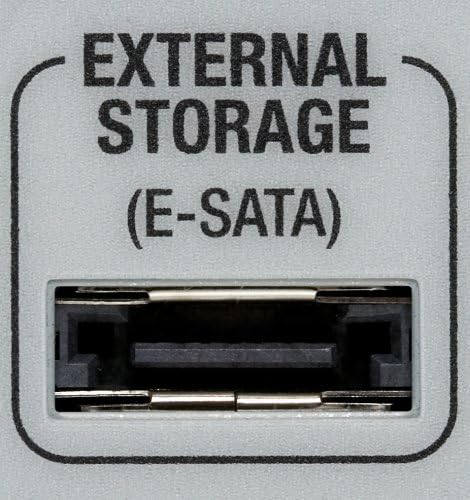
Image: Close-up of the E-SATA port, used for connecting external storage devices.
- Ethernet: Connects to an Ethernet cable to allow your DVR to access your home network and broadband Internet connection.

Image: Close-up of the Ethernet port and two USB ports.
- 2 USB Ports: Connects to the TiVo wireless adapter if you want to wirelessly connect to your home network and broadband internet connection.
- HDMI Out: Connects to a TV, A/V receiver, or home theater system for a pure digital connection that provides HD video and digital audio all in one cable.

Image: Close-up of the HDMI, Component, A/V, S-Video, and Digital Audio (Optical) output ports.
- Component Video Out: Connects to a TV for a high-definition picture. Requires connecting a separate cable for audio.

Image: A component video cable, typically used for high-definition video connections.
- Composite Video and Stereo Out: Connects to a TV for a standard definition picture. Use only the white and red cables if all you need is audio for a different video source, like S-Video or Component video.

Image: A composite video (yellow) and stereo audio (red/white) cable.
- S-Video Out: Connects to a TV for a high-quality standard definition picture. It does not support high definition. Requires connecting a separate cable for audio.
- Digital Audio (Optical): Connects to your home theater system for digital sound using an optical digital audio cable (sold separately).
- Phone Line: Connects to an existing home phone line, unless you connect an Ethernet cable or the TiVo wireless adapter.

Image: Close-up of the Phone Line port.
CableCARD Installation
The TiVo HD DVR uses CableCARD decoders from your cable company to replace your existing cable box. This allows for direct connection to your cable service. For digital cable, you may require up to two CableCARD decoders to enable recording of two shows simultaneously and to support HD channels. It is recommended to contact your cable service provider to arrange for CableCARD installation and activation. Ensure you have performed the guided setup on your TiVo HD DVR before the technician arrives. For detailed instructions and support, visit tivo.com.
Operating Your TiVo HD DVR
The TiVo HD DVR offers intuitive controls for managing your television viewing experience. The included remote control is your primary interface.

Image: The TiVo HD remote control, featuring various buttons for navigation and control.
Recording Shows
- Record Every Episode: The TiVo service tracks TV schedules and automatically records every episode of your favorite shows, even if their airtime changes. You can specify whether to record all episodes or only new ones.
- Record Two Shows at Once: With two tuners, your TiVo DVR can record two different TV shows simultaneously. You can even play back a third show you've already saved while two new shows are recording.
Controlling Live and Recorded Shows
TiVo DVRs provide extensive control over your viewing:
- Pause: Pause live or recorded shows (live TV can stay paused for up to 30 minutes).
- Rewind/Fast-Forward: Use three different speeds for both.
- Instant Replay: Jump back a few seconds.
- Slow Motion: View content in slow motion.
- Frame Forward/Reverse: Advance or go back frame by frame.
- Skip-to-Tick: Jump ahead or back in 15-minute increments in recorded shows.
- Jump: Go to the beginning of a show, the end of a show, or the live broadcast point.
Searching for Content
- Keyword Search: Search for shows by specific words in the title or episode description.
- Category Search: Find shows in a particular category (e.g., 'Cooking' shows about 'Chocolate').
- WishList Search: Use a TiVo WishList to find every show with your favorite actor, director, keyword, or sports team. Your TiVo DVR will save your search and can automatically record new matching shows.
TiVo Suggestions
TiVo Suggestions are personalized shows selected to match your preferences. Rate shows using the THUMBS UP or THUMBS DOWN buttons on your remote. When the TiVo DVR has empty space, it will automatically record shows liked by others with similar viewing habits. Suggestions never replace requested shows and are the first to be deleted if space is needed.
KidZone
Enable KidZone to select programs and channels your children can watch. You can also block specific shows on approved channels, ensuring children only access approved content.
Scheduling Shows Online
You can search for TV shows by title, category, keyword, or person on tivo.com. Log in to your account, select the DVR, and choose to record a single episode or an entire series. You will receive email confirmations for your request and when the DVR reports the recording status.
Advanced Features: Network Connectivity
Connecting your TiVo HD DVR to a home network and the internet unlocks a wide range of additional features.
With a PC or Mac on Your Home Network
- Take Your Shows With You: Transfer recorded shows to your computer, iPod, PSP, or other compatible portable player. Requires TiVo Desktop for PC (for computer transfer) or TiVo Desktop Plus for PC (for portable player transfer). For Mac, Roxio Toast Titanium is needed.
- Save Shows to DVD: Save your favorite TV shows and movies to a DVD using your network-connected TiVo DVR and a computer capable of creating DVDs. Requires Roxio Creator for PC or Roxio Toast Titanium for Mac.
- Transfer Shows Between TiVo DVRs: If you have multiple TiVo DVRs with service on your home network, you can transfer shows between them. HD shows transfer only between HD-compatible TiVo DVRs. Standard definition shows transfer between all Series2, HD, and Series3 DVRs. Protected content cannot be transferred.
- Your Own Music Library: Stream MP3 music files from your PC or Mac to your TiVo DVR for playback through your TV or home entertainment system. Requires TiVo Desktop software for PC or Mac.
- Your Photo Library: View photos from your PC or Mac on your TV using your TiVo DVR. Requires TiVo Desktop software for PC or Mac.
With a High-Speed Internet Connection
- Amazon Instant Video: Watch new release movies and TV shows in HD. Movies are available for rent ($2.99-$3.99) or purchase ($9.99-$14.99). TV show episodes can be purchased for as little as $1.89. Rentals must be viewed within 24 hours of starting playback.
- Music Videos: Download thousands of free music videos from Music Choice.
- Rhapsody Music Service: Access millions of songs, search artists, tune into Rhapsody Channels, and build your music library directly from your TV. A Rhapsody membership is required after a 30-day free trial.
- Internet Radio & Podcasts: Play your favorite audio podcasts using the Podcaster feature or listen to Live365.com's internet radio network.
- View Family and Friends' Photos: Make your personal photos available for viewing on other TiVo DVRs by uploading them to Photobucket or Picasa Web Albums and sharing your username.
- Home Videos: Share personal home movies by creating an account with One True Media, uploading footage, editing, and sharing a private channel code with family and friends.
- Internet Feeds: Using TiVo Desktop Plus software on your PC, your TiVo DVR can monitor RSS or video podcast feeds and automatically download new videos to watch on your TV.
Video: This video demonstrates various TiVo features, including accessing web videos and Amazon Unbox content directly on your TV. It highlights how TiVo integrates internet content with your television viewing experience.
Maintenance
To ensure the longevity and optimal performance of your TiVo HD DVR, follow these general maintenance guidelines:
- Cleaning: Use a soft, dry cloth to clean the exterior of the unit. Avoid liquid cleaners or abrasive materials.
- Ventilation: Ensure the DVR has adequate ventilation. Do not block the ventilation openings on the unit.
- Placement: Place the unit on a stable, flat surface away from direct sunlight, heat sources, and moisture.
- Power Cycle: If the unit becomes unresponsive, perform a power cycle by unplugging it from the power outlet for 30 seconds, then plugging it back in.
Troubleshooting
If you encounter issues with your TiVo HD DVR, consider the following common solutions:
- CableCARD Issues: If you experience problems with channel reception or recording, especially after initial setup, it may be related to CableCARD activation. Contact your cable service provider and request to speak with someone familiar with CableCARDs and TiVo devices. You may need to ask them to 'refresh' your CableCARDs.
- No Signal/Picture: Check all cable connections (HDMI, Component, Composite, S-Video) to ensure they are securely plugged into both the TiVo DVR and your TV/receiver. Verify your TV input is set to the correct source.
- Network Connectivity Problems: If you cannot access online features, ensure your Ethernet cable is connected or your TiVo wireless adapter is properly installed and configured. Check your home router and internet connection. A router is required for internet connectivity.
- Remote Control Not Responding: Replace the AA batteries in the remote control. Ensure there are no obstructions between the remote and the TiVo DVR.
- System Unresponsive: Perform a power cycle as described in the Maintenance section.
For further assistance, refer to the detailed troubleshooting guides available on the official TiVo website.
Specifications
| Brand | TiVo |
| Model Number | TCD652160 |
| Item Weight | 13.25 pounds |
| Product Dimensions | 12.63 x 16.5 x 3.38 inches |
| Color | Black |
| Storage Capacity | 160GB (up to 20 hours HD / 180 hours SD) |
| Video Output Modes | 480i, 480p, 720p, 1080i |
| Supported Sources | Digital cable, Analog cable, Digital antenna (ATSC), Analog antenna, Broadband content |
| Connectivity Technology | Powerline (Ethernet, USB for wireless adapter) |
| Compatible Devices | Television, Computer, Monitor |
| Connector Type | HDMI, RCA, Coaxial, Antenna Input Jack |
Warranty and Support
This product can no longer be activated by TiVo. Only Series3/TiVo HD DVRs with Product Lifetime service can be reconnected to the TiVo service. For any support inquiries or to check the status of your device's service, please visit the official TiVo website at www.tivo.com. Item is sold as-is.


