
1. Introduction
The Ninco N-Scorer Lap Counter, Model 10409, is a universal accessory designed for slot car tracks. It provides accurate lap counting and timing functionalities, enhancing your racing experience. This device is compatible with various track types and brands, offering programmable race settings for both time and laps.
2. Safety Information
- This product is not a toy for children under 14 years of age. Adult supervision is recommended during use.
- Ensure proper battery installation. Do not mix old and new batteries, or different types of batteries.
- Remove batteries if the unit will not be used for an extended period to prevent leakage.
- Keep the device away from water and extreme temperatures.
3. Package Contents
Please check that your package contains the following items:
- Ninco N-Scorer Lap Counter Unit (Model 10409)
If any items are missing or damaged, please contact your retailer.
4. Setup
4.1 Battery Installation
- Locate the battery compartment on the underside of the N-Scorer unit.
- Open the battery compartment cover.
- Insert four (4) AA batteries (not included), ensuring correct polarity (+/-).
- Close the battery compartment cover securely.
4.2 Placement on Track
The Ninco N-Scorer is designed for universal compatibility. Place the unit directly onto your slot car track. Ensure it is positioned on a straight section of the track where cars can pass through the sensor area smoothly. The unit detects cars as they pass, counting laps accurately.
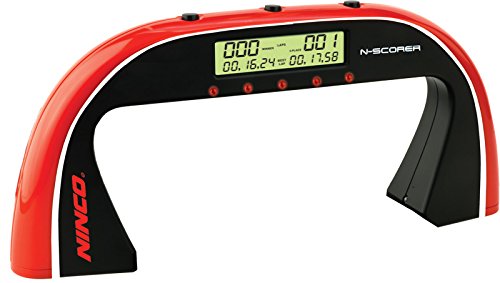
Figure 1: The Ninco N-Scorer lap counter, a red and black unit designed to sit on a slot car track. It features a digital display and control buttons on top.
5. Operating Instructions
5.1 Power On/Off
Press the designated power button (usually located on the top panel) to turn the unit on or off.
5.2 Programming Race Settings
The N-Scorer allows you to program races based on either a set time duration or a specific number of laps. Use the control buttons (refer to the labels on the unit) to navigate through the menu and adjust these settings. Follow the on-screen prompts to set your desired race parameters.
5.3 Starting a Race
Once settings are configured, press the start button. The unit will initiate a traffic light sequence, signaling the start of the race. Wait for the 'GO' signal before starting your cars.
5.4 During the Race
The N-Scorer will automatically detect and count laps for each car as they pass through the sensor. The display will show current lap counts and times.
5.5 Race Completion and Results
Upon completion of the programmed time or laps, the unit will display the final results. This includes indicating the fastest lap achieved and identifying the winning car.
6. Maintenance
6.1 Cleaning
To clean the N-Scorer, gently wipe the surface with a dry, soft cloth. Do not use abrasive cleaners or solvents, as these can damage the unit's finish or internal components.
6.2 Battery Replacement
Replace the batteries when the display becomes dim or the unit's performance degrades. Refer to section 4.1 for battery installation instructions.
7. Troubleshooting
- Poor Display Visibility: The N-Scorer's display is not backlit. For optimal viewing, ensure adequate lighting and adjust your viewing angle. The display may be difficult to read from certain elevated positions or in low light.
- Car Detection Issues: If laps are not being counted accurately, ensure that cars are passing directly through the sensor area. Verify that the track width is compatible with the unit's sensor. Some narrower tracks, such as Scalextric Compact, may not be reliably detected.
- Rapid Battery Drain: If batteries deplete quickly, ensure you are using high-quality AA batteries. Turn off the unit when not in use to conserve power.
- Unit Malfunction: If the unit is unresponsive, check that the batteries are correctly installed and have sufficient charge. If issues persist, try replacing the batteries with a fresh set.
8. Specifications
| Model Number | 10409 |
| Dimensions (L x W x H) | 30.48 x 5.08 x 13.97 cm |
| Weight | 480 g |
| Power Source | 4 x AA batteries (not included) |
| Material | Plastic |
| Color | Red and Black |
| Recommended Age | 14 years and up |
| Scale Compatibility | 1:32 |
9. Warranty and Support
For warranty information or technical support, please refer to the documentation provided with your purchase or visit the official Ninco website. Keep your proof of purchase for any warranty claims.