
1. Product Overview
The Roland RT-10K Acoustic Kick Drum Trigger is designed to convert the vibrations of an acoustic kick drum into an electronic signal, allowing drummers to trigger sounds from electronic drum modules, samplers, or other MIDI devices. This trigger features an advanced sensor system for improved response and reduced false retriggering, making it a reliable choice for both live performance and studio recording.
Key Features:
- New sensor system and lighter material case to improve trigger response.
- Compatible with both mesh heads and regular acoustic drumheads.
- Works directly with Roland V-Drums TD series, TMC-6, SPD series, and HPD-series.
- Approximately 10 percent smaller than previous models for easier positioning.
- Includes a Kensington security lock-hole for theft-proof merchandising.
2. Setup and Installation
Follow these steps to properly set up and install your RT-10K Kick Drum Trigger:
- Mounting the Trigger: Securely attach the RT-10K to the hoop of your acoustic kick drum. Ensure the sensor pad makes firm contact with the drumhead. The compact design allows for flexible positioning.
- Connecting to a Module: Connect a standard 1/4-inch TRS (stereo) or TS (mono) instrument cable from the 'OUTPUT' jack of the RT-10K to the trigger input of your Roland V-Drums module (TD series), TMC-6, SPD series percussion pad, or HPD-series hand percussion controller.
- Module Settings: Refer to your drum module's manual for specific settings related to external triggers. You may need to select the appropriate trigger type (e.g., 'Kick Trigger' or 'RT-10K') and adjust sensitivity and threshold parameters for optimal performance.
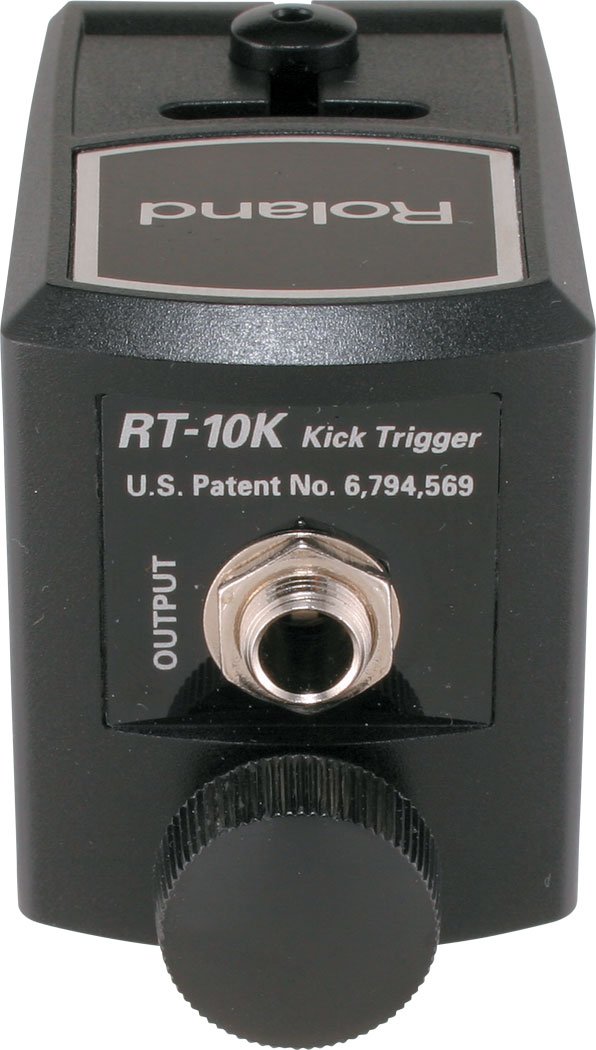
Figure 2.1: Front view of the Roland RT-10K Kick Drum Trigger, highlighting the 'OUTPUT' jack and the adjustment knob.
3. Operation
Once installed and connected, the RT-10K operates by sensing the vibrations of your kick drumhead. When the drumhead is struck, the trigger converts these vibrations into an electrical signal that is sent to your connected drum module. The module then interprets this signal to play the assigned electronic sound.
The RT-10K features an adjustable sensor structure. This allows you to fine-tune the trigger's sensitivity to match your playing style and the characteristics of your drumhead, helping to prevent false retriggering and ensure accurate signal detection.
4. Maintenance
Proper maintenance ensures the longevity and optimal performance of your RT-10K trigger:
- Cleaning: Use a soft, dry cloth to wipe down the trigger. Avoid using abrasive cleaners, solvents, or waxes, as these can damage the finish or internal components.
- Storage: Store the trigger in a cool, dry place away from direct sunlight, extreme temperatures, and high humidity.
- Handling: Handle the trigger with care. Avoid dropping it or subjecting it to strong impacts, which could damage the sensor or casing.
- Cable Connections: Periodically check the connection cable for any signs of wear or damage. A faulty cable can lead to intermittent signals or no signal at all.
5. Troubleshooting
If you encounter issues with your RT-10K trigger, refer to the following common problems and solutions:
| Problem | Possible Cause | Solution |
|---|---|---|
| No signal or intermittent signal | Loose cable connection; faulty cable; incorrect module input; trigger not making proper contact with drumhead. | Ensure cable is securely connected at both ends. Try a different cable. Verify the trigger is connected to the correct input on your module. Adjust trigger position to ensure firm contact with the drumhead. |
| False retriggering (triggering without being struck) | Trigger sensitivity too high; drumhead vibrations from other drums/sources. | Adjust the sensitivity setting on your drum module downwards. Ensure the trigger is mounted firmly and not picking up sympathetic vibrations from other drums. |
| Inconsistent triggering or missed triggers | Trigger sensitivity too low; drumhead tension issues; improper trigger placement. | Increase the sensitivity setting on your drum module. Ensure your drumhead is tuned evenly. Experiment with different trigger placements on the drum hoop. |
6. Specifications
| Attribute | Detail |
|---|---|
| Model Number | RT-10K |
| Generic Name | Electronic Drum Accessories |
| Product Dimensions (LxWxH) | 11 x 4 x 7 cm |
| Item Weight | 90 g |
| Manufacturer | Roland |
| Date First Available | 7 August 2012 |
7. Warranty and Support
For detailed warranty information, please refer to the warranty card included with your product or visit the official Roland website. If you require technical support or have questions not covered in this manual, please contact Roland customer service or an authorized Roland dealer in your region.
You can find contact information and support resources on the official Roland website: www.roland.com