
Introduction
The METROVAC DataVac/3 ESD is a powerful 1.7-HP vacuum and blower designed for cleaning sensitive electronic equipment. It features advanced quadruple filtration, including a HEPA filter, to capture 99.97% of dust particles as small as 0.3 microns. Its anti-static design, including a grounding wrist strap, helps prevent Electro Static Discharge (ESD) which can damage computer components. This manual provides essential information for the safe and effective use, maintenance, and troubleshooting of your DataVac/3 ESD unit.
Key Features:
- Quadruple filtration with HEPA filter (99.97% effective for particles down to 0.3 microns).
- Powerful 2-speed 1.7 HP motor for versatile cleaning.
- Grounding wrist strap to eliminate static discharge.
- Designed to virtually eliminate Electro Static Discharge (ESD) for safe electronic cleaning.
- Includes a convenient carry case for portability and attachment storage.
Product Overview
The DataVac/3 ESD is engineered for durability and performance, featuring an all-steel construction. It functions as both a powerful vacuum and a high-volume blower, making it ideal for cleaning computers, servers, and other sensitive electronics.
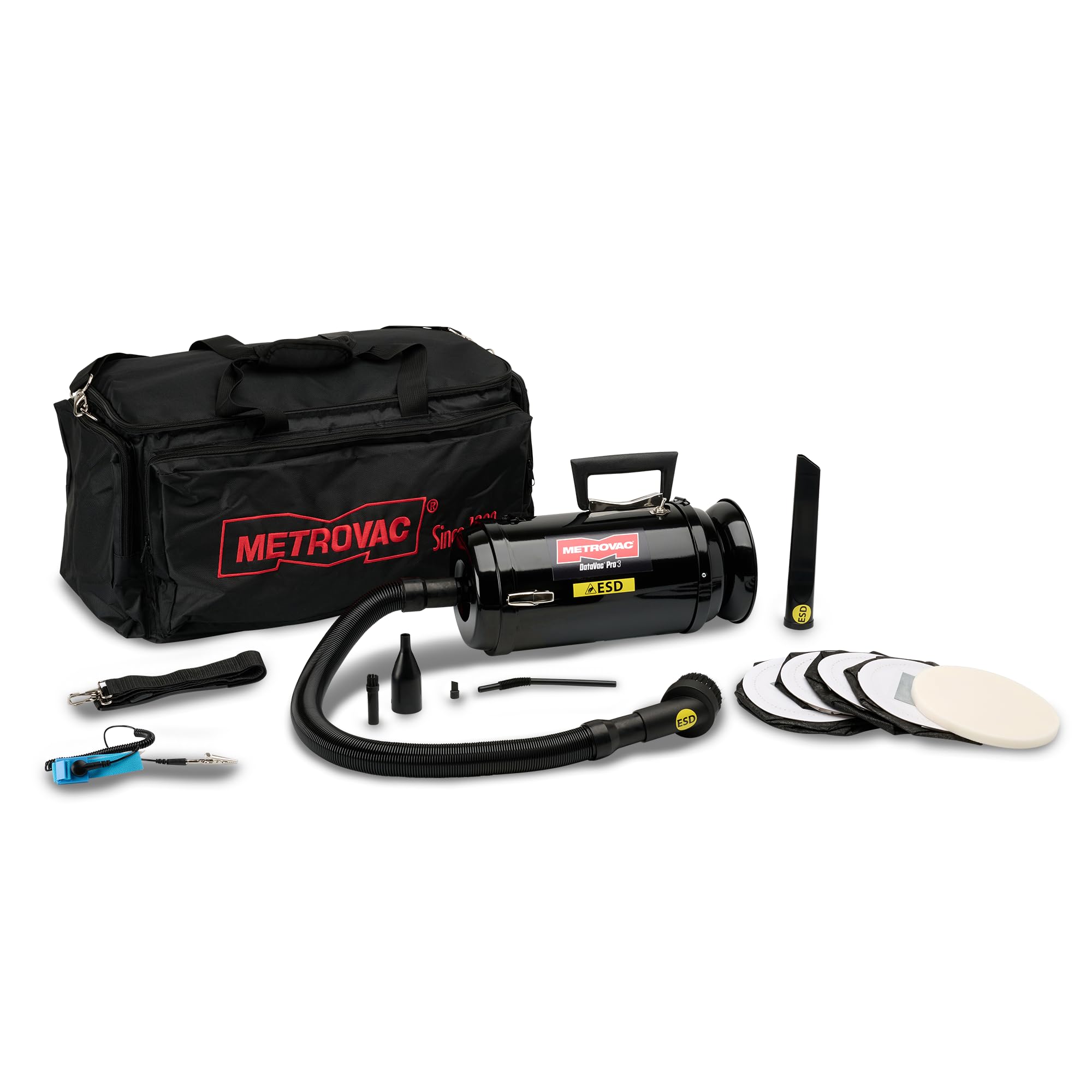
Included Components:
- DataVac/3 ESD Unit
- Flexible Hose
- Crevice Tool
- Brush Attachment
- HEPA Filter (installed)
- Disposable Bags
- Anti-Static Wrist Strap
- Carry Case
Product Video:
Official Metrovac promotional video showcasing various applications of Metrovac products, including electronic cleaning.
Setup
- Unpacking: Carefully remove all components from the packaging. Ensure all listed accessories are present.
- Filter and Bag Installation: The HEPA filter and a disposable bag are typically pre-installed. Verify they are securely in place before first use. Refer to the 'Maintenance' section for detailed instructions on replacing these components.
- Hose and Attachment Connection: Attach the flexible hose to either the vacuum port (for suction) or the blower port (for blowing) on the unit. Securely twist or push the hose into place. Select the appropriate nozzle or brush attachment for your task and connect it to the end of the hose.
- Anti-Static Wrist Strap: When cleaning sensitive electronics, always wear the provided anti-static wrist strap. Connect the strap's grounding clip to a grounded metal object (e.g., the metal casing of the DataVac unit, a grounded outlet cover screw) to dissipate static electricity from your body.
- Power Connection: Plug the power cord into a standard 120-volt AC outlet.
Operating Instructions
The DataVac/3 ESD offers two operational modes: vacuum and blower, with a 2-speed motor for varying power needs.
General Operation:
- Ensure the unit is properly set up and plugged into a grounded outlet.
- Always wear the anti-static wrist strap when working with sensitive electronics.
- Turn the unit ON using the power switch. Select the desired speed (Low or High) based on the cleaning task.
- After use, turn the unit OFF and unplug it from the power outlet.
Using as a Vacuum:
- Connect the flexible hose to the intake port (vacuum side) of the unit.
- Attach the desired vacuum nozzle or brush to the end of the hose.
- Turn the unit ON. Use the vacuum to remove dust, debris, and particles from surfaces. The HEPA filtration system ensures captured particles are contained.
Using as a Blower:
- Connect the flexible hose to the exhaust port (blower side) of the unit.
- Attach the desired blowing nozzle to the end of the hose.
- Turn the unit ON. Use the powerful airflow to dislodge and clear dust from hard-to-reach areas, vents, and internal components of electronics. For best results, perform blowing tasks in a well-ventilated area or outdoors to prevent dust from resettling.
Maintenance
Regular maintenance ensures optimal performance and extends the lifespan of your DataVac/3 ESD unit. Always unplug the unit before performing any maintenance.
Disposable Bag Replacement:
- Unplug the unit.
- Open the unit's casing to access the filter bag compartment.
- Carefully remove the full disposable bag, ensuring dust does not escape. Dispose of the bag according to local regulations.
- Install a new METROVAC disposable bag, ensuring it is properly seated and sealed within the compartment.
- Close the unit's casing securely.
HEPA Filter Maintenance:
The HEPA filter is designed for long-term use but should be inspected periodically. If the filter appears heavily soiled or suction power significantly decreases, it may need replacement. Consult the manufacturer's guidelines for recommended HEPA filter replacement intervals.
General Cleaning:
- Wipe the exterior of the unit with a soft, damp cloth. Do not use harsh chemicals or abrasive cleaners.
- Inspect the hose and attachments for blockages or damage. Clear any obstructions.
- Store the unit and its accessories in the provided carry case in a clean, dry place.
Troubleshooting
If you encounter issues with your DataVac/3 ESD, refer to the following common problems and solutions:
| Problem | Possible Cause | Solution |
|---|---|---|
| Unit does not turn on | No power, faulty switch, damaged cord | Check power outlet and cord. Ensure switch is in ON position. If problem persists, contact support. |
| Low suction/airflow | Full disposable bag, clogged hose/attachments, dirty HEPA filter | Replace disposable bag. Clear any blockages in hose or attachments. Inspect and replace HEPA filter if necessary. |
| Unit overheats | Prolonged use on high speed, restricted airflow | Allow unit to cool down. Ensure vents are clear and not obstructed. Avoid continuous operation on high speed for extended periods. |
| Unusual noise | Loose components, foreign object in motor/fan | Turn off and unplug the unit immediately. Inspect for loose parts or obstructions. Do not attempt to repair internal components; contact support. |
If troubleshooting steps do not resolve the issue, please contact METROVAC customer support.
Specifications
| Feature | Detail |
|---|---|
| Brand | METROVAC |
| Model Name | DV3ESD1 |
| Motor Horsepower | 1.7 HP |
| Number of Speeds | 2 |
| Filter Type | HEPA Filter (99.97% effective at 0.3 microns) |
| Power Source | Corded Electric |
| Voltage | 120 Volts |
| Wattage | 900 Watts |
| Amperage | 7.5 Amps |
| Noise Level | 78 Decibels |
| Item Weight | 15.9 Pounds |
| Item Dimensions (L x W x H) | 22" x 14" x 13" |
| Color | Black |
| Special Feature | HEPA filtration, Anti-Static, Corded |
| Recommended Use | Computer, Office |
Warranty and Support
METROVAC products are known for their quality and durability. For specific warranty information regarding your DV3ESD1 DataVac/3 ESD unit, please refer to the documentation included with your purchase or visit the official METROVAC website. General warranty terms typically cover manufacturing defects for a specified period from the date of purchase.
Customer Support:
If you require technical assistance, have questions about your product, or need to inquire about warranty service, please contact METROVAC customer support directly. Contact information can usually be found on the product packaging, the METROVAC website, or through your retailer.
When contacting support, please have your model number (DV3ESD1) and proof of purchase readily available to expedite the service process.
