
Introduction
This manual provides detailed instructions for the safe installation, operation, and maintenance of your Leviton 20-Amp, 125-Volt, Narrow Body Single Receptacle. Designed for commercial-grade applications, this grounding receptacle is built to withstand demanding environments, making it an ideal choice for hotels, schools, hospitals, and commercial office buildings. Please read all instructions carefully before beginning installation or use.
Safety Information
WARNING: Risk of electric shock or fire. Improper installation can result in serious injury or death. Always turn off power at the circuit breaker or fuse box before wiring. Installation should be performed by a qualified electrician in accordance with all national and local electrical codes.
- Always disconnect power at the service panel before working with electrical wiring.
- Use only copper or copper-clad wire.
- Ensure all wire connections are secure and properly insulated.
- Do not exceed the specified electrical ratings of 20 Amps and 125 Volts.
- This device is for indoor use only unless installed in a suitable weatherproof enclosure.
Product Overview
The Leviton 5801-W is a robust single receptacle featuring a narrow body design for maximum wiring room within the electrical box. Its commercial-grade construction ensures durability and reliable performance.
Key Features:
- Large-Head Terminal Screws: Backed out and staked, designed to accept No.10 copper or copper-clad wire for secure connections.
- Heavy-Duty Brass Power Contacts: Ensures maximum conductivity and secure plug retention.
- Heavy-Gauge, Rust-Resistant Steel Mounting Strap: Provides robust and stable installation.
- Shallow Design: Maximizes wiring room within the electrical box, simplifying installation.
- Captive Mounting Screws: For fast and convenient installation where applicable.
- Total Power Outlets: 1
Product Views:
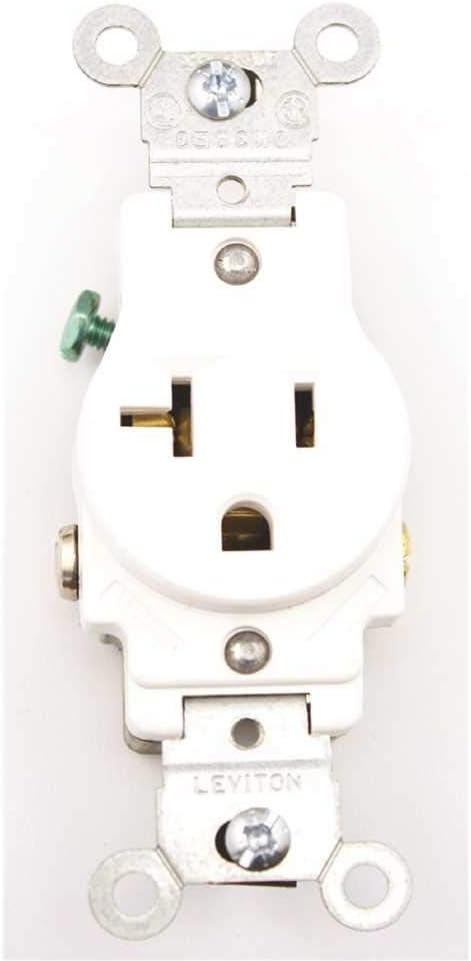
Front view of the Leviton 20-Amp, 125-Volt single receptacle, showing the single outlet configuration and grounding slot. The receptacle is white.

Angled view of the Leviton 20-Amp, 125-Volt single receptacle, highlighting its compact design and the robust mounting strap.

Side view of the Leviton 20-Amp, 125-Volt single receptacle, illustrating the shallow depth and the terminal screws for wiring connections, including the green grounding screw.

Opposite side view of the Leviton 20-Amp, 125-Volt single receptacle, providing another perspective on the wiring terminals and the overall narrow body construction.
Setup and Installation
Installation of electrical devices should only be performed by individuals with appropriate knowledge and experience. Always consult local electrical codes and regulations.
Required Tools:
- Screwdriver (Phillips and/or Flathead)
- Wire Strippers
- Voltage Tester
- Electrical Tape (optional)
Installation Steps:
- Turn Off Power: Locate the circuit breaker or fuse that controls the power to the outlet where you will be installing the receptacle. Turn it OFF. Use a voltage tester to confirm that the power is completely off at the outlet.
- Remove Old Receptacle (if applicable): Carefully remove the faceplate and then unscrew the mounting screws holding the old receptacle in the electrical box. Gently pull the old receptacle out of the box.
- Disconnect Wires: Disconnect the wires from the old receptacle. Note which wire was connected to which terminal (typically: black/hot to brass, white/neutral to silver, bare/green/ground to green screw).
- Prepare Wires: If necessary, strip approximately 1/2 to 5/8 inch of insulation from the ends of the circuit wires (black, white, and bare/green) using wire strippers. Ensure the wire ends are clean and straight.
- Connect Wires to New Receptacle:
- Ground Wire (Bare Copper or Green): Connect to the green grounding screw on the receptacle. Tighten securely.
- Neutral Wire (White): Connect to one of the silver-colored terminal screws. Ensure the wire is wrapped clockwise around the screw and tightened firmly.
- Hot Wire (Black): Connect to one of the brass-colored terminal screws. Ensure the wire is wrapped clockwise around the screw and tightened firmly.
- Secure Receptacle: Carefully fold the wires into the electrical box, leaving enough room to push the receptacle in. Align the receptacle with the mounting holes in the box and secure it with the provided captive mounting screws.
- Install Faceplate: Once the receptacle is securely mounted, install the decorative faceplate (not included with receptacle) over the receptacle and secure it with its screw(s).
- Restore Power: Go back to the circuit breaker or fuse box and turn the power back ON. Test the receptacle with a known working device.
Operating Instructions
Operating the Leviton 20-Amp, 125-Volt Single Receptacle is straightforward:
- Ensure the receptacle is properly installed and power is supplied to the circuit.
- Insert the plug of your electrical device into the receptacle. The receptacle is designed for 20-Amp, 125-Volt devices with a straight blade configuration.
- Verify that the device powers on correctly.
Do not attempt to force a plug into the receptacle if it does not fit. This receptacle is designed for specific plug types (NEMA 5-20R for 20A, 125V). Using incompatible plugs can damage the receptacle or the device.
Maintenance
The Leviton 20-Amp, 125-Volt Single Receptacle requires minimal maintenance to ensure long-term performance.
- Cleaning: Periodically wipe the surface of the receptacle and faceplate with a soft, damp cloth. Do not use abrasive cleaners or solvents, as they may damage the finish. Ensure power is off before cleaning.
- Inspection: Annually inspect the receptacle for any signs of damage, such as cracks, discoloration, or loose connections. If any damage is observed, disconnect power and have the receptacle inspected and replaced by a qualified electrician.
- Tightness: If you notice any looseness in the receptacle or its connections, turn off power at the breaker and carefully tighten the mounting screws and terminal screws.
Troubleshooting
If you experience issues with your Leviton receptacle, consider the following common troubleshooting steps:
| Problem | Possible Cause | Solution |
|---|---|---|
| No power at the receptacle | Circuit breaker tripped or fuse blown | Check your electrical panel and reset the circuit breaker or replace the fuse. |
| No power at the receptacle | Loose wire connection | Turn off power at the breaker. Remove the faceplate and receptacle. Check and tighten all wire connections (hot, neutral, ground). Reinstall and restore power. |
| Plug feels loose in receptacle | Worn contacts or incorrect plug type | Ensure you are using a compatible 20-Amp, 125-Volt straight blade plug. If the issue persists, the receptacle contacts may be worn and require replacement by a qualified electrician. |
| Receptacle is hot to the touch | Overload or loose connection | Immediately unplug devices and turn off power at the breaker. This indicates a serious issue. Do not use the receptacle until it has been inspected and repaired by a qualified electrician. |
If troubleshooting steps do not resolve the issue, contact a qualified electrician for assistance.
Specifications
| Attribute | Value |
|---|---|
| Brand | Leviton |
| Model Number | 5801-W (072-05801-00W) |
| Type | Single Receptacle, Straight Blade, Commercial Grade, Grounding |
| Amperage | 20 Amps |
| Voltage | 125 Volts |
| Wattage | 125 Watts |
| Color | White |
| Material | Steel (Mounting Strap) |
| Item Weight | 1.76 ounces |
| Product Dimensions | 1.97 x 0.39 x 1.18 inches |
| Item Package Quantity | 1 |
| Compatible Wire Size | No.10 Copper or Copper-Clad Wire |
Warranty Information
This Leviton receptacle is covered by a 10 Year Limited Warranty. For specific terms and conditions, please refer to the official Leviton warranty documentation or contact Leviton customer support.
Support
For further assistance, technical support, or to inquire about replacement parts, please contact Leviton customer service. You can find contact information and additional resources on the official Leviton website or by visiting the Leviton Brand Store on Amazon.


