
Mastercool 98210-A
Mastercool ACCU-CHARGE II Electronic Refrigerant Scale User Manual
Model: 98210-A
Introduction
The Mastercool ACCU-CHARGE II Electronic Refrigerant Scale (Model 98210-A) is designed for precise measurement of refrigerant during charging and recovery processes. Its robust construction and advanced features ensure accuracy and ease of use in various HVAC/R applications.
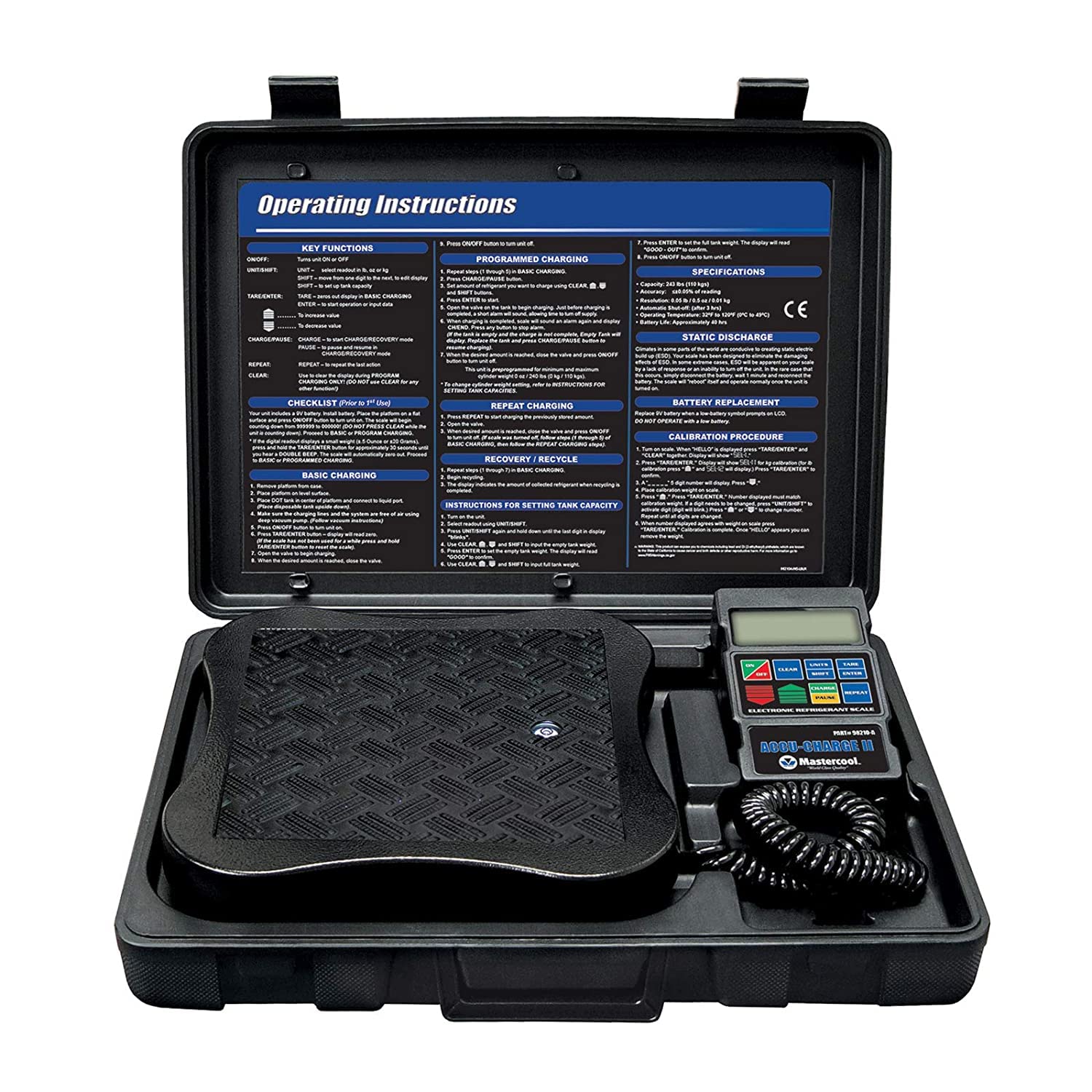
Figure 1: Mastercool 98210-A Electronic Refrigerant Scale in its durable carrying case, displaying the scale platform, control unit, and coiled cable, along with printed operating instructions inside the lid.
Product Components
The Mastercool 98210-A scale consists of the following main components:
- Weighing Platform: A heavy-duty 9" x 9" non-slip platform for stable placement of refrigerant tanks.
- Control Unit: Features an extra-large LCD display and a keypad for operation.
- Coiled Cable: Connects the weighing platform to the control unit, allowing flexible positioning of the display.
- Durable Carrying Case: A rugged ABS case with a handle and latches for portability and protection.
- Adjustable Leveling Feet: Located on the platform for ensuring accurate measurements on uneven surfaces.
- Platform Level Eye: A built-in bubble level to assist in proper setup.

Figure 2: Detailed view of the Mastercool 98210-A scale highlighting the compact control panel with its large LCD screen and keypad, the rugged 9" x 9" platform, the platform level eye, adjustable leveling feet, and the flexible coiled cable connecting the components.
Setup Instructions
- Unpack the Scale: Carefully remove the scale components from the carrying case.
- Battery Installation: The scale requires one 9V battery. Open the battery compartment on the control unit (usually on the back) and insert the battery, observing polarity. Close the compartment securely.
- Placement: Place the weighing platform on a stable, level surface. Use the built-in platform level eye and adjust the leveling feet as necessary to ensure the platform is perfectly horizontal.
- Connect Control Unit: Ensure the coiled cable securely connects the weighing platform to the control unit. The control unit can be placed conveniently nearby or remain in its designated slot within the case.
- Power On: Press the ON/OFF button on the control unit to power on the scale. The display will show "HELLO" and then "0.000" (or the last measured weight).
Operating Instructions
Key Functions
- ON/OFF: Powers the unit on or off.
- UNITS: Toggles between pounds (lb) and kilograms (kg).
- TARE/ZERO: Resets the display to zero, useful for weighing the net amount of refrigerant.
- SHIFT: Used in combination with other buttons for advanced functions.
- ENTER: Confirms selections or inputs.
- CLEAR: Clears programmed values or errors.
- CHARGE: Initiates programmed charging.
- PAUSE: Pauses an active charging or recovery process.
- REPEAT: Repeats the last programmed charge.
Basic Charging
- Place the refrigerant tank on the center of the weighing platform.
- Press the TARE/ZERO button to zero out the tank's weight. The display should read "0.000".
- Connect the refrigerant lines to the system to be charged.
- Open the valves to begin charging. The display will show the amount of refrigerant being added to the system.
- Monitor the display and close the valves once the desired amount of refrigerant has been transferred.
Programmed Charging
This feature allows you to set a target charge amount, and the scale will alert you when the target is approached or reached.
- Place the refrigerant tank on the platform and press TARE/ZERO.
- Press CHARGE. The display will show "0.000".
- Use the numeric keypad to enter the desired charge amount (e.g., "1.500" for 1.5 lbs).
- Press ENTER to confirm.
- Connect the refrigerant lines and open valves to begin charging.
- An alarm will sound when the charge is nearing completion, allowing you to manually close the valves at the precise moment.
Recovery / Recycle
To measure the amount of refrigerant being recovered or recycled:
- Place the recovery tank on the platform and press TARE/ZERO.
- Connect the recovery unit and lines.
- Begin the recovery process. The display will show the negative weight as refrigerant is removed from the system and added to the tank.
- The negative value indicates the total amount recovered.
Maintenance
- Cleaning: Wipe the scale platform and control unit with a soft, damp cloth. Do not use abrasive cleaners or immerse the unit in water.
- Storage: When not in use, store the scale in its original carrying case in a dry, cool place to protect it from dust and damage.
- Battery Replacement: When the battery indicator appears on the LCD, replace the 9V battery promptly to ensure accurate readings.
- Calibration: The scale is factory calibrated. If you suspect calibration issues, refer to the "Calibration Procedure" section in the original manual or contact Mastercool support.
Troubleshooting
| Problem | Possible Cause | Solution |
|---|---|---|
| Display shows "LO" or is dim. | Low battery. | Replace the 9V battery. |
| Inaccurate readings. | Scale not level; external vibrations; exceeding capacity. | Ensure scale is on a level, stable surface. Minimize vibrations. Do not exceed 243 lbs (110 kg) capacity. |
| Scale does not power on. | Dead battery; incorrect battery installation. | Check battery polarity and ensure it is properly seated. Replace battery if necessary. |
| Display shows "OVERLOAD". | Weight on platform exceeds maximum capacity. | Remove excess weight immediately to prevent damage. |
Specifications
- Model: 98210-A
- Capacity: Up to 243 lbs (110 kg)
- Accuracy: ≤±0.05% of reading
- Platform Dimensions: 9" x 9"
- Display Type: LCD
- Power Source: 1 x 9V battery
- Product Dimensions: 16 x 11.25 x 3.25 inches
- Product Weight: 7.23 Pounds
- Color: Black
- Recommended Uses: Refrigerants, HVACR
- Special Feature: Auto Shut Off
- Manufacturer: Mastercool
- Country of Origin: USA
Warranty Information
Mastercool products are manufactured to high-quality standards. For specific warranty terms and conditions, please refer to the warranty card included with your product or visit the official Mastercool website. Keep your purchase receipt as proof of purchase for any warranty claims.
Customer Support
For technical assistance, spare parts, or service inquiries, please contact Mastercool customer support. You can find contact information on the Mastercool website or within the product packaging.
Online Resources: Visit the Mastercool Store on Amazon
Related documents98210-A


Ask a question about this manual
Ask about setup, troubleshooting, compatibility, parts, safety, or missing instructions. Manuals+ will review the question and use this page’s manual context to help answer it.