
1. Product Overview
The Panasonic EVOLTA Rapid Charger BQ-391 is designed for efficient and safe charging of Panasonic EVOLTA AA (Size 3) and AAA (Size 4) rechargeable nickel-metal hydride batteries. This charger features advanced functions such as rapid charging, individual battery monitoring, and a battery diagnosis system to help recover weakened batteries. It automatically stops charging for non-rechargeable or faulty batteries, ensuring safety and optimal battery life.
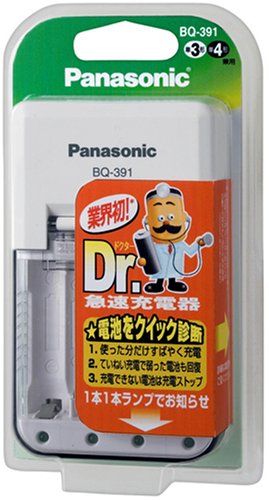
Image showing the Panasonic EVOLTA Rapid Charger BQ-391, designed for charging AA and AAA rechargeable batteries.
2. Setup Instructions
- Unpacking: Carefully remove the charger from its packaging. Ensure all components are present and undamaged.
- Power Connection: Plug the charger's power cord into a standard electrical outlet. The charger is ready for use when connected to power.
- Battery Insertion: Insert AA or AAA rechargeable nickel-metal hydride batteries into the designated charging slots. Ensure the positive (+) and negative (-) terminals of the batteries align correctly with the markings on the charger. The charger can accommodate up to four AA batteries or four AAA batteries simultaneously. For AA batteries, the design allows for easy removal.
3. Operating Instructions
Once batteries are correctly inserted and the charger is connected to power, the charging process will begin automatically. Each battery slot has an individual indicator lamp to display its status.
- Charging Indication: The indicator lamp for each slot will illuminate (e.g., green or orange, refer to specific model details if available) to show that charging is in progress.
- Full Charge Indication: When a battery is fully charged, its corresponding indicator lamp will change color or turn off, depending on the model.
- Battery Diagnosis and Recovery: The charger incorporates a 'careful charging' mode that can detect and attempt to recover weakened rechargeable batteries.
- Safety Stop: If a non-rechargeable battery or a severely damaged rechargeable battery is inserted, the charger will detect it and automatically stop charging for that specific battery, indicated by a distinct lamp pattern (e.g., flashing or red light). Remove such batteries immediately.
- Individual Charging: Each battery slot operates independently, allowing you to charge one, two, three, or four batteries at a time, regardless of their charge level.
Important Safety Notes:
- Only charge nickel-metal hydride (Ni-MH) rechargeable batteries. Do not attempt to charge alkaline, carbon-zinc, or other types of batteries, as this may lead to leakage, overheating, or explosion.
- Do not disassemble or modify the charger or batteries.
- Avoid exposing the charger to water or high humidity.
- Keep out of reach of children.
4. Maintenance
- Cleaning: Disconnect the charger from the power outlet before cleaning. Use a soft, dry cloth to wipe the exterior of the charger. Do not use liquid cleaners or abrasive materials.
- Storage: When not in use, store the charger in a cool, dry place away from direct sunlight and extreme temperatures. Remove batteries from the charger before storing for extended periods.
5. Troubleshooting
| Problem | Possible Cause | Solution |
|---|---|---|
| Battery not charging / Indicator light not on. |
|
|
| Charging takes longer than expected. |
|
|
| Charger or batteries feel warm during charging. | Normal operation. | A slight increase in temperature is normal during charging. If the heat is excessive or accompanied by smoke or unusual odors, immediately unplug the charger and remove batteries. |
6. Specifications
- Model Number: BQ-391
- Brand: Panasonic
- Compatible Battery Types: AA (Size 3), AAA (Size 4) Nickel-Metal Hydride (Ni-MH) rechargeable batteries
- Input Voltage: (Typically 100-240V AC, specific voltage not provided in data, assume standard for region)
- Charging Control: Individual cell charging, automatic stop function, battery diagnosis
- Package Dimensions: Approximately 15.8 x 8.6 x 3.4 cm
- Package Weight: Approximately 18.14 g
- First Available Date: April 30, 2007
7. Warranty and Support
For warranty information, technical support, or service inquiries, please refer to the warranty card included with your product or visit the official Panasonic website for your region. Keep your purchase receipt as proof of purchase.
You can find more information and contact details on the official Panasonic website: www.panasonic.com