
1. Introduction
Welcome to the world of astronomy and terrestrial observation with your new Tasco Spacestation 60mm Refractor AZ Telescope. This manual provides detailed instructions for assembling, operating, maintaining, and troubleshooting your telescope to ensure you get the most out of your viewing experience. Designed for ease of use, this telescope is perfect for beginners eager to explore the night sky and distant terrestrial objects.
2. Safety Information
- Never look directly at the sun through your telescope or its finderscope, even for an instant. Permanent and irreversible eye damage, including blindness, can result.
- Do not point the telescope at the sun without a professionally manufactured solar filter that covers the entire front of the telescope.
- Always supervise children when using the telescope.
- Handle optical components with care to avoid scratches or damage.
- Ensure the tripod is stable on a flat, secure surface to prevent tipping.
3. Package Contents
Before beginning assembly, verify that all parts are present and accounted for. Refer to the image below for a visual guide to the components included with your Tasco Spacestation 60mm Refractor AZ Telescope.

Image: Exploded view of the Tasco Spacestation 60mm Refractor AZ Telescope showing all included parts.
- Altazimuth Plus (Z) Mount
- Eyepieces: 25mm (28x), 10mm (70x) and 4mm (175x)
- 3x Barlow Lens
- Image Erector (for terrestrial use)
- Lunar Filter
- Eyepiece Accessory Tray
- Red Dot Starpointer Finderscope
- Adjustable Tripod
4. Setup and Assembly
Follow these steps to assemble your telescope. It is recommended to perform the initial setup indoors to familiarize yourself with the components.
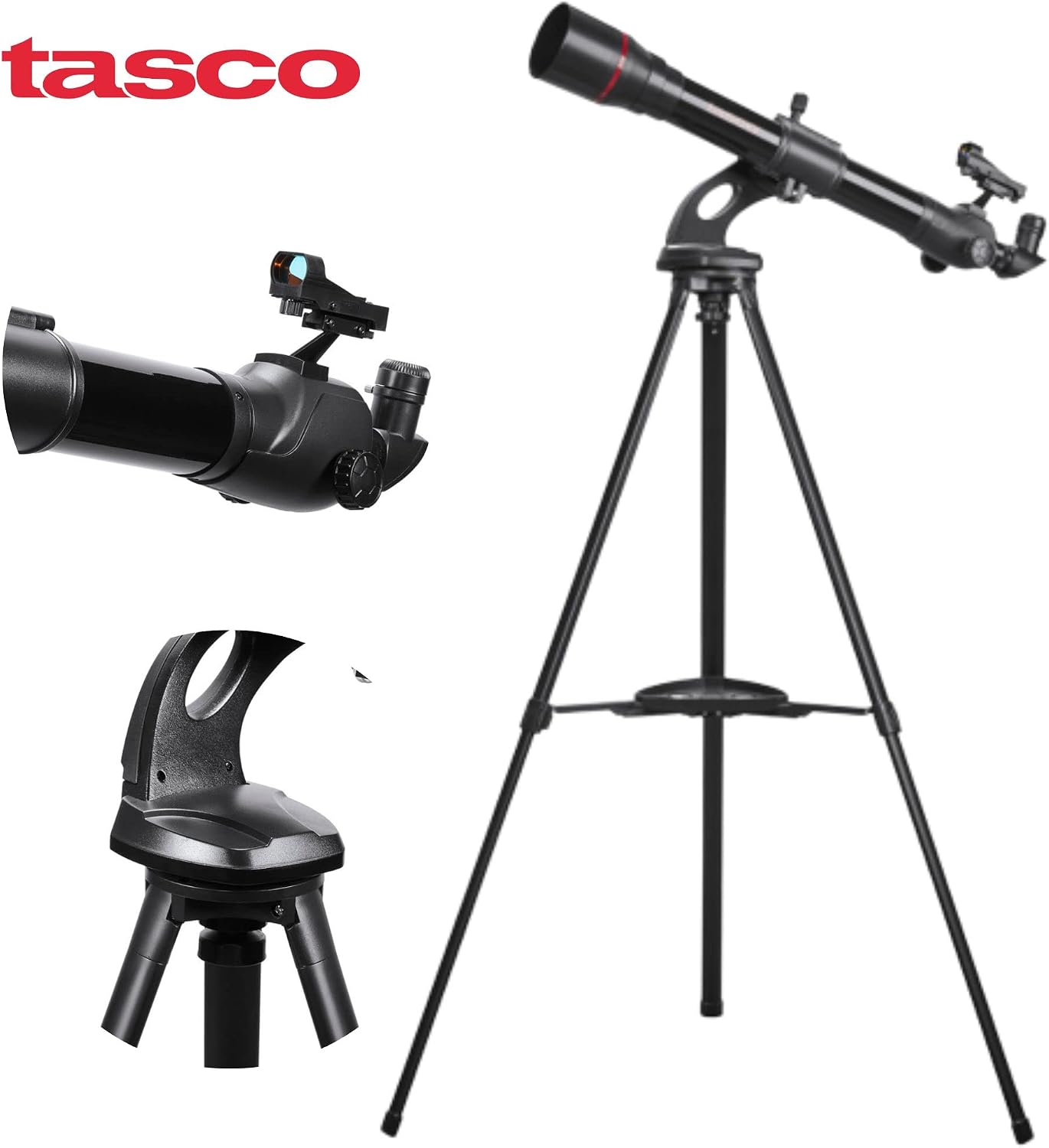
Image: Main components of the telescope ready for assembly.
- Set up the Tripod: Spread the tripod legs fully until they are stable. Adjust the height of the legs to your desired viewing level by loosening the leg locks, extending the legs, and then tightening the locks. Attach the eyepiece accessory tray to the center brace of the tripod.
- Attach the Mount: Secure the Altazimuth Plus (Z) Mount to the top of the tripod. Ensure it is firmly tightened.
- Attach the Telescope Tube: Carefully place the telescope optical tube onto the mount. Align the mounting screws on the mount with the holes on the telescope tube and tighten them securely.
- Install the Finderscope: Slide the Red Dot Starpointer Finderscope into its bracket on the telescope tube. Tighten the small screw to hold it in place.
- Insert the Eyepiece: Loosen the thumbscrew on the focuser tube. Insert the desired eyepiece (e.g., 25mm for lower magnification) directly into the focuser. Tighten the thumbscrew to secure it. If using the 3x Barlow lens, insert the Barlow into the focuser first, then insert the eyepiece into the Barlow. For terrestrial viewing, insert the Image Erector into the focuser before the eyepiece.

Image: The Tasco Spacestation 60mm Refractor AZ Telescope fully assembled and ready for use.
5. Operating Your Telescope
Once assembled, your telescope is ready for observation. Follow these steps to locate and view objects.

Image: A user observing through the telescope during twilight.
- Aligning the Finderscope: Before observing, align the finderscope with the main telescope. Point the main telescope at a distant, stationary object (e.g., a tree or building) during daylight hours. Look through the finderscope and adjust its alignment screws until the object is centered in the finderscope's reticle.
- Locating an Object: Use the finderscope to locate the object you wish to observe. The finderscope provides a wider field of view, making it easier to pinpoint targets.
- Centering and Focusing: Once the object is centered in the finderscope, look through the main telescope's eyepiece. Use the slow-motion controls on the mount to fine-tune the telescope's position until the object is centered in the eyepiece. Rotate the focus knob until the image appears sharp and clear.
- Changing Magnification: To change magnification, swap eyepieces. The lower the millimeter (mm) number on the eyepiece, the higher the magnification. For example, the 10mm eyepiece provides higher magnification than the 25mm eyepiece. The 3x Barlow lens triples the magnification of any eyepiece it is used with.
- Terrestrial vs. Celestial Viewing: For terrestrial viewing (objects on Earth), use the Image Erector to correct the inverted image produced by the refractor telescope. For celestial viewing (stars, planets, moon), the Image Erector is not necessary, as astronomical objects appear the same whether inverted or not.
6. Maintenance and Care
Proper care will extend the life and performance of your telescope.
- Cleaning Optics: Use a soft, lint-free cloth or a specialized optical cleaning brush to remove dust from lenses. For smudges, use a lens cleaning solution specifically designed for optical instruments and apply it to a clean cloth, not directly to the lens.
- Storage: Store your telescope in a cool, dry place, away from direct sunlight and extreme temperatures. Keep dust caps on the objective lens and focuser when not in use.
- General Cleaning: Wipe down the telescope tube and mount with a soft, damp cloth. Avoid using harsh chemicals or abrasive cleaners.
7. Troubleshooting
Here are solutions to common issues you might encounter:
| Problem | Possible Cause | Solution |
|---|---|---|
| Image is blurry or out of focus. | Improper focus; atmospheric conditions; dirty optics. | Adjust the focus knob slowly. Wait for stable atmospheric conditions. Clean lenses if necessary. |
| Cannot find objects. | Finderscope is not aligned; incorrect aiming. | Align the finderscope with the main telescope during daylight. Practice aiming at bright, easy-to-find objects. |
| Image is upside down or reversed. | Normal for astronomical viewing; Image Erector not used for terrestrial viewing. | For terrestrial viewing, insert the Image Erector. For astronomical viewing, this is normal and does not affect observation. |
| Vibrations or shaky image. | Unstable tripod; windy conditions. | Ensure tripod legs are fully extended and stable on a firm surface. Avoid touching the telescope during observation. Observe on calm nights. |
8. Specifications
| Feature | Detail |
|---|---|
| Model Name | Tasco Spacestation 60mm Refractor AZ Telescope |
| Optical Design | Refractor |
| Objective Lens Diameter | 60 Millimeters |
| Telescope Mount | Altazimuth Mount |
| Eyepiece Lens Description | Barlow |
| Finderscope | Reflex (Red Dot Starpointer) |
| Focus Type | Manual Focus |
| Item Weight | 5 Kilograms |
| Material | Plastic |
| Color | Black |
| Skill Level | Beginner |
| Country of Origin | China |
9. Warranty and Support
This product comes with a manufacturer's warranty. For specific details regarding the warranty period and coverage, please refer to the warranty documentation included with your purchase or visit the official TASCO website. For technical support, replacement parts, or further assistance, please contact TASCO customer service through their official channels. Keep your purchase receipt as proof of purchase for warranty claims.