
Metra 71-1721
Metra Electronics 71-1721 Reverse Wiring Harness User Manual
Model: 71-1721
Introduction
The Metra 71-1721 Reverse Wiring Harness is designed to connect to the factory radio in compatible 1998-up Honda and Acura vehicles. This harness provides connections for power and up to four speakers, making it suitable for repairing existing harnesses or for specific audio system installations. It ensures a direct plug-and-play connection to the OEM radio, simplifying the wiring process.
Safety Information
Always disconnect the vehicle's battery before performing any electrical work to prevent short circuits and electrical shock. Ensure all connections are secure and properly insulated to avoid damage to the vehicle's electrical system or the audio components. If you are unsure about any step, consult a professional automotive technician.
Package Contents
- Metra 71-1721 Reverse Wiring Harness
- Instruction Manual (this document)
Setup and Installation
This harness is intended for use with 1998-up Honda and Acura vehicles. It plugs directly into the OEM (Original Equipment Manufacturer) radio's harness port. The individual wires on the harness are color-coded to match standard aftermarket radio wiring conventions.
Identifying Components
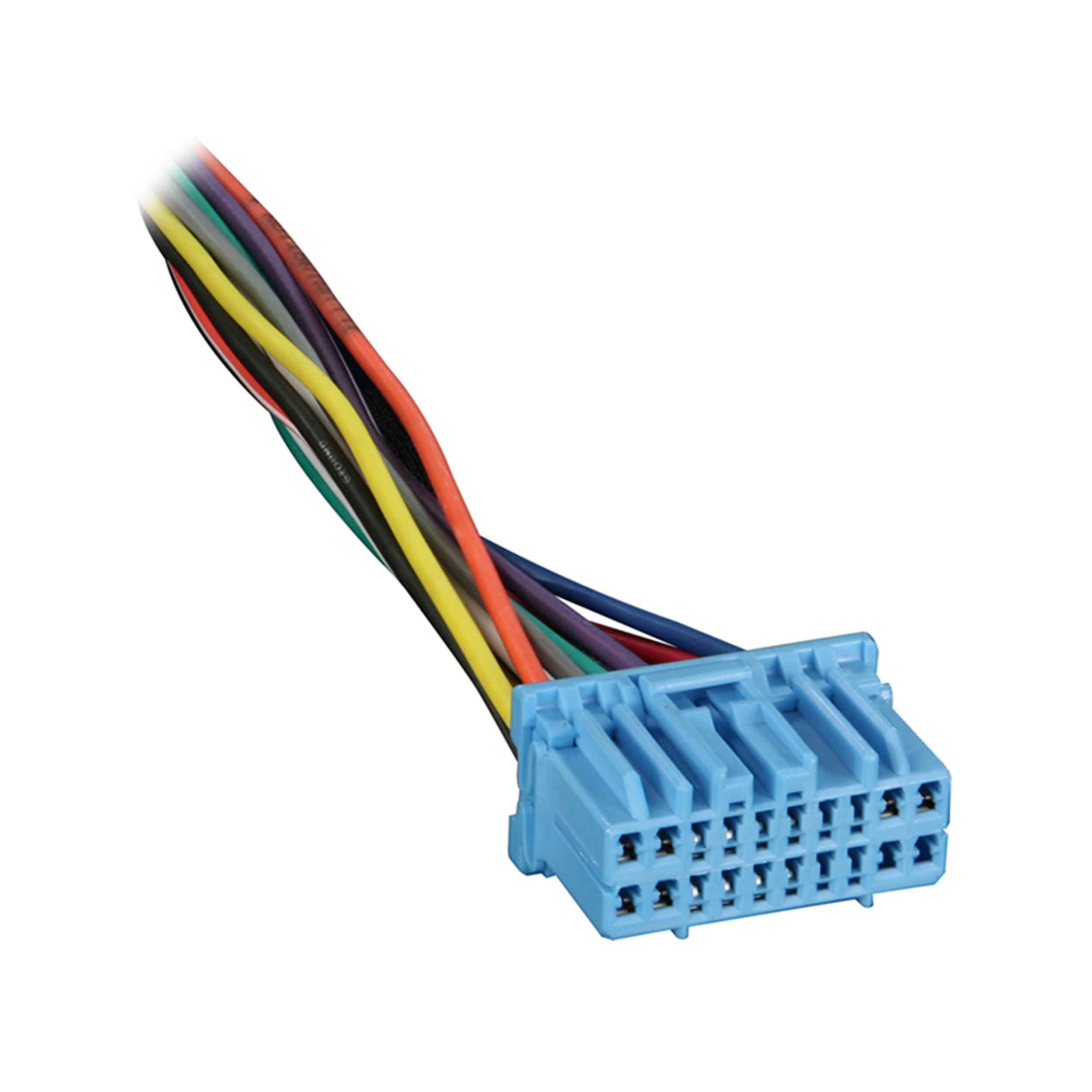
Figure 1: Metra 71-1721 Reverse Wiring Harness. This image shows the Metra 71-1721 Reverse Wiring Harness. It features a light blue multi-pin connector on one end, from which numerous individual wires extend. These wires are color-coded (red, orange, yellow, green, blue, purple, gray, white, black) and have exposed copper tips, ready for connection. The harness is designed to plug into an OEM radio.
The harness consists of a multi-pin connector designed to interface with the vehicle's factory radio wiring, and a series of individual wires. Each wire is color-coded to indicate its function (e.g., power, ground, speaker outputs).
Connection Procedure
- Disconnect Battery: Before starting, disconnect the negative terminal of your vehicle's battery.
- Access Radio: Carefully remove the factory radio from the dashboard to access its wiring harness. Refer to your vehicle's service manual for specific instructions on radio removal.
- Identify OEM Connector: Locate the factory wiring harness connector that plugs into the back of your OEM radio.
- Connect Harness: Plug the blue multi-pin connector of the Metra 71-1721 harness directly into the corresponding port on the OEM radio. Ensure it clicks securely into place.
- Wire Connections: The individual wires extending from the Metra harness are designed to provide power and speaker outputs. These wires can be used to repair a damaged factory harness or to provide a clean connection point for an aftermarket amplifier or other audio components.
- Power Wires: Typically red (accessory), yellow (constant 12V), and black (ground).
- Speaker Wires: Typically pairs of solid and striped wires (e.g., white/white-black for front left, gray/gray-black for front right, green/green-black for rear left, purple/purple-black for rear right).
Match these wires to the corresponding functions of your aftermarket component or to the wires you are repairing. Use appropriate crimp connectors or solder for secure and reliable connections. Insulate all connections with electrical tape or heat shrink tubing.
- Test Connections: Before fully reassembling the dashboard, reconnect the vehicle's battery and test the functionality of your audio system.
- Reassemble: Once confirmed working, carefully reassemble the radio and dashboard components.
Operating
The Metra 71-1721 Reverse Wiring Harness is a passive electrical component. Once correctly installed, it facilitates the electrical connection between your vehicle's factory radio and other audio components or repairs. Its operation is integrated into the overall vehicle audio system, providing the necessary power and speaker signals without requiring user interaction.
Maintenance
This wiring harness requires minimal maintenance. Ensure all connections remain secure and free from corrosion. Periodically inspect the wiring for any signs of wear, fraying, or damage, especially if the harness is exposed to movement or extreme temperatures. Keep the area around the connections clean and dry.
Troubleshooting
| Problem | Possible Cause | Solution |
|---|---|---|
| No power to connected component | Incorrect power wire connection; Blown fuse; Loose connection at battery. | Verify red (accessory) and yellow (constant) wires are correctly connected and receiving power. Check vehicle fuses. Ensure battery terminals are secure. |
| No sound from speakers | Incorrect speaker wire connection; Speaker wires shorted; Component not powered. | Double-check all speaker wire connections for correct polarity and secure contact. Ensure no bare wires are touching. Confirm the audio component is receiving power. |
| Intermittent connection | Loose connections; Damaged wiring. | Inspect all crimped or soldered connections for tightness. Check the harness wires for any cuts or damage. Re-secure or repair as needed. |
Specifications
- Model: Metra 71-1721
- Compatibility: 1998-up Honda/Acura Vehicles (Factory Radio)
- Connector Type: 20-pin Connector
- Material: Copper, Polyvinyl Chloride (PVC)
- Item Dimensions (L x W x H): 7.5 x 4.5 x 0.75 inches
- Included Components: Wire Harness
Warranty Information
This Metra product is covered by a 1-Year Limited Warranty from the date of purchase. This warranty covers defects in materials and workmanship under normal use. It does not cover damage resulting from improper installation, accident, misuse, abuse, or unauthorized modifications. For warranty claims or further details, please contact Metra Electronics customer support.
Customer Support
For technical assistance, installation questions, or warranty inquiries, please visit the official Metra Electronics website or contact their customer service department. Have your product model number (71-1721) and purchase information ready when contacting support.
Related documents71-1721


Ask a question about this manual
Ask about setup, troubleshooting, compatibility, parts, safety, or missing instructions. Manuals+ will review the question and use this page’s manual context to help answer it.