
Introduction
This manual provides essential information for the proper use and care of your Beetlejuice DVD. It covers setup, operation, maintenance, and troubleshooting to ensure an optimal viewing experience. The film 'Beetlejuice' is a classic comedy-fantasy directed by Tim Burton, starring Alec Baldwin, Geena Davis, and Michael Keaton.
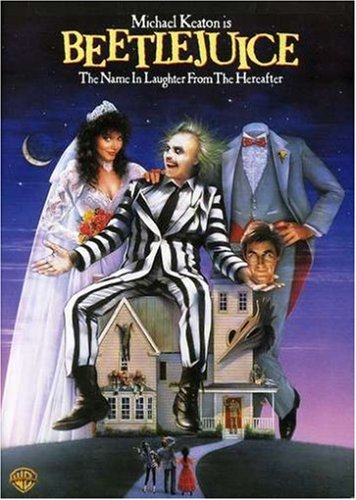
This image displays the front cover of the Beetlejuice DVD. The cover art features Michael Keaton in his iconic Beetlejuice costume, seated on a tombstone, flanked by Alec Baldwin and Geena Davis as the ghostly Maitlands. The title 'Beetlejuice' is prominently displayed at the top.
Setup
To begin enjoying your Beetlejuice DVD, follow these basic setup steps:
- Connect Your DVD Player: Ensure your DVD player is properly connected to your television or display device. Refer to your DVD player's instruction manual for specific connection details (e.g., HDMI, RCA cables).
- Power On: Turn on your television and DVD player. Select the correct input source on your television for the DVD player.
- Insert the DVD: Gently open the DVD player's disc tray. Hold the Beetlejuice DVD by its edges to avoid touching the playback surface. Place the disc label-side up into the tray and close the tray.
- Automatic Playback: Many DVD players will automatically begin playing the disc or display the main menu.
Operating Instructions
Navigate and control your viewing experience with these instructions:
- Main Menu: Upon disc insertion, the main menu typically appears. Use your DVD player's remote control (arrow keys and 'Enter' or 'Play' button) to select options like 'Play Movie', 'Scene Selection', 'Audio Options', or 'Subtitles'.
- Playback Controls: During movie playback, use the remote for standard functions:
- Play/Pause: Starts or temporarily stops the movie.
- Stop: Ends playback and usually returns to the main menu or stops the disc.
- Fast Forward/Rewind: Skips through the movie quickly.
- Skip Chapter: Jumps to the next or previous chapter.
- Audio and Subtitle Selection: Access these options from the main menu or by pressing the 'Audio' or 'Subtitle' button on your remote during playback. The Beetlejuice DVD supports English audio and English, French, and Spanish subtitles.
- Scene Selection: Allows you to jump directly to specific scenes within the movie.
Maintenance
Proper care of your DVD will ensure its longevity and consistent performance:
- Handling: Always hold the DVD by its outer edges or by placing a finger through the center hole. Avoid touching the shiny playback surface.
- Cleaning: If the disc becomes dirty or smudged, gently wipe it with a soft, lint-free cloth (e.g., microfiber) from the center outwards. Do not use abrasive materials or harsh chemical cleaners. A specialized DVD cleaning solution can be used if necessary.
- Storage: Store the DVD in its original case, away from direct sunlight, extreme temperatures, and high humidity. Keep it in a vertical position to prevent warping.
- Avoid Scratches: Scratches can impair playback. Handle the disc carefully and return it to its case immediately after use.
Troubleshooting
If you encounter issues, try these common troubleshooting steps:
- Disc Not Playing/Loading:
- Ensure the disc is inserted correctly (label side up).
- Check if the disc is clean and free of smudges or scratches. Clean if necessary.
- Verify your DVD player is powered on and connected to the correct TV input.
- Try playing another DVD to determine if the issue is with the player or the disc.
- Skipping or Freezing:
- Clean the disc thoroughly as described in the Maintenance section.
- Ensure the disc is not warped or severely scratched.
- Check your DVD player's lens for dust or debris. Refer to your player's manual for cleaning instructions.
- No Audio:
- Check the volume level on your TV and DVD player.
- Ensure audio cables are securely connected.
- Verify the correct audio track is selected from the DVD menu or remote.
- No Video:
- Ensure video cables are securely connected.
- Verify your TV is on the correct input source.
- Try restarting both your TV and DVD player.
If problems persist, consult your DVD player's instruction manual or contact the manufacturer of your DVD player for further assistance.
Specifications
| Title | Beetlejuice |
| ASIN | B000P0J074 |
| Brand/Studio | Warner Home Video |
| Format | DVD |
| Media Format | AC-3, Closed-captioned, Color, DVD, Dolby, Dubbed, Full Screen, Subtitled, Widescreen |
| Run Time | 1 hour and 32 minutes |
| Aspect Ratio | 1.33:1 |
| MPAA Rating | NR (Not Rated) |
| Audio Language | English |
| Dubbed Language | French |
| Subtitles | English, French, Spanish |
| Product Dimensions | 7.44 x 5.35 x 0.71 inches; 0.01 ounces |
Warranty Information
This DVD is typically covered by a limited warranty against manufacturing defects. If you receive a defective disc, please contact the retailer from whom you purchased the product for exchange or refund within their specified return period. Keep your proof of purchase for any warranty claims.
Support
For technical issues related to your DVD player, please refer to the instruction manual provided with your player or contact the player's manufacturer directly. For inquiries regarding the content of the Beetlejuice DVD, please contact Warner Home Video customer service. Contact information can usually be found on the DVD packaging or their official website.