
1. Introduction
This manual provides detailed instructions for the proper setup, operation, maintenance, and troubleshooting of your VocoPro DA-9800 RV 600W Professional Digital Key Control Mixing Amplifier. Please read this manual thoroughly before using the unit to ensure optimal performance and to prevent damage.
The VocoPro DA-9800 RV is a high-performance mixing amplifier designed for karaoke and professional audio applications, featuring 600W max power output, 15-step DSP key control, and digital echo with repeat and delay functions.
2. Safety Precautions
- Ensure the amplifier is placed on a stable, level surface with adequate ventilation.
- Do not expose the unit to moisture, rain, or extreme temperatures.
- Before connecting or disconnecting any cables, ensure the amplifier is powered off.
- Use only the specified power supply and ensure the voltage selector is set correctly for your region.
- Do not open the amplifier casing. Refer all servicing to qualified personnel.
3. Setup
3.1 Unpacking and Placement
Carefully remove the amplifier from its packaging. Inspect the unit for any signs of damage. Place the amplifier in a location that allows for proper airflow around the unit to prevent overheating.
3.2 Front Panel Overview
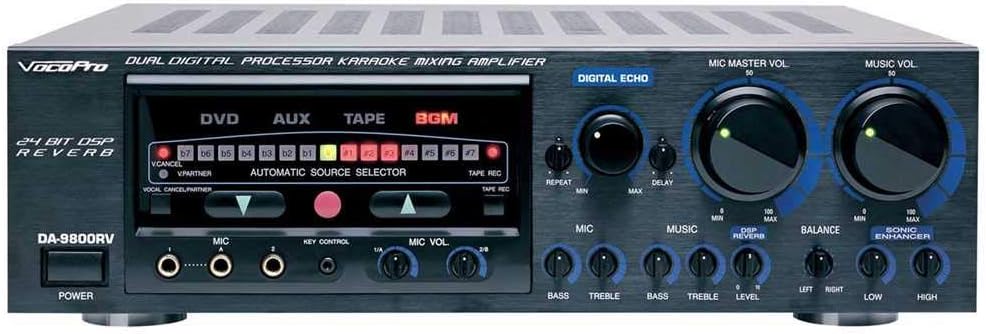
Figure 1: Front Panel of the VocoPro DA-9800 RV Amplifier
This image displays the front panel of the VocoPro DA-9800 RV amplifier, showing the power button, microphone inputs, key control, microphone volume, digital echo controls (repeat, delay), music volume, bass, treble, balance, and sonic enhancer controls. The central display indicates source selection and DSP settings.
3.3 Rear Panel Overview and Connections

Figure 2: Rear Panel of the VocoPro DA-9800 RV Amplifier
This image illustrates the rear panel of the VocoPro DA-9800 RV amplifier, detailing various input and output connections. These include rear microphone inputs, video inputs (DVD, AUX, TAPE), audio inputs (DVD, AUX, TAPE, MUSIC IN), audio outputs (MIC-OUT, REC-IN/PRE-OUT), speaker terminals, and the AC power input with voltage selector.
3.3.1 Voltage Selection
Before connecting the power cord, ensure the VOLTAGE SELECTOR switch on the rear panel is set to match your local power supply (110-120V or 220-240V). Incorrect voltage selection can cause severe damage to the unit.
3.3.2 Power Connection
Connect the supplied AC power cord to the AC INPUT on the rear panel and then to a suitable wall outlet.
3.3.3 Speaker Connections
The DA-9800 RV features 4 speaker outputs. Connect your speakers to the SPEAKER SYSTEMS terminals on the rear panel. Ensure correct polarity (+ to + and - to -) for each speaker. The amplifier supports 4-ohm speakers.
3.3.4 Audio Source Connections
- DVD/AUX/TAPE Inputs: Connect your DVD player, auxiliary devices, or tape deck to the corresponding RCA audio inputs.
- MUSIC IN: Use this input for additional music sources.
3.3.5 Microphone Connections
Connect your microphones to the MIC IN jacks on the front panel or the REAR MIC INPUT jacks on the rear panel.
3.3.6 Video Connections
Connect video sources (DVD, AUX, TAPE) to the respective VIDEO IN jacks. Use the VIDEO OUT jack to connect to a display device.
4. Operating Instructions
4.1 Power On/Off
Press the POWER button on the front panel to turn the amplifier on or off.
4.2 Source Selection
Use the AUTOMATIC SOURCE SELECTOR buttons (DVD, AUX, TAPE, BGM) to choose your desired audio/video input source.
4.3 Microphone Controls
- MIC MASTER VOL: Adjusts the overall volume of all connected microphones.
- MIC VOL 1/2, 3/4: Adjusts individual microphone volumes.
- MIC BASS/TREBLE: Adjusts the low and high frequencies for microphone audio.
- DIGITAL ECHO (REPEAT/DELAY): Controls the characteristics of the echo effect applied to microphones.
- DSP REVERB: Adjusts the amount of reverb effect.
- KEY CONTROL: The 15-step DSP key controller allows you to adjust the musical key of the background music to match your vocal range. The key setting will auto-reset when the unit is powered off or the source is changed.
4.4 Music Controls
- MUSIC VOL: Adjusts the overall volume of the background music.
- MUSIC BASS/TREBLE: Adjusts the low and high frequencies for music audio.
- BALANCE: Adjusts the left/right channel balance of the music.
4.5 Sonic Enhancer
Engage the SONIC ENHANCER for improved sound clarity and presence.
4.6 Tape Recording
The TAPE REC function allows you to record your performance. Refer to the rear panel connections for proper setup.
5. Maintenance
To ensure the longevity and optimal performance of your VocoPro DA-9800 RV amplifier, follow these maintenance guidelines:
- Cleaning: Use a soft, dry cloth to clean the exterior of the unit. Do not use liquid cleaners or abrasive chemicals.
- Ventilation: Regularly check that the ventilation openings are clear of dust and obstructions.
- Storage: If storing the unit for an extended period, disconnect it from power and store it in a cool, dry place.
6. Troubleshooting
If you encounter issues with your amplifier, refer to the following common problems and solutions:
| Problem | Possible Cause | Solution |
|---|---|---|
| No power | Power cord disconnected; power outlet faulty; voltage selector incorrect. | Check power cord connection; try a different outlet; verify voltage selector setting. |
| No sound output | Speaker cables disconnected; volume levels too low; incorrect source selected; faulty audio cables. | Check speaker connections and polarity; increase master and music/mic volumes; select correct input source; replace audio cables. |
| Distorted sound | Volume too high; incorrect impedance speakers; damaged speakers or cables. | Reduce volume; ensure speakers are 4-ohm compatible; inspect speakers and cables for damage. |
| Microphone not working | Microphone not connected; mic volume too low; faulty microphone. | Ensure microphone is securely connected; increase MIC MASTER VOL and individual MIC VOL; test with a different microphone. |
| Key control not functioning | Temporary software glitch; internal component issue. | Power cycle the unit (turn off, wait 30 seconds, turn on). If the issue persists, contact VocoPro support. |
If the problem persists after attempting these solutions, please contact VocoPro customer support or a qualified service technician.
7. Specifications
- Max Power Output: 300W + 300W (4 ohms)
- Continuous Power Output: 150W + 150W (4 ohms)
- Speaker Outputs: 4 (for increased sound coverage)
- Key Controller: 15-Step DSP with auto reset
- Echo: Digital echo with repeat and delay controls
- Reverb: DSP Reverb
- Item Weight: 29.4 pounds
- Product Dimensions: 23 x 21 x 21 inches
- Output Wattage: 600 Watts
- Power Source: Corded Electric
- Color: Black
8. Warranty and Support
For warranty information, please refer to the warranty card included with your product or contact your retailer. VocoPro provides customer support for technical assistance and service inquiries.
Please visit the official VocoPro website or contact their customer service department for the most up-to-date support information, including contact details and service center locations.
9. Official Product Videos
No official product videos from the seller were found for this product at this time.


