1. Introduction
This manual provides essential information for the safe and effective operation of your Orange AD30HTC 30-Watt Twin-Channel Guitar Amp Head. The AD30HTC is a versatile amplifier designed for guitarists seeking distinct tonal characteristics across two independent channels. Please read this manual thoroughly before use to ensure proper setup and to maximize your amplifier's performance.
2. Safety Information
- Power Supply: Connect the amplifier only to a grounded AC power outlet of the correct voltage as indicated on the rear panel.
- Ventilation: Ensure adequate ventilation around the amplifier. Do not block ventilation openings.
- Moisture: Do not expose the amplifier to rain, moisture, or excessive humidity.
- Heat: Keep the amplifier away from heat sources such as radiators, heat registers, stoves, or other heat-producing apparatus.
- Servicing: Refer all servicing to qualified service personnel. Do not attempt to service this product yourself.
- Speaker Connections: Always connect the amplifier to a suitable speaker cabinet with the correct impedance before powering on. Failure to do so can damage the amplifier.
3. Key Features
- 30-Watt all-valve (tube) guitar amplifier head.
- Twin-channel design offering distinct tonal characteristics.
- Channel 1: Vintage-style tone with rich harmonics.
- Channel 2: High-gain tone with tight response.
- Independent Gain, Volume, Bass, Middle, and Treble controls for each channel.
4. Controls and Connections
4.1 Front Panel Controls

Figure 1: Front Panel Overview of the Orange AD30HTC
- Input Jack: Connect your guitar here using a standard 1/4\" instrument cable.
- Channel Selector Switch: Toggles between Channel 1 and Channel 2.
- Channel 1 Controls:
- Gain: Adjusts the amount of pre-amp distortion and sustain.
- Bass: Controls the low-frequency response.
- Middle: Controls the mid-range frequency response.
- Treble: Controls the high-frequency response.
- Volume: Adjusts the overall output level of Channel 1.
- Channel 2 Controls:
- Gain: Adjusts the amount of pre-amp distortion and sustain.
- Bass: Controls the low-frequency response.
- Middle: Controls the mid-range frequency response.
- Treble: Controls the high-frequency response.
- Volume: Adjusts the overall output level of Channel 2.
- Standby Switch: Places the amplifier in standby mode, allowing tubes to warm up or cool down without signal passing through.
- Power Switch: Turns the amplifier on or off.
4.2 Rear Panel Connections
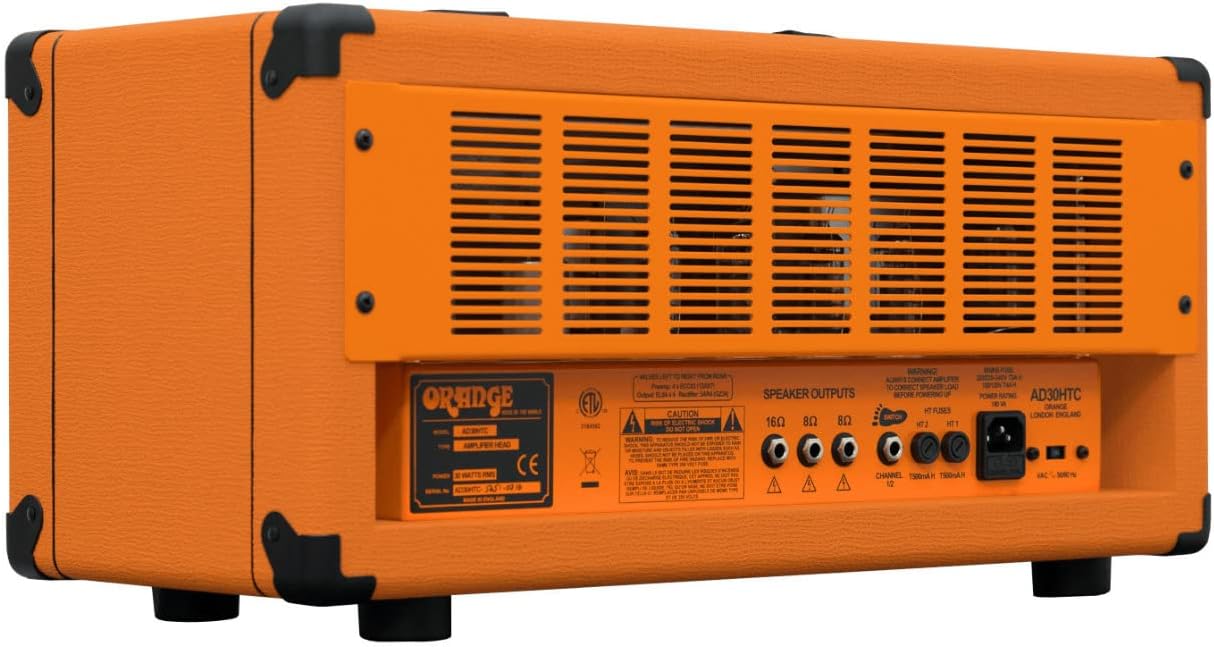
Figure 2: Rear Panel Overview of the Orange AD30HTC
- Speaker Outputs: Connect your speaker cabinet(s) here. The AD30HTC features multiple outputs for different impedance configurations (e.g., 16 Ohm, 8 Ohm). Ensure the correct impedance match.
- Mains Input: Connect the supplied power cable here.
- Fuse Holder: Contains the main power fuse. Refer to specifications for correct fuse type.
5. Setup
- Placement: Place the amplifier head on a stable, level surface, ensuring adequate ventilation.
- Speaker Connection: Using a high-quality speaker cable, connect the appropriate speaker output on the rear panel to your speaker cabinet. Match the impedance correctly (e.g., 16 Ohm output to a 16 Ohm cabinet).
- Guitar Connection: Connect your guitar to the Input jack on the front panel.
- Power Connection: Ensure the Power and Standby switches are in the 'OFF' position. Connect the mains power cable to the amplifier's mains input and then to a grounded power outlet.
6. Operating Instructions
- Power On:
- Ensure all volume controls are set to minimum.
- Flip the Power switch to 'ON'. The power indicator light will illuminate.
- Wait approximately 60 seconds for the amplifier's tubes to warm up.
- Flip the Standby switch to 'ON'. The amplifier is now ready for use.
- Channel Selection: Use the Channel selector switch to choose between Channel 1 (vintage) and Channel 2 (high-gain).
- Adjusting Tone: Experiment with the Gain, Bass, Middle, and Treble controls for each channel to achieve your desired sound. Start with all tone controls at the 12 o'clock position and adjust incrementally.
- Volume Adjustment: Slowly increase the Volume control for the selected channel to reach your desired listening level.
- Power Off:
- Flip the Standby switch to 'OFF'.
- Wait a few moments for the tubes to cool down.
- Flip the Power switch to 'OFF'.
7. Maintenance
- Cleaning: Clean the amplifier's exterior with a soft, dry cloth. Do not use abrasive cleaners or solvents.
- Tube Replacement: Vacuum tubes have a finite lifespan. If you notice a decrease in performance or unusual noise, consult a qualified technician for tube testing and replacement.
- Fuse Replacement: If the amplifier fails to power on, check the fuse. Replace only with a fuse of the exact same type and rating as specified on the rear panel.
- Storage: When not in use for extended periods, store the amplifier in a dry, temperature-controlled environment.
8. Troubleshooting
| Problem | Possible Cause | Solution |
|---|---|---|
| No power | Power cable disconnected, blown fuse, faulty power outlet. | Check power cable connections. Replace fuse if blown (use correct type). Test power outlet with another device. |
| No sound | Speaker cable disconnected, incorrect impedance, guitar cable faulty, volume controls at zero, standby switch off. | Verify speaker and guitar cable connections. Ensure correct speaker impedance. Check volume settings. Ensure standby switch is 'ON'. |
| Weak or distorted sound | Worn out tubes, faulty cables, incorrect settings. | Check cables. Adjust gain and tone settings. If problem persists, consult a technician for tube inspection. |
| Excessive hum or noise | Ground loop, faulty cables, proximity to interference sources. | Ensure proper grounding. Try different cables. Move amplifier away from other electronic devices. |
If you experience issues not covered here, or if troubleshooting steps do not resolve the problem, please contact Orange customer support or a qualified service technician.
9. Specifications
- Model: AD30HTC
- Output Wattage: 30 Watts
- Channels: 2 (Twin-Channel)
- Item Weight: 39.6 pounds
- Product Dimensions: 9.84 x 11.81 x 23.62 inches (Height x Depth x Width)
- Material Type: Metal chassis with Orange Tolex covering
- Compatible Devices: Guitar
- Connector Type: 6.35mm Jack (Input)
- Power Source: Corded Electric
- Color: Orange
10. Warranty and Support
For detailed warranty information, please refer to the warranty card included with your product or visit the official Orange Amplification website. For technical support, service inquiries, or to locate an authorized service center, please contact Orange customer support through their official channels.
Note: Unauthorized repairs or modifications may void your warranty.


