
1. Introduction
This manual provides essential instructions for the safe and efficient operation, maintenance, and troubleshooting of your SPT SD-46T 46-Pint Dehumidifier. This appliance is designed to reduce excess moisture in indoor environments, contributing to a more comfortable living space and mitigating issues such as mold growth and dust mites. It also incorporates TiO2 and UV light technology for enhanced air quality.
Please read this manual thoroughly before operating the unit and retain it for future reference.
2. Safety Instructions
- Always connect the unit to a grounded electrical outlet. Do not use extension cords.
- Ensure the power cord is not damaged or pinched.
- Do not operate the dehumidifier near water or in excessively wet areas.
- Keep children and pets away from the unit during operation.
- Do not block the air intake or exhaust vents.
- Unplug the unit before cleaning or performing any maintenance.
- Do not attempt to repair or modify the unit yourself. Contact qualified service personnel.
- Avoid direct exposure to the UV light. The UV light is enclosed within the unit for safe operation.
- Empty the water tank regularly to prevent overflow.
3. Product Overview
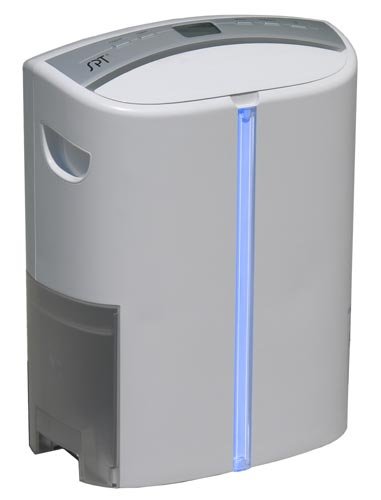
The SPT SD-46T Dehumidifier is designed for efficient moisture removal and air purification. Key features include:
- 46-Pint Capacity: Capable of removing up to 46 pints of moisture per day.
- TiO2 Filter: Utilizes Titanium Dioxide (TiO2) for air purification.
- UV Light: Integrated UV light helps sanitize the air by eliminating germs and bacteria.
- Electronic Control Panel: User-friendly interface for setting desired humidity levels and fan speeds.
- Removable Water Tank: 5.5-liter (approximately 1.5 gallons) capacity with a full-bucket indicator and auto shut-off feature.
- Two Fan Settings: Allows for adjustment of air circulation.
- Quiet Operation: Designed to operate with minimal noise.
4. Setup
- Unpacking: Carefully remove the dehumidifier from its packaging. Retain packaging materials for future storage or transport.
- Placement: Place the unit on a flat, stable surface in the area where dehumidification is desired. Ensure there is at least 8 inches (20 cm) of clear space around all sides for proper air circulation. Do not place it against a wall or furniture that could obstruct airflow.
- Power Connection: Plug the power cord into a grounded 3-prong electrical outlet. Ensure the voltage matches the unit's requirements (typically 110-120V, 60Hz).
- Water Tank: Ensure the water tank is correctly seated in the unit. The unit will not operate if the tank is not properly installed or if it is full.
5. Operating Instructions
5.1. Control Panel
The electronic control panel is located on the top of the unit. It allows you to adjust settings and monitor operation.
5.2. Power On/Off
- Press the POWER button to turn the unit on or off.
5.3. Setting Humidity Level
- Press the HUMIDITY button to cycle through desired humidity levels: 50%, 60%, 70%, 80%, or Continuous.
- The unit will operate until the set humidity level is reached, then cycle on and off to maintain it.
- In Continuous mode, the unit will run constantly regardless of the ambient humidity.
5.4. Fan Speed
- Press the FAN SPEED button to select between two fan settings (High/Low).
5.5. Water Tank Full Indicator and Auto Shut-off
- When the water tank is full, the water indicator light will change from blue to red.
- The unit will automatically shut off to prevent overflow.
- Empty the water tank and reinsert it properly to resume operation.
5.6. TiO2 and UV Light Function
- The TiO2 and UV light functions operate automatically to help purify the air and eliminate germs and bacteria. There is no separate control for these features.
6. Maintenance
6.1. Emptying the Water Tank
- When the full-bucket indicator illuminates red, gently pull out the water tank from the front of the unit.
- Carefully carry the tank to a sink and pour out the collected water.
- Rinse the tank with clean water periodically to prevent mold or mildew growth. Do not use harsh detergents.
- Reinsert the empty water tank firmly into the unit until it clicks into place.
6.2. Cleaning the Air Filter
(Note: While not explicitly detailed in the product description, dehumidifiers typically have an air filter that requires regular cleaning for optimal performance.)
- Unplug the dehumidifier from the power outlet.
- Locate the air filter (usually at the back or side of the unit). Refer to the unit's physical design for exact location.
- Remove the filter.
- Clean the filter using a vacuum cleaner to remove dust and debris. For heavily soiled filters, wash gently with warm, soapy water, rinse thoroughly, and allow it to air dry completely before reinserting.
- Reinstall the dry filter and plug the unit back in.
6.3. Cleaning the Exterior
- Wipe the exterior of the unit with a soft, damp cloth. Do not use abrasive cleaners or solvents.
6.4. Storage
- If storing the unit for an extended period, ensure the water tank is empty and clean, and the unit is dry.
- Clean the air filter.
- Store the unit in an upright position in a cool, dry place, preferably in its original packaging.
7. Troubleshooting
| Problem | Possible Cause | Solution |
|---|---|---|
| Unit does not turn on. | No power; power cord not plugged in; water tank full or not properly seated. | Check power connection; empty and reinsert water tank correctly. |
| Unit is running but not collecting water. | Ambient humidity is too low; temperature is too low; air filter is clogged; unit is in continuous mode but humidity is already low. | Ensure ambient humidity is above the set level; clean air filter; verify room temperature is above 5°C (41°F). |
| Water indicator light is red, but tank is not full. | Water tank not properly seated; float switch malfunction. | Remove and reinsert water tank firmly. If problem persists, contact support. |
| Unit is noisy. | Unit not on a level surface; air filter clogged. | Place unit on a flat, stable surface; clean air filter. |
8. Specifications
| Feature | Detail |
|---|---|
| Model | SD-46T |
| Brand | SPT |
| Dehumidifying Capacity | 46 Pints/Day |
| Recommended Room Size | Up to 200 Square Feet |
| Water Tank Capacity | 5.5 Litres (approx. 1.5 Gallons) |
| Special Features | TiO2, UV Light, Quiet Operation, Removable Tank, Full-Bucket Auto Shut-off |
| Fan Settings | 2 (High/Low) |
| Humidity Settings | Continuous, 50%, 60%, 70%, 80% |
| Item Weight | 13.61 kg (approx. 30.0 lbs) |
| Dimensions (LxWxH) | 40.6 x 21.6 x 53.3 cm (approx. 16.0 x 8.5 x 21.0 inches) |
| UPC | 876840001053 |
9. Warranty & Support
This SPT SD-46T Dehumidifier comes with a 1-year limited warranty from the date of purchase. Please retain your proof of purchase for warranty claims.
For technical assistance, troubleshooting beyond this manual, or warranty service, please contact SPT customer support. Contact information can typically be found on the manufacturer's official website or on the product packaging.
Please note that unauthorized repairs or modifications may void your warranty.


