
1. Introduction
The LiftMaster 398LM Smart Control Panel enhances the functionality of your garage door opener. This control panel is designed to automatically activate operator lights upon sensing entry into the garage. It features a display for time and inside garage temperature, along with system status messages for easier maintenance. The panel also includes on-board programming capabilities for remote controls and settings for time, temperature, and language preferences. Additionally, it can disable external remote control radio signals for security when you are away.
2. Compatibility
This control panel is compatible with specific garage door opener systems. Ensure your opener meets the following criteria:
- Your motorhead has a purple learn button.
- Your motorhead has a purple antenna.
- The unit operates on a 315Mhz frequency.
The 398LM is compatible with all 315Mhz Chamberlain manufactured units. Compatible accessories include the 370LM mini remote and the 377LM keypad.
3. Setup & Installation
Installation of the 398LM Smart Control Panel is straightforward. It connects using two low-voltage wires, similar to a standard wall panel.
Installation Steps:
- Prepare for Installation: While it may not be necessary to turn off power to the garage door opener, exercising caution is recommended. If you choose to keep the power on, work carefully to prevent wires from touching.
- Access Wiring Terminals: Gently lift the top cover of the new 398LM control panel to expose the screw terminals for wiring.
- Connect Wires: Connect the two wires from your wall to the corresponding terminals on the control panel. Typically, one wire is white and the other is red. The terminals on the 398LM are marked with appropriate colors for guidance. Connect one wire at a time to avoid accidental contact.
- Secure Panel: Once wires are connected, secure the control panel to the wall using appropriate fasteners.
- Test Functionality: After installation, test the control panel to ensure proper operation of the garage door and lights.
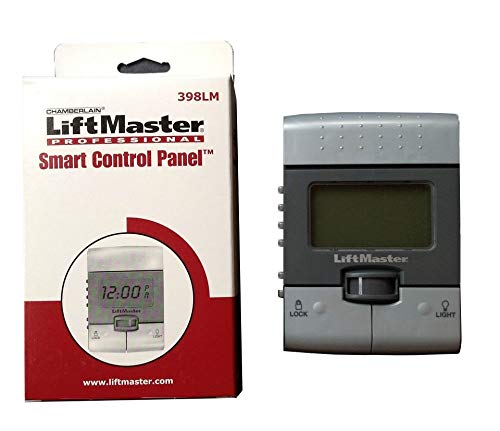
Image: The LiftMaster 398LM Smart Control Panel. This image shows the front of the control panel, typically mounted on a garage wall, displaying its screen and main button.
4. Operation
The 398LM Smart Control Panel offers several features for convenient garage door operation and monitoring.
Key Features and Functions:
- Automatic Light Activation: The built-in motion sensor detects movement when you enter the garage and automatically turns on the opener lights.
- Time and Temperature Display: The panel's display alternates between showing the current time and the inside garage temperature.
- System Status Messages: Important operational and diagnostic messages are displayed to assist with system maintenance.
- Remote Control Programming: New remote controls can be programmed directly from the control panel, eliminating the need to access the opener motor unit. Refer to the specific remote control's instructions for pairing.
- Setting Time, Temperature, and Language: Use the buttons located on the side of the control panel to adjust the time, switch between temperature units (e.g., Fahrenheit/Celsius), and select your preferred language (English, Spanish, French).
- Security Lockout: The panel can be set to lock out all outside remote control radio signals, enhancing security when you are away from home. Consult the full product manual for detailed instructions on activating this feature.
5. Maintenance
Regular maintenance helps ensure the longevity and optimal performance of your Smart Control Panel.
- Preventing Debris Accumulation: The back cover of the unit may not completely seal against the wall, potentially allowing dust, insects, or other debris to enter. To mitigate this, consider applying tape around the edges of the back cover after installation to create a better seal.
- Cleaning the Display: If debris accumulates behind the display screen, it may obscure the time and temperature readings. To clean, carefully dismantle the back cover from the front cover. This allows access to gently blow away any dust or debris. Exercise caution as plastic tabs securing components can be delicate.
- Button Durability: The plastic tabs securing the garage door opener button to the front cover can be delicate. Avoid excessive force when disassembling or reassembling the unit to prevent breakage.
6. Troubleshooting
If you encounter issues with your LiftMaster 398LM Smart Control Panel, consider the following diagnostic steps:
- Panel Flickering or Unresponsive: If the control panel display flickers or requires multiple presses to activate the garage door, the issue might stem from the control panel itself or the main controller board within the garage door opener motor assembly.
- Voltage Check (Advanced): For advanced users with a multimeter, measure the voltage across the input terminals of the control panel.
- If the reading is approximately 16-18 VDC (potentially fluctuating slightly), the control panel may be faulty.
- If the reading is 35+ VDC and stable, the problem likely originates from the controller board in the motor assembly. Voltages above 24 VDC can permanently damage the control panel.
- Contact Technical Support: Before replacing parts, it is highly recommended to contact Chamberlain technical support. They can provide detailed diagnostic assistance and help determine the root cause of the problem.
7. Specifications
| Feature | Detail |
|---|---|
| Model Number | 398LM |
| Brand | LiftMaster |
| Manufacturer | Chamberlain |
| Item Weight | 6.4 ounces |
| Package Dimensions | 10.2 x 9.06 x 1.69 inches |
| Power Source | Low-voltage wiring from opener (internal battery for settings retention, if applicable) |
| Special Features | Keyless Features, Lockable, Motion Sensor, Time/Temperature Display |
| Connectivity Technology | Radio Frequency (315Mhz) |
| Compatible Devices | Garage Door Openers with purple learn button/antenna, 315Mhz frequency |
Note: The control panel primarily draws power from the garage door opener's low-voltage wiring. While some specifications may mention 'Battery Powered', this typically refers to a small internal battery for retaining settings, not for primary operation.
8. Support
For further assistance, technical support, or warranty inquiries, please contact Chamberlain customer service. Refer to the official Chamberlain website or the documentation included with your garage door opener for the most current contact information.
Online Resources: Chamberlain Official Website


