
Introduction
This manual provides comprehensive instructions for the operation and maintenance of your OM SYSTEM OLYMPUS Evolt E510 Digital SLR Camera. Designed for photographers seeking advanced control and image quality, the E-510 features a 10-megapixel Live MOS sensor, CCD Shift Image Stabilization, and a 2.5-inch Live View HyperCrystal LCD. Its lightweight and ergonomic design ensures comfortable use. Understanding its functions will enable you to capture high-quality images in various conditions.

Figure 1: Front view of the Olympus Evolt E510 Digital SLR Camera with the included 14-42mm f/3.5-5.6 Zuiko lens. The camera body is black, featuring the Olympus branding and E-510 model designation.
Setup
1. Battery Installation
The E-510 is powered by a lithium-ion battery. To install:
- Locate the battery compartment cover on the bottom of the camera.
- Slide the latch to open the cover.
- Insert the battery with the correct orientation, aligning the contacts.
- Close the battery compartment cover until it clicks securely into place.
2. Memory Card Insertion
The camera supports CompactFlash Type I & II, Microdrives, and xD-Picture Cards.
- Open the memory card slot cover, typically located on the side of the camera.
- Insert the memory card firmly into the slot until it locks. Ensure correct orientation to avoid damage.
- Close the memory card slot cover.
3. Lens Attachment
The camera comes with a 14-42mm f/3.5-5.6 Zuiko lens.
- Remove the body cap from the camera and the rear lens cap from the lens.
- Align the mounting marks on the lens and the camera body.
- Attach the lens by rotating it clockwise until it clicks into place.
4. Initial Power On
After installing the battery and memory card, turn the camera on using the power switch. The Live View LCD will activate.
Operating the Camera
1. Controls and Display
Familiarize yourself with the camera's controls and the 2.5-inch HyperCrystal LCD display.
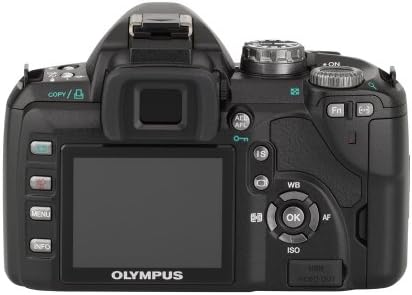
Figure 2: Rear view of the Olympus Evolt E510, highlighting the 2.5-inch Live View LCD, navigation buttons, and various function controls for easy operation.
2. Shooting Modes
The E-510 offers 28 shooting modes to optimize settings for various scenarios. These include:
- Automatic Modes: Landscape-portrait, Landscape, Macro, Document, Portrait, Fireworks, Beach/Snow, Panorama, High Key, Children, Sunset, Candle, Night Portrait, Low Key, Nature Macro, Sports.
- Manual Control Options: The camera also provides a full range of manual control options for advanced users.
3. Image Stabilization
The E-510 features Mechanical Image Stabilization (Sensor-shift) to compensate for camera movement, ensuring sharp images even in challenging conditions. This works in conjunction with Digital Image Stabilization for moving subjects.
4. Focusing
The camera supports both autofocus and manual focus. Autofocus technology includes Phase Detection, Selective single-point, Multi-area, Single, and Continuous modes. For manual focus, the camera offers a focus confirmation light in the viewfinder.
5. Image Capture and File Formats
The 10-megapixel Live MOS sensor captures high-resolution still images. Supported file formats include RAW (ORF) and JPEG. You can select the JPEG quality level (Normal).
6. Reviewing Images
Images can be reviewed on the 2.5-inch HyperCrystal LCD display. The display offers a wide viewing angle for easy sharing and composition.
Maintenance
1. Dust Reduction System
The Olympus E-510 incorporates a Supersonic Wave Filter, which vibrates to remove dust and other particles from the image sensor. This system activates automatically each time the camera is turned on, helping to ensure spot-free photos.
2. Cleaning the Camera and Lens
- Use a soft, lint-free cloth to clean the camera body.
- For the lens, use a lens brush or blower to remove dust, followed by a lens cleaning solution and cloth if necessary. Avoid touching the lens surface directly with your fingers.
- Do not use organic solvents or strong chemicals for cleaning.
3. Battery Care
- Charge the battery fully before use.
- Store the battery in a cool, dry place when not in use.
- Remove the battery from the camera if it will not be used for an extended period.
Troubleshooting
1. Image Noise at Higher ISO Settings
The E-510 may exhibit increased image noise when shooting at ISO settings greater than 400. To minimize noise, try to shoot in well-lit conditions or use a lower ISO setting when possible. The TruePic III Image Processor helps reduce noise, but optimal results are achieved at lower ISOs.
2. Autofocus Performance in Low Light
Autofocus may struggle in very low light conditions. In such situations, consider switching to manual focus. The camera provides a focus confirmation light in the viewfinder to assist with accurate manual focusing.
3. Firmware Updates
Periodically check the Olympus support website for firmware updates. To update the camera's firmware, ensure the USB Mode setting in the camera's menu is set to "Storage" (not "Auto") before connecting to a computer. Follow the instructions provided with the firmware update utility.
4. RAW File Conversion
The E-510 produces proprietary Olympus RAW Files (ORF). These files may not be directly readable by all third-party photo editing software. Olympus Viewer 3 software can be used for conversion. Alternatively, third-party converters like XnView can convert ORF files to more common formats like TIFF for editing.
Specifications
| Feature | Detail |
|---|---|
| Model Name | Olympus Evolt E510 |
| Image Sensor | 10 MP Live MOS |
| Image Stabilization | Sensor-shift (Mechanical) |
| LCD Display | 2.5 Inches HyperCrystal LCD (230,000 dots) |
| Lens Mount | Four Thirds |
| Included Lens | 14-42mm f/3.5-5.6 Zuiko Lens |
| Supported File Formats | RAW, JPEG |
| Storage Media | Compact Flash (Type I or II), xD Picture Card |
| Connectivity | USB, HDMI |
| Weight (Body Only) | 1.1 Pounds (approx. 460 grams) |
| Dimensions (Excluding Protrusions) | 5.35 x 3.61 x 2.2 inches (136 x 91.7 x 56 mm) |
| Continuous Shooting Speed | 3 frames per second |
| Minimum Shutter Speed | 60 seconds |
| Maximum Shutter Speed | 1/4000 seconds |
Warranty and Support
For warranty information, technical support, or service inquiries regarding your Olympus Evolt E510 camera, please refer to the official Olympus website or contact Olympus customer service directly. Keep your purchase receipt as proof of purchase for any warranty claims.
You can find more information and support resources by visiting the official Olympus Store.


