1. Introduction
The Canon Speedlite 580EX II is an advanced external flash unit designed for Canon EOS digital SLR cameras. It offers enhanced performance, durability, and control features, making it suitable for a wide range of photographic applications. This manual provides essential information for the proper setup, operation, and maintenance of your Speedlite 580EX II.
Key features include:
- Approximately 20 percent faster recycling time compared to the 580EX.
- Superior build quality, including a metal foot for higher rigidity.
- Max Guide Number 58 at 105mm setting (GN 190, feet).
- Automatic conversion of flash coverage with compatible digital SLR cameras.
- White Balance information communicated instantly to compatible digital SLR cameras.
- Full swivel, 180 degrees in either direction.
- AF-assist beam, compatible with all AiAF points on every EOS SLR.
- Dust- and water-resistance to match the EOS-1D Mark III.
2. Product Overview
Familiarize yourself with the components of your Canon Speedlite 580EX II.

Figure 2.1: Front view of the Canon Speedlite 580EX II Flash, showing the flash head and infrared panel.

Figure 2.2: Rear view of the flash, displaying the LCD screen and control buttons for various settings.

Figure 2.3: Side view of the flash with the head tilted upwards, demonstrating its bounce capabilities.
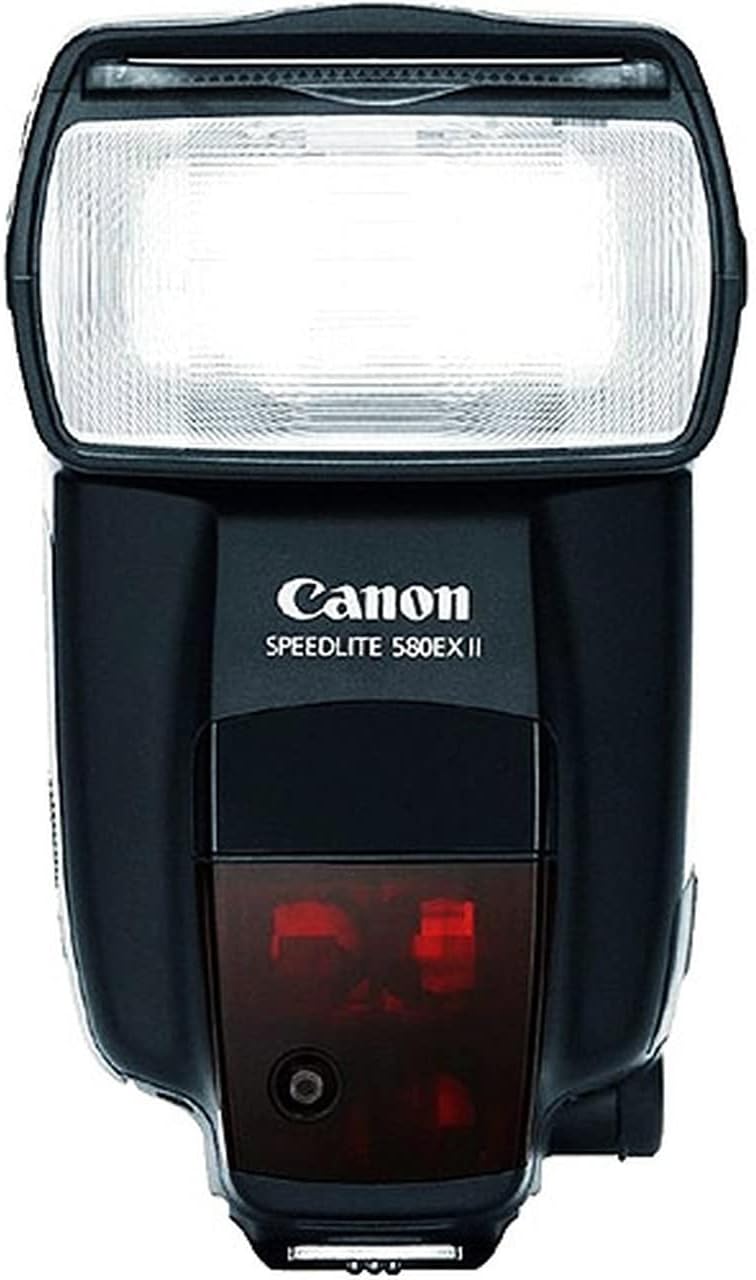
Figure 2.4: Bottom view of the flash, highlighting the durable metal hot shoe for secure camera attachment.
3. Setup
3.1 Battery Installation
The Speedlite 580EX II requires four (4) AA batteries for operation. Ensure you use fresh, high-quality batteries for optimal performance and recycling times.
- Locate the battery compartment door on the side of the flash unit.
- Slide the latch to open the compartment.
- Insert four AA batteries, observing the correct polarity (+/-) indicated inside the compartment.
- Close the battery compartment door securely until it clicks into place.
3.2 Mounting to Camera
The Speedlite 580EX II features a robust metal hot shoe with dust and water resistance, designed for secure attachment to compatible Canon EOS DSLR cameras.
- Ensure both the camera and flash are powered off.
- Slide the flash unit onto the camera's hot shoe.
- Engage the locking lever on the flash foot to secure it firmly to the camera. A small round safety button must be pressed to release the device from the hot shoe.
4. Operating Modes
The Speedlite 580EX II offers various operating modes to suit different lighting needs and creative effects.
- E-TTL II / E-TTL / TTL Autoflash: This mode automatically sets the flash output for optimal exposure. E-TTL II is an advanced version that considers lens distance information for more accurate flash metering.
- Manual Flash: Allows you to manually set the flash output from full power down to 1/128 power.
- Multi (Stroboscopic) Flash: Fires the flash multiple times during a single exposure to capture a sequence of movements.
- First-Curtain Sync: The flash fires immediately after the shutter opens.
- Second-Curtain Sync: The flash fires just before the shutter closes, useful for capturing motion trails behind a moving subject.
- High-Speed Sync (FP Flash): Enables flash photography at shutter speeds faster than the camera's maximum flash sync speed, useful for balancing flash with bright ambient light.
- Wireless Master/Slave Functionality: The 580EX II can act as a master unit to control other compatible Speedlite units wirelessly via infrared signals, or as a slave unit to be controlled by another master flash or transmitter.
4.1 Flash Head Adjustment
The flash head can be rotated and tilted to bounce light off ceilings or walls, creating softer and more natural illumination.
- The flash head swivels 180 degrees to the left and right.
- It can be tilted upwards up to 90 degrees and downwards up to 7 degrees.
- A built-in wide panel and bounce adapter can be pulled out from the flash head for wider coverage or softer light.
5. Maintenance
Proper maintenance ensures the longevity and optimal performance of your Speedlite 580EX II.
- Cleaning: Use a soft, lint-free cloth to wipe the flash unit. For stubborn dirt, slightly dampen the cloth with water or a mild cleaning solution. Avoid using organic solvents.
- Battery Care: Remove batteries when the flash is not in use for extended periods to prevent leakage. Store batteries in a cool, dry place.
- Storage: Store the flash in a dry, well-ventilated area, away from direct sunlight and extreme temperatures. Use the provided soft case for protection during transport and storage.
- Dust and Water Resistance: While the unit offers dust and water resistance, it is not waterproof. Avoid exposing it to heavy rain or submerging it in water.
6. Troubleshooting
If you encounter issues with your Speedlite 580EX II, refer to the following common troubleshooting tips:
- Flash Not Firing: Check if the flash is securely mounted to the camera's hot shoe and the locking lever is engaged. Ensure batteries are correctly inserted and have sufficient charge. Verify the flash and camera are powered on.
- Slow Recycling Time: Replace old or depleted batteries with fresh ones. Using rechargeable batteries can also improve recycling speed.
- Incorrect Exposure: Ensure the flash mode (E-TTL II, Manual) is appropriate for your shooting conditions. Check flash exposure compensation settings on both the flash and camera.
- Wireless Communication Issues: Ensure line-of-sight between master and slave units for infrared communication. Check channel and group settings on all flashes.
- Flash Head Movement: If the flash head does not move smoothly, ensure the pivot release button is pressed when adjusting its angle.
For more detailed troubleshooting, consult the full Canon Speedlite 580EX II user manual or Canon's official support resources.
7. Specifications
| Feature | Specification |
|---|---|
| Product Dimensions | 4.49 x 2.99 x 5.35 inches |
| Item Weight | 3.53 ounces |
| ASIN | B000NP3DJW |
| Item Model Number | 1946B002 |
| Batteries | 4 AA batteries required |
| Brand | Canon |
| Compatible Mountings | Canon |
| Battery Life | 12 months (typical usage) |
| Camera Flash Type | Slave |
| Flash Sync Speed | 1/200 to 1/300 seconds |
| Manufacturer | Canon Cameras US |
| Date First Available | May 10, 2007 |
8. Warranty and Support
The Canon Speedlite 580EX II comes with a FULL 14 DAY SATISFACTION GUARANTEE and a FULL 90 DAY PARTS AND LABOR WARRANTY. For further support, please contact Canon Cameras US customer service or visit their official website.
9. Product Videos
Watch these videos for additional insights into the Canon Speedlite 580EX II Flash.
Video 9.1: This video demonstrates the Canon 580EX II Speedlight Flash, highlighting its super fast recycle time and various features.
Video 9.2: An informational video discussing key aspects to consider before purchasing the Canon Speedlite 580EX II Flash.
Video 9.3: A review showcasing the durability and performance of the Canon Speedlite 580EX II Flash over time.


