
Celestron 31057
Celestron Omni XLT 150 Reflector Telescope Instruction Manual
Model: 31057
Introduction
This manual provides detailed instructions for the assembly, operation, and maintenance of your Celestron Omni XLT 150 Reflector Telescope. The Omni XLT 150 is a Newtonian reflector telescope designed for visual observation of celestial objects, featuring high-quality optics and a robust German Equatorial mount. Proper setup and care will ensure optimal performance and longevity of your instrument.
Unpacking and Assembly
Package Contents
Before beginning assembly, carefully unpack all components and verify that all parts are present. The package should include:
- Omni XLT 150mm Optical Tube Assembly (OTA)
- CG-4 German Equatorial Mount
- Full-height Steel Tripod with Accessory Tray
- 6x30 Optical Finderscope
- 1.25" Star Diagonal
- 1.25" 25mm Plossl Eyepiece
- Counterweights and Counterweight Shaft
- Slow-motion Control Cables
Assembly Steps
- Set up the Tripod: Spread the tripod legs to their full extent. Secure the accessory tray to the center brace of the tripod. Adjust the leg height for stability and comfortable viewing.
- Attach the Equatorial Mount: Place the CG-4 German Equatorial Mount onto the tripod head. Secure it using the large knob or bolt located underneath the tripod head. Ensure it is firmly attached.
- Install Counterweight Shaft and Counterweights: Thread the counterweight shaft into the declination axis of the mount. Slide the counterweights onto the shaft and secure them with the locking knob.
- Attach the Optical Tube: Locate the dovetail bar on the optical tube. Slide this bar into the dovetail clamp on the equatorial mount. Tighten the clamp knobs securely.
- Install the Finderscope: Slide the finderscope bracket into the receptacle on the optical tube. Tighten the small thumbscrew to hold it in place. Remove the lens caps from the finderscope.
- Insert the Eyepiece: Loosen the thumbscrews on the focuser. Insert the 1.25" star diagonal into the focuser, then insert the 25mm eyepiece into the star diagonal. Tighten the thumbscrews to secure them.
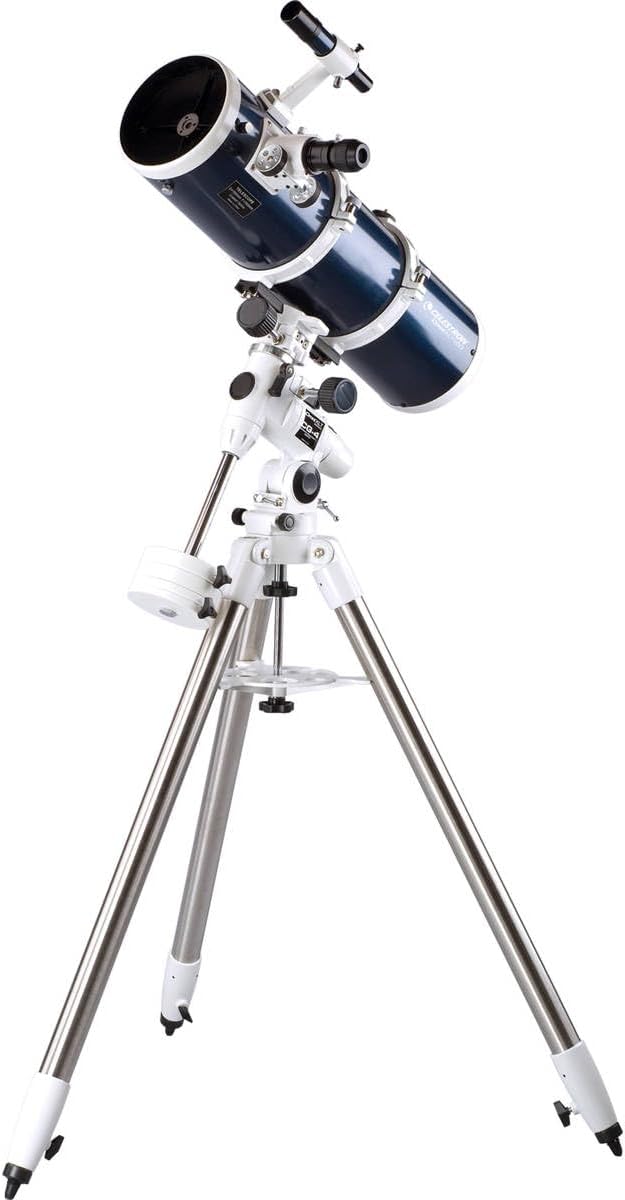
Image: The Celestron Omni XLT 150 Reflector Telescope fully assembled, showing the optical tube, equatorial mount, and tripod.

Image: The Celestron CG-4 German Equatorial Mount and tripod, ready for the optical tube to be attached.
Components Overview
Understanding the main components of your telescope is crucial for effective operation:
- Optical Tube Assembly (OTA): The main body of the telescope, housing the primary and secondary mirrors.
- Focuser: Mechanism for adjusting the eyepiece position to achieve a sharp image.
- Eyepiece: Magnifies the image formed by the telescope. Different eyepieces provide different magnifications.
- Finderscope: A small, low-power telescope mounted parallel to the main telescope, used for locating objects in the sky.
- CG-4 German Equatorial Mount: Allows the telescope to track celestial objects as they move across the sky. It has two axes: Right Ascension (RA) and Declination (DEC).
- Counterweights: Used to balance the optical tube on the equatorial mount, ensuring smooth movement and stability.
- Slow-motion Controls: Fine adjustment knobs for precise movement along the RA and DEC axes.
- Tripod: Provides a stable base for the telescope and mount.
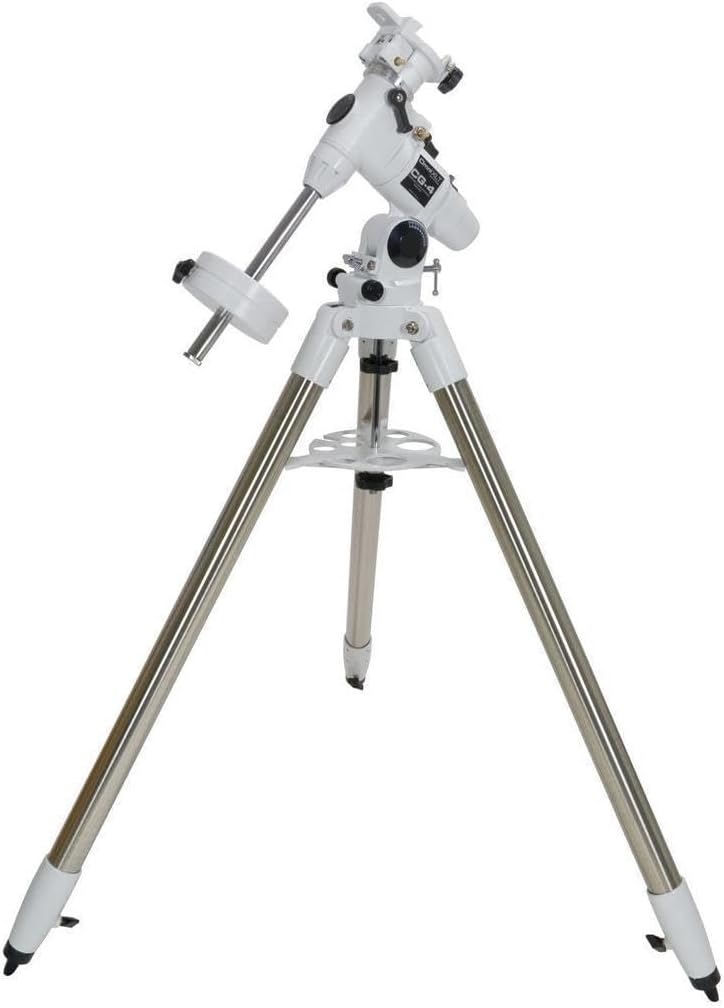
Image: A detailed view of the Celestron Omni XLT 150 optical tube, highlighting the focuser mechanism and the attached finderscope.
Operating Instructions
Balancing the Telescope
Proper balancing is essential for smooth tracking and preventing strain on the mount. With the optical tube attached and an eyepiece inserted, adjust the counterweights along the shaft until the telescope remains stationary when the RA and DEC clutches are disengaged. This ensures the telescope is balanced in both axes.
Using the CG-4 German Equatorial Mount
The CG-4 mount allows you to track celestial objects by aligning its Right Ascension axis with the Earth's rotational axis (Polar Alignment). Once polar aligned, you only need to turn the Right Ascension slow-motion control to follow objects as they drift across the sky.
- Polar Alignment: Point the RA axis of the mount towards Polaris (the North Star) in the Northern Hemisphere, or Sigma Octantis in the Southern Hemisphere. Use the altitude and azimuth adjustment knobs for fine tuning.
- Setting Circles: The setting circles on the RA and DEC axes can be used to locate objects by their celestial coordinates, though a finderscope is often more practical for beginners.
- Slow-motion Controls: Once an object is centered in the eyepiece, use the slow-motion control cables for precise adjustments and tracking.
Aligning the Finderscope
The finderscope must be aligned with the main telescope for easy object location:
- Point the main telescope at a distant, stationary object (e.g., a streetlight or a distant tree) during daylight hours. Center the object in the main telescope's eyepiece.
- Look through the finderscope. Use the adjustment screws on the finderscope bracket to move the finderscope's crosshairs until they are centered on the same object.
- Verify alignment by switching between the finderscope and the main eyepiece.
Inserting Eyepieces and Focusing
To change magnification, simply loosen the thumbscrews on the focuser, remove the current eyepiece (and diagonal if used), insert the desired eyepiece (and diagonal), and tighten the thumbscrews. To focus, turn the focuser knob until the image appears sharp. Start with the lowest magnification eyepiece (largest focal length) for wider fields of view and easier object acquisition.
Observing Celestial Objects
Once your telescope is assembled, balanced, and the finderscope is aligned, you are ready to observe. Begin by locating a bright object with the finderscope, then center it in the main telescope's eyepiece. Use the slow-motion controls for fine adjustments and tracking.
Starry Night Astronomy Software
Your telescope includes access to a free download of Starry Night Astronomy Software. This software is a valuable tool for planning your observing sessions, identifying celestial objects, and learning about the night sky. It features a database of over 36,000 objects and allows you to print custom star maps.
Maintenance
Optical Tube Care
- Cleaning Lenses and Mirrors: Dust on optical surfaces should be removed with a soft camel hair brush or compressed air. For smudges, use a specialized optical cleaning solution and a microfiber cloth, applying gentle, circular motions. Avoid touching optical surfaces with bare hands.
- Storage: Always replace all lens caps when the telescope is not in use. Store the telescope in a dry, dust-free environment.
Mount Care
The CG-4 mount requires minimal maintenance. Keep the gears and moving parts free of dust and debris. Periodically check that all bolts and knobs are securely tightened. Avoid over-tightening, which can strip threads.
Collimation
As a Newtonian reflector, your Omni XLT 150 requires occasional collimation (alignment of the mirrors). This is a critical step for achieving sharp images. Refer to advanced guides or Celestron's support resources for detailed collimation procedures, which typically involve adjusting the secondary and primary mirrors.
Troubleshooting
- Image is blurry: Ensure the focuser is properly adjusted. If the image remains blurry, check if the telescope has acclimated to the ambient temperature. For reflector telescopes, verify collimation.
- Cannot find objects: Confirm that the finderscope is accurately aligned with the main telescope. Start with low magnification eyepieces for a wider field of view.
- Objects drift out of view quickly: Ensure the equatorial mount is properly polar aligned. Use the slow-motion controls for tracking.
- Shaky image: Ensure the tripod legs are fully extended and all knobs are tightened. Observe from a stable surface. Avoid touching the telescope during observation.
Specifications
| Brand | Celestron |
| Model Number | 31057 |
| Optical Design | Newtonian Reflector |
| Objective Lens Diameter | 150 mm |
| Focal Length | 750 mm |
| Focal Ratio | f/5 |
| Mount Type | CG-4 German Equatorial Mount |
| Finderscope | 6x30 Optical Finderscope |
| Eyepiece Included | 1.25" 25mm Plossl |
| Lens Coating | StarBright XLT |
| Item Weight | 45.5 pounds (total) |
| Product Dimensions | 31 x 15.5 x 13.75 inches |
Warranty and Support
Celestron products are designed for durability and performance. For specific warranty details, please refer to the warranty card included with your product or visit the official Celestron website. For technical support, troubleshooting assistance, or to inquire about replacement parts, please contact Celestron customer service through their official channels. Keep your purchase receipt as proof of purchase for warranty claims.
Related documents31057


Ask a question about this manual
Ask about setup, troubleshooting, compatibility, parts, safety, or missing instructions. Manuals+ will review the question and use this page’s manual context to help answer it.