
1. Product Overview
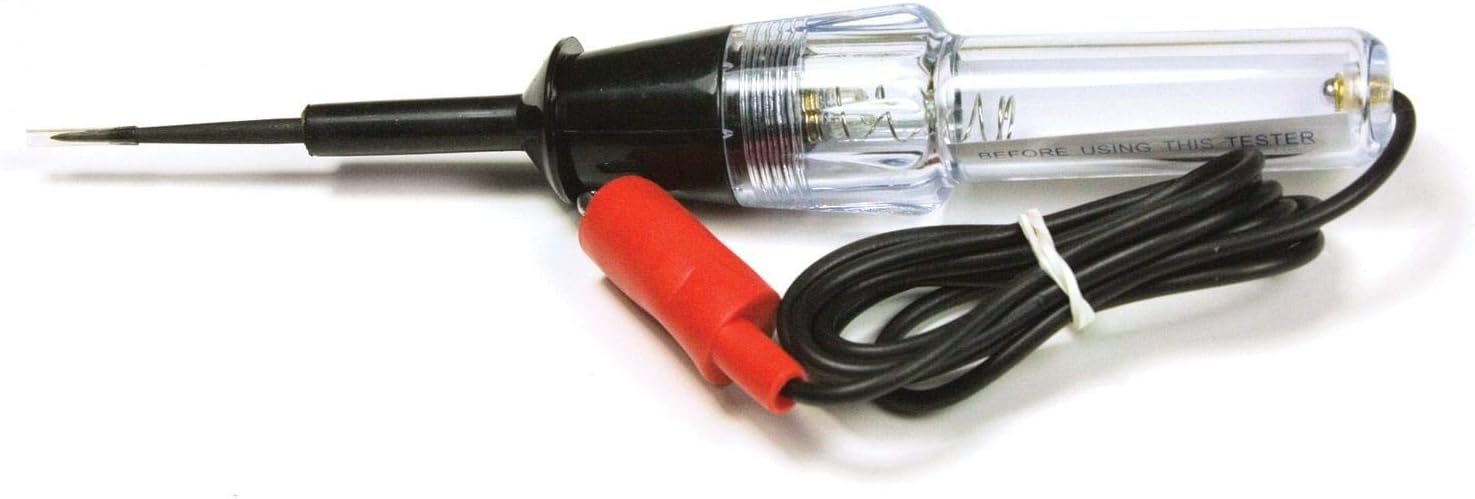
The Performance Tool W2982 Deluxe Continuity Tester is designed for accurate continuity testing in various electrical applications. This tool features a 3-inch probe and an alligator clip test lead, facilitating access to hard-to-reach areas. It operates on a single AA battery (not included) for convenient and efficient portable testing. Constructed with durable materials, the W2982 is built for sustained use. Its versatile capabilities allow for testing circuits, fuses, switches, and other electrical components.
2. Safety Information
- Always wear appropriate personal protective equipment, such as safety glasses, when working with electrical systems.
- Ensure the circuit being tested is de-energized before connecting or disconnecting the continuity tester, unless specifically testing for live voltage (which this tool is not designed for).
- Do not use the tester on circuits exceeding its specified voltage range (typically low voltage DC for continuity).
- Keep the tester clean and dry. Do not use it in wet conditions.
- Inspect the tester for any damage before each use. Do not use if damaged.
- Keep out of reach of children.
3. Product Components
- Tester Body: Contains the indicator light and battery compartment.
- 3-Inch Probe: A sharp metal tip for making contact with test points.
- Alligator Clip Test Lead: A flexible wire with an alligator clip for grounding or connecting to a circuit point.
- Coiled Cord: Connects the probe to the alligator clip, allowing for extended reach.

4. Setup
4.1 Battery Installation
- Unscrew the two halves of the tester body to access the battery compartment.
- Insert one AA battery (not included) into the compartment, ensuring correct polarity (+/-).
- Carefully screw the two halves of the tester body back together until secure.
- Test the unit by touching the alligator clip to the probe tip. The indicator light should illuminate, confirming proper battery installation and functionality.
5. Operating Instructions
5.1 Basic Continuity Test
- Ensure the circuit or component you are testing is de-energized.
- Connect the alligator clip to one end of the circuit or component you wish to test. This can be a ground point or one side of the component.
- Touch the probe tip to the other end of the circuit or component.
- If the indicator light on the tester illuminates, there is continuity (a complete electrical path) between the probe and the alligator clip. If the light does not illuminate, there is an open circuit or no continuity.
5.2 Testing Fuses
- Remove the fuse from its holder.
- Connect the alligator clip to one metal end of the fuse.
- Touch the probe tip to the other metal end of the fuse.
- If the light illuminates, the fuse is good. If the light does not illuminate, the fuse is blown and needs replacement.
5.3 Testing Wires and Switches
- Wires: Connect the alligator clip to one end of the wire and touch the probe to the other. Light indicates a good wire.
- Switches: With the switch in the "ON" position, connect the alligator clip to one terminal and the probe to the other. Light indicates a working switch. Repeat for the "OFF" position; the light should not illuminate.
6. Maintenance
- Cleaning: Wipe the tester with a dry, clean cloth. Do not use abrasive cleaners or solvents.
- Battery Replacement: Replace the AA battery when the indicator light appears dim or fails to illuminate during a known good continuity test. Follow the battery installation steps in Section 4.1.
- Storage: Store the tester in a dry, cool place away from direct sunlight and extreme temperatures. Disconnect the alligator clip from the probe to prevent accidental battery drain.
7. Troubleshooting
| Problem | Possible Cause | Solution |
|---|---|---|
| Indicator light does not illuminate during a known good continuity test. | Dead or improperly installed battery. | Check battery polarity or replace the AA battery. |
| Indicator light is dim. | Low battery power. | Replace the AA battery. |
| No continuity detected on a component expected to have continuity. | Faulty component or poor connection. | Ensure firm contact with test points. Inspect the component for damage. |
8. Specifications
- Brand: Performance Tool
- Model: W2982
- Power Source: Battery Powered (1x AA battery, not included)
- Style: Deluxe Continuity Tester
- Color: Black
- Item Weight: Approximately 2.4 ounces (0.15 Pounds)
- Product Dimensions: Approximately 3.6 x 1.5 x 10.5 inches
- Minimum Operating Voltage: 1.5 Volts
- Measurement Type: Ohmmeter (for continuity)
- UPC: 039564139840
- Manufacturer: Wilmar
- Manufacturer Part Number: W2982
9. Warranty and Support
For warranty information and customer support, please refer to the documentation included with your Performance Tool W2982 Deluxe Continuity Tester at the time of purchase. You may also visit the official Performance Tool website for further assistance.