
seca 472
seca 472 Tripod for Remote Displays User Manual
Introduction
This manual provides essential instructions for the safe and effective setup, operation, and maintenance of your seca 472 Tripod for Remote Displays. Please read this manual thoroughly before using the product and retain it for future reference.
The seca 472 Tripod is designed to provide a stable and adjustable mounting solution for cable remote displays of seca scales and measuring rods. Its robust construction ensures reliable performance in various settings.
Setup
1. Unpacking
- Carefully remove all components from the packaging.
- Verify that all parts are present and undamaged. If any parts are missing or damaged, do not proceed with assembly and contact seca support.
- Retain packaging materials for potential future transport or storage.
2. Assembly
The seca 472 tripod is designed for straightforward assembly. Follow these steps:
- Extend the tripod legs to their full stable position. Ensure the locking mechanisms are securely engaged.
- Place the tripod in the desired location. The non-slip rubber feet provide stability on various surfaces.
- Attach the display element bracket to the top of the tripod pole. Secure it firmly using the provided fasteners.
- Carefully mount your seca remote display onto the bracket. Ensure it is seated correctly and securely fastened to prevent accidental dislodgement.
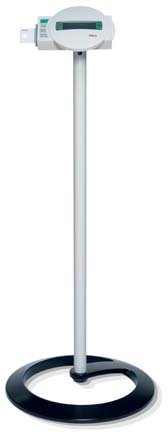
Figure 1: The seca 472 Tripod with a remote display mounted. This image illustrates the stable setup of the tripod, ready for use with a seca scale or measuring rod display.
3. Placement
Position the tripod on a flat, stable surface. The integrated non-slip rubber feet are designed to prevent movement during use. Avoid placing the tripod in high-traffic areas where it could be accidentally knocked over.
Operating Instructions
Height Adjustment
The display height is continuously adjustable up to 39 inches (approximately 99 cm). To adjust the height:
- Loosen the height adjustment knob or lever located on the tripod pole.
- Carefully slide the display assembly up or down to the desired height.
- Tighten the knob or lever firmly to secure the display at the chosen height. Ensure the display is stable before use.
General Use
Once the display is securely mounted and adjusted to the appropriate height, the tripod provides a stable platform for viewing measurements from your seca scale or measuring rod. Ensure all cables connected to the remote display are managed to prevent tripping hazards or accidental disconnections.
Maintenance
Cleaning
- Wipe the tripod surfaces with a soft, damp cloth.
- Do not use abrasive cleaners or solvents, as these can damage the finish.
- Ensure the tripod is dry before storage or continued use.
Inspection
- Periodically inspect all fasteners and connections to ensure they are tight and secure.
- Check the non-slip rubber feet for wear or damage. Replace if necessary to maintain stability.
- Examine the tripod legs and pole for any signs of bending or structural fatigue.
Troubleshooting
| Problem | Possible Cause | Solution |
|---|---|---|
| Tripod feels unstable. | Legs not fully extended or locked; uneven surface; damaged rubber feet. | Ensure legs are fully extended and locked. Move to a flat, level surface. Inspect and replace damaged rubber feet. |
| Display not securely attached. | Bracket fasteners loose; display not correctly seated. | Tighten all bracket fasteners. Re-seat the display, ensuring it clicks into place or is firmly screwed. |
| Height adjustment slips. | Adjustment knob/lever not tightened sufficiently. | Ensure the height adjustment knob or lever is tightened firmly after setting the desired height. |
Specifications
| Model | seca 472 |
| Material | High-grade steel tubing |
| Dimensions (W x H x D) | 19 1/2 x 39 x 19 1/2 inches (approx. 49.5 x 99 x 49.5 cm) |
| Weight | 6.5 lbs (approx. 2.95 kg) |
| Height Adjustment Range | Continuously adjustable up to 39 inches (approx. 99 cm) |
| Features | Non-slip rubber feet, robust bracket for display attachment |
Warranty
The seca 472 Tripod for Remote Displays comes with a 2-year warranty from the date of purchase. This warranty covers defects in materials and workmanship under normal use. Please retain your proof of purchase for warranty claims. For full warranty terms and conditions, please refer to the documentation provided with your product or contact seca support.
Support
For technical assistance, spare parts, or any questions regarding your seca 472 Tripod, please contact seca customer support. You can find contact information on the official seca website or through your local distributor.
Visit the official seca website for more information: www.seca.com
Related documents472


Ask a question about this manual
Ask about setup, troubleshooting, compatibility, parts, safety, or missing instructions. Manuals+ will review the question and use this page’s manual context to help answer it.