
Introduction
This manual provides detailed instructions for the safe and effective use of your Sony Cybershot DSC-S650 digital camera. Please read this manual thoroughly before operating the camera and retain it for future reference. The Sony Cybershot DSC-S650 is a 7.2-megapixel point-and-shoot digital camera featuring a 3x optical zoom lens, designed for capturing high-quality still images and video.
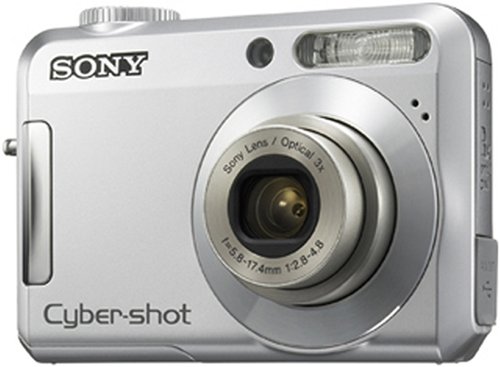
Figure 1: Front view of the Sony Cybershot DSC-S650 Digital Camera. This image shows the lens, flash, and grip area.
Safety Information
- Battery Safety: Use only specified batteries. Do not expose batteries to excessive heat or dispose of them in fire. Keep batteries out of reach of children.
- Water and Moisture: This camera is not waterproof. Do not expose it to rain, moisture, or immerse it in water.
- Handling: Avoid dropping the camera or subjecting it to strong impacts. Do not attempt to disassemble or modify the camera.
- Lens Care: Do not touch the lens surface directly. Use a soft, clean cloth for cleaning.
- Operating Temperature: Operate the camera within the recommended temperature range (typically 0°C to 40°C / 32°F to 104°F).
Package Contents
Verify that all items listed below are included in your camera package:
- Sony Cybershot DSC-S650 Digital Camera
- Batteries (Lithium Ion)
- USB Cable
- Wrist Strap
- Software CD-ROM (may vary by region)
- Instruction Manual (this document)
Camera Overview
Familiarize yourself with the main components of your camera:
- Front: Lens, Flash, Self-timer lamp/Autofocus illuminator.
- Top: Power button, Shutter button, Mode dial.
- Back: 2-inch LCD screen, Zoom lever, Playback button, Menu button, Control buttons (directional pad), Delete button.
- Side: USB/AV out terminal cover.
- Bottom: Battery/Memory card compartment cover, Tripod socket.
Note: For a visual guide to camera components, refer to the diagrams typically found in the printed manual.
Setup
1. Inserting the Battery
- Open the battery/memory card compartment cover on the bottom of the camera.
- Insert the supplied Lithium Ion battery, ensuring the correct orientation as indicated inside the compartment.
- Close the compartment cover securely until it clicks into place.
Charging the Battery: Connect the camera to a power source using the supplied USB cable and AC adapter (if included) to charge the battery. The charging indicator will illuminate during charging and turn off when complete.
2. Inserting a Memory Card
The camera has approximately 24 MB of internal memory. For extended shooting, a Memory Stick Duo or Memory Stick PRO Duo card is recommended (up to 32 GB supported).
- Open the battery/memory card compartment cover.
- Insert the memory card into the slot with the correct orientation until it clicks.
- Close the compartment cover.
Formatting a Memory Card: New memory cards or cards used in other devices should be formatted in the camera before first use. Go to the camera's menu, navigate to "Setup" or "Settings," and select "Format." Formatting erases all data on the card.
Operating the Camera
1. Powering On/Off
Press the POWER button located on the top of the camera to turn it on or off.
2. Basic Photography (Still Images)
- Select a Shooting Mode: Turn the Mode Dial (if present) or navigate through the menu to select a shooting mode, such as "Auto" for general photography. The DSC-S650 primarily operates in automatic shooting modes.
- Frame Your Shot: Use the 2-inch LCD screen to compose your image.
- Zoom: Use the zoom lever (W/T) to adjust the optical zoom (3x) and digital zoom (up to 6x).
- Focus: Press the shutter button halfway down. The camera will automatically focus, and a focus indicator will appear on the LCD.
- Shoot: Press the shutter button fully down to take the picture.
Using the Flash: The built-in flash has modes such as Auto and On/Fill. Access flash settings through the camera's menu or a dedicated flash button (if available) to select the appropriate mode for your lighting conditions.
3. Recording Videos
- Select Video Mode: Turn the Mode Dial to the video camera icon or select "Movie" from the menu.
- Start Recording: Press the shutter button to start recording. A recording indicator will appear on the screen. The camera records video in MP4 format at 720p resolution.
- Stop Recording: Press the shutter button again to stop recording.
4. Playback
- Press the PLAYBACK button to enter playback mode.
- Use the directional buttons to scroll through your photos and videos.
- To view a video, select it and press the center button to start playback.
- Press the PLAYBACK button again or the shutter button to return to shooting mode.
5. Deleting Images/Videos
- In playback mode, select the image or video you wish to delete.
- Press the DELETE button (often marked with a trash can icon).
- Confirm your selection when prompted.
Maintenance
- Cleaning the Lens: Use a soft, lint-free cloth or a lens brush to gently remove dust and smudges. Do not use chemical cleaners.
- Cleaning the LCD Screen: Wipe the screen gently with a soft, dry cloth. Avoid pressing hard on the screen.
- Cleaning the Camera Body: Use a soft, dry cloth to wipe the camera body. For stubborn dirt, slightly dampen the cloth with water and wipe, then dry thoroughly.
- Storage: When not in use for extended periods, remove the battery and store the camera in a cool, dry place away from direct sunlight and extreme temperatures.
Troubleshooting
| Problem | Solution |
|---|---|
| Camera does not turn on. | Ensure the battery is correctly inserted and fully charged. Try reinserting the battery. |
| Cannot take pictures. | Check if the memory card is full or correctly inserted. Ensure the lens cap is removed. |
| Images are blurry. | Ensure the lens is clean. Hold the camera steady. Check focus before fully pressing the shutter button. |
| Flash does not fire. | Check flash settings; it might be set to "Off" or "Auto" in bright conditions. |
| "Memory Card Error" message. | Reinsert the memory card. Try formatting the card (this will erase all data). If the problem persists, try a different memory card. |
Specifications
- Model Name:
- DSC-S650
- Effective Still Resolution:
- 7.2 MP
- Optical Zoom:
- 3x
- Digital Zoom:
- 6x
- Image Stabilization:
- Digital, Optical
- Photo Sensor Technology:
- CMOS
- Screen Size:
- 2 Inches (LCD)
- Supported File Format:
- JPEG, RAW
- Video Resolution:
- 720p
- Video Capture Format:
- MP4
- Connectivity Technology:
- USB
- Battery Type:
- Lithium Ion
- Item Weight:
- 130 Grams
- Flash Memory Installed Size:
- 24 MB (internal)
- Flash Memory Supported Size Maximum:
- 32 GB
- Minimum Shutter Speed:
- 1/4000 seconds
- Exposure Control:
- Automatic
- Focus Type:
- Auto Focus
Warranty and Support
For warranty information and customer support, please refer to the warranty card included with your product or visit the official Sony support website. Keep your proof of purchase for warranty claims.
Online Resources: For additional support, software updates, and FAQs, visit the Sony support website. You can often find detailed guides and video tutorials there.
Contact Information: Refer to your regional Sony website for specific contact details, including phone numbers and service center locations.