
Introduction
This manual provides comprehensive instructions for the Sony ICF-CDK70 Under Cabinet Kitchen Clock Radio with 3-Disc CD Changer. Please read this manual thoroughly before operating the unit and retain it for future reference.
Important Safety Information
General Safety Precautions
- Power Source: Operate the unit only from the power source indicated on the nameplate.
- Ventilation: Ensure adequate ventilation. Do not block ventilation openings.
- Water and Moisture: Do not expose the unit to rain or moisture to reduce the risk of fire or electric shock.
- Cleaning: Unplug the unit from the wall outlet before cleaning. Use a dry cloth only.
- Servicing: Do not attempt to service the unit yourself. Refer all servicing to qualified service personnel.
Setup and Installation
Unpacking
Carefully remove the unit and all accessories from the packaging. Verify that all components are present:
- Sony ICF-CDK70 Unit
- Mounting Template
- Mounting Screws
- Power Cord
- Audio Line-in Cable
Mounting Under a Cabinet
The ICF-CDK70 is designed for under-cabinet installation to save counter space. Follow these steps:
- Select Location: Choose a flat, sturdy surface under a cabinet, away from heat sources or moisture. Ensure there is sufficient space for the CD tray to open.
- Use Template: Tape the provided mounting template to the underside of the cabinet.
- Drill Pilot Holes: Using an appropriate drill bit, drill pilot holes at the marked locations on the template.
- Attach Mounting Brackets: Secure the mounting brackets to the cabinet using the provided screws.
- Mount Unit: Slide the ICF-CDK70 unit onto the mounting brackets until it clicks securely into place.
- Connect Power: Plug the power cord into the unit and then into a standard AC outlet.

Image: Side view of the Sony ICF-CDK70, illustrating the under-cabinet mounting mechanism and control layout.
Initial Setup
- Set Clock: After connecting power, the clock display will flash. Use the TIME SET buttons to adjust the hour and minute.
- Antenna: Extend the FM wire antenna for optimal FM reception. For AM, rotate the unit for best reception.
Operating Instructions
Radio Operation (AM/FM)
- Turn On: Press the POWER button.
- Select Band: Press the BAND button to switch between FM and AM.
- Tune Stations: Use the TUNING buttons to manually tune to a station. Press and hold for automatic scanning.
- Preset Stations: The unit supports 20 presets. To store a station, tune to the desired frequency, press MEMORY, then press a preset number button (1-20). To recall, press the desired preset number.
- Adjust Volume: Use the VOLUME knob.
CD Player Operation (3-Disc Changer)
- Open CD Tray: Press the OPEN/CLOSE button to open the CD tray.
- Load Discs: Place up to three standard audio CDs or CD-R/RW discs onto the trays, label side up.
- Close CD Tray: Press OPEN/CLOSE again.
- Play CD: Press the CD PLAY button. The unit will start playing from the first loaded disc.
- Select Disc: Press the DISC SKIP button to switch between loaded discs.
- Track Navigation: Use the SKIP buttons to go to the next or previous track. Press and hold to fast forward or rewind.
- Stop/Pause: Press STOP to stop playback. Press PAUSE to temporarily stop playback.
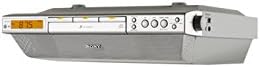
Image: Front view of the Sony ICF-CDK70, highlighting the digital display, 3-disc CD changer tray, and primary control buttons.
Auxiliary Input
Connect an external audio device (e.g., MP3 player) to the AUDIO IN jack using the supplied audio line-in cable. Press the FUNCTION button to select the AUX input. Control playback from the connected device.
Alarm Clock Function
- Set Alarm: Press and hold the ALARM SET button. Use the TIME SET buttons to set the desired alarm time.
- Alarm Source: Select whether the alarm will sound from the radio or CD player.
- Activate Alarm: Press the ALARM ON/OFF button to activate the alarm. An indicator will appear on the display.
- Snooze: Press the SNOOZE button to temporarily silence the alarm.
Maintenance
Cleaning the Unit
- Exterior: Wipe the exterior surfaces with a soft, dry cloth. For stubborn stains, use a cloth lightly dampened with a mild detergent solution, then wipe dry.
- CD Lens: Do not attempt to clean the CD lens directly. Use a commercially available CD lens cleaner disc if necessary.
- Do Not Use: Avoid using abrasive pads, scouring powders, or solvents such as alcohol or benzene, as these can damage the finish.
Disc Handling
- Handle discs by their edges to avoid fingerprints on the playing surface.
- Store discs in their cases when not in use to prevent scratches and dust accumulation.
- Do not expose discs to direct sunlight or heat sources.
Troubleshooting Guide
| Problem | Possible Cause | Solution |
|---|---|---|
| Unit does not power on. | Power cord not securely plugged in. | Ensure the power cord is firmly connected to both the unit and the AC outlet. |
| No sound from radio/CD. | Volume is too low or muted. Incorrect function selected. | Increase volume. Press FUNCTION to select the correct source (RADIO, CD, AUX). |
| CD skips or does not play. | Disc is dirty, scratched, or inserted incorrectly. | Clean the disc with a soft cloth. Ensure the disc is inserted label side up. Try a different disc. |
| Poor radio reception. | Antenna not properly positioned. Interference from other electronics. | Adjust the FM wire antenna. For AM, rotate the unit. Move unit away from other electronic devices. |
| Alarm does not sound. | Alarm not activated or set incorrectly. | Verify alarm time and ensure the alarm is turned ON (indicator visible). Check alarm source. |
Specifications
- Model: Sony ICF-CDK70
- Power Source: Corded Electric
- Supported Media: CD, CD-R/RW
- Tuner: AM/FM Digital Tuner with 20 Presets
- CD Changer: 3-Disc
- Audio Input: Auxiliary (3.5mm jack)
- Speaker Type: Stereo, Bass Reflex Sound System
- Output Power: 3 watts
- Dimensions (L x W x H): 31.9 x 36.2 x 10.5 cm (12.56 x 14.25 x 4.13 inches)
- Weight: 1.81 kg (4 lbs)
Warranty and Support
For warranty information and customer support, please refer to the separate warranty card included with your product or visit the official Sony support website. Keep your proof of purchase for warranty claims.
Online Support: www.sony.com/electronics/support