
1. Introduction
This manual provides essential information for the safe and effective operation, maintenance, and care of your Shoprider Flagship Enclosed Scooter. Please read this manual thoroughly before operating the scooter to ensure proper usage and to prevent injury or damage. Keep this manual for future reference.
2. Safety Information
Your safety is paramount. Adhere to all warnings and instructions provided in this manual. Failure to do so may result in serious injury or damage to the scooter.
- Proposition 65 Warning: This product may contain chemicals known to the State of California to cause cancer and birth defects or other reproductive harm.
- Always operate the scooter on stable, level surfaces. Avoid steep inclines or declines, especially if carrying cargo or passengers, as this may affect stability.
- Ensure all doors are securely latched before operation.
- Do not exceed the maximum weight capacity of 350 lbs.
- Use the full light package, including turn signals and emergency flashers, to enhance visibility, especially in low-light conditions or when signaling turns.
- Familiarize yourself with all controls before operating the scooter in public areas.
- Avoid sudden turns at high speeds to maintain stability.
3. Product Overview
The Shoprider Flagship Enclosed Scooter is designed for personal mobility, offering protection from elements with its enclosed cabin. Key features include:
- Enclosed cabin with clear windows for weather protection.
- Locking doors that open on both sides and are removable.
- Front and rear suspension for a smoother ride.
- Full light package, including turn signals and emergency flashers.
- Waterproof and weatherproof design.
- Captain Seat for user comfort.
- U-shaped or Delta-shaped handlebar for steering control.
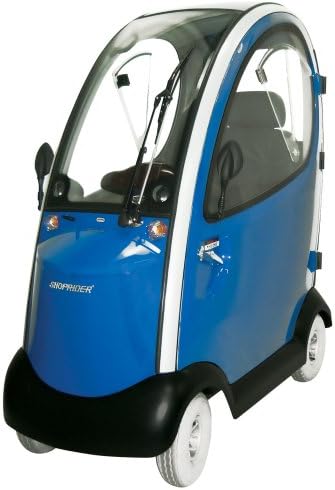
An image of the Shoprider Flagship Enclosed Scooter, showcasing its blue exterior, enclosed cabin with clear windows, front windshield wipers, and four wheels. The doors are visible on the side.
4. Setup
Before initial use, ensure the following setup procedures are completed:
- Battery Installation/Charging: Refer to the separate battery manual for specific instructions on installing and fully charging the scooter's battery before first use.
- Seat Adjustment: Adjust the Captain Seat to a comfortable and secure position. Ensure it is locked into place.
- Door Installation (Optional): If the doors are not pre-installed, carefully attach them to the designated hinges. Ensure they latch securely. The doors are designed to be removable for open-air operation if desired.
- Handlebar Adjustment: Adjust the U-shaped or Delta-shaped handlebar to a comfortable height and angle for optimal control.
- Pre-Operation Check: Verify that all components are securely fastened and that the tires are properly inflated.
5. Operating Instructions
Follow these steps for safe and effective operation of your scooter:
- Power On: Insert the key into the ignition and turn it to the 'ON' position. The display panel should illuminate.
- Speed Control: Use the speed adjustment dial or lever to select one of the 20 available speed settings. Start with a lower speed until you are comfortable with the scooter's handling.
- Steering: Use the handlebar to steer the scooter. Apply gentle pressure for smooth turns.
- Acceleration/Braking: Use the throttle control (typically a lever or paddle) to accelerate. Releasing the throttle will engage the electromagnetic brake, bringing the scooter to a stop.
- Lights and Signals: Activate the headlights, taillights, turn signals, and emergency flashers as needed using the controls on the dashboard or handlebar.
- Horn: Use the horn to alert pedestrians or other vehicles when necessary.
- Parking: When parking, ensure the scooter is on a level surface and turn the key to the 'OFF' position to engage the parking brake and prevent accidental movement.
6. Maintenance
Regular maintenance ensures the longevity and safe operation of your scooter.
- Battery Care: Keep the battery fully charged. Avoid deep discharges. Refer to the battery manufacturer's guidelines for optimal charging practices.
- Tire Pressure: Check tire pressure regularly and maintain it at the recommended levels to ensure proper handling and efficiency.
- Cleaning: Clean the scooter regularly with a damp cloth and mild detergent. Avoid using abrasive cleaners or high-pressure washers. Ensure the enclosed cabin windows are kept clean for clear visibility.
- Inspections: Periodically inspect all electrical connections, cables, and mechanical fasteners for wear or looseness.
- Suspension: Check the front and rear suspension for proper function and signs of damage.
7. Troubleshooting
This section addresses common issues you might encounter with your scooter.
- Scooter Does Not Power On:
- Check if the key is fully inserted and turned to the 'ON' position.
- Ensure the battery is charged and properly connected.
- Verify that the circuit breaker has not tripped.
- Scooter Moves Slowly or Not at All:
- Check battery charge level.
- Ensure the speed setting is not at its lowest.
- Verify that the freewheel lever is not engaged (if applicable).
- Lights Not Working:
- Check if the light switch is in the 'ON' position.
- Inspect bulbs for damage (if replaceable).
For issues not listed here or if troubleshooting steps do not resolve the problem, contact customer support.
8. Specifications
| Feature | Specification |
|---|---|
| Brand | Shoprider |
| Model Name | Flagship Enclosed Scooter |
| Item Model Number | Flagship Scooter |
| Product Dimensions (L x W x H) | 64"L x 29"W x 63"H |
| Item Weight | 525 Pounds |
| Weight Limit | 350 lbs |
| Frame Material | Alloy Steel or Stainless Steel |
| Wheel Material | Rubber |
| Handlebar Type | U-shaped or Delta-shaped |
| Special Feature | Captain Seat |
| Speed Settings | 20 |
9. Warranty Information
Specific warranty details for the Shoprider Flagship Enclosed Scooter are typically provided at the time of purchase or can be found on the manufacturer's official website. Please retain your proof of purchase for any warranty claims. For detailed information, contact Shoprider directly or the authorized dealer from whom you purchased the scooter.
10. Customer Support
For technical assistance, parts, or further inquiries regarding your Shoprider Flagship Enclosed Scooter, please contact the seller or the manufacturer directly. Refer to your purchase documentation for specific contact information.