Introduction
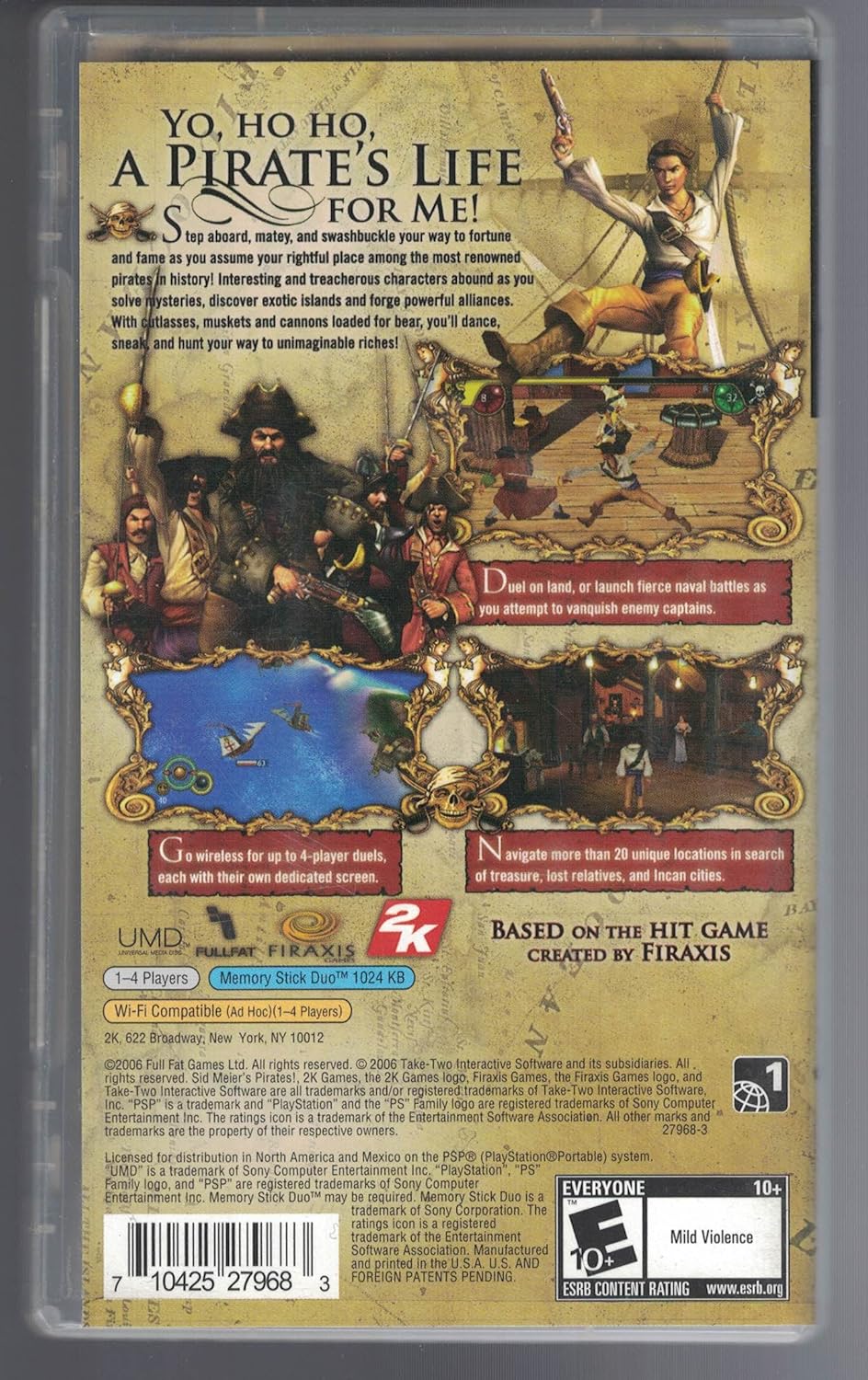
Welcome to Sid Meier's Pirates! on the Sony PlayStation Portable (PSP). This game allows you to embark on an epic adventure as a pirate captain in the 17th-century Caribbean. Your goal is to amass fortune and fame, navigate treacherous waters, engage in naval battles, and explore exotic islands. This manual provides essential information to help you get started and master the game.
As a pirate captain, you will encounter a variety of characters, solve mysteries, discover hidden treasures, and forge powerful alliances. The game offers diverse activities including dueling, land and sea battles, dancing, and stealth missions, ensuring a unique experience with each playthrough.
Setup
1. Inserting the UMD
- Ensure your PSP system is powered off.
- Locate the UMD (Universal Media Disc) slot on the back of your PSP.
- Open the UMD cover.
- Carefully insert the Sid Meier's Pirates UMD with the label facing away from the PSP, until it clicks into place.
- Close the UMD cover securely.
2. Starting the Game
- Power on your PSP system.
- Navigate to the Game menu on the PSP XMB (XrossMediaBar).
- Select the UMD icon for "Sid Meier's Pirates!" and press the X button to start the game.
3. Initial Game Settings
Upon first launch, you may be prompted to adjust settings such as screen brightness, sound volume, or create a save file. Follow the on-screen instructions to configure these options to your preference.
Operating
Gameplay Overview
Sid Meier's Pirates! offers a blend of adventure, strategy, and role-playing. You begin as a young adventurer seeking fortune and revenge, eventually becoming a renowned pirate captain. The game is open-ended, allowing you to choose your path:
- Naval Combat: Engage in fierce ship-to-ship battles, commanding your fleet against merchant vessels, rival pirates, or naval patrols.
- Sword Fighting: Duel enemy captains, guards, or rivals in land-based encounters.
- Exploration: Discover new ports, hidden coves, and ancient ruins across the Caribbean map.
- Trade: Buy and sell goods in various ports to accumulate wealth.
- Diplomacy: Interact with governors, secure privateer commissions, and manage relations with different European powers (English, Spanish, French, Dutch).
- Romance: Woo governors' daughters to gain valuable information or social standing.
Controls
The game utilizes the standard Sony PSP control scheme:
- Analog Stick: Movement (e.g., controlling your ship, character movement on land).
- Directional Buttons (D-Pad): Menu navigation, fine movement, or specific actions.
- X Button: Confirm selection, interact, attack (context-sensitive).
- O Button: Cancel, back.
- Square Button: Special action (context-sensitive).
- Triangle Button: Special action (context-sensitive).
- L Button: Camera control, menu tab switching.
- R Button: Camera control, menu tab switching.
- START Button: Pause menu, in-game options.
- SELECT Button: Map or other quick access features.
Specific control mappings for various gameplay modes (sailing, dueling, dancing) will be displayed on-screen during gameplay or can be found in the in-game help menu.
Key Features
- Multiplayer (Ad-Hoc): Up to 4 players can engage in wireless multiplayer battles using the PSP's Wi-Fi capabilities. Each player uses their own PSP system.
Description: This feature allows for local competitive play, expanding the game's replayability beyond the single-player campaign. Players can test their pirating skills against friends in various scenarios.
- New Treasure Hunts: Explore over 20 unique locations to find pirate treasure, locate lost relatives, and discover Incan cities.
Description: The game includes new treasure hunting mechanics, requiring players to navigate diverse environments and solve clues to uncover valuable rewards and advance personal storylines.
- Widescreen Display: Full utilization of the PSP's widescreen display for an immersive visual experience.
Description: The game is optimized to take advantage of the PSP's widescreen aspect ratio, providing a broader view of the Caribbean world, naval battles, and land-based interactions.
- Seamless Transitions: Minimal load times and breaks when switching between game modes such as sailing, ship-to-ship battles, and entering a port.
Description: Designed for fluid gameplay, the transitions between different core activities are streamlined, reducing interruptions and maintaining player immersion.
- 3D Tile-Based Environment Combat: Engage in land battles within a 3D tile-based environment, allowing for tactical movement and combat against guards in towns.
Description: When infiltrating towns or engaging in land-based skirmishes, players navigate a grid-based environment, using cover and strategic positioning to overcome opponents.
Maintenance
UMD Care
- Always handle the UMD by its edges to avoid touching the disc surface.
- Store the UMD in its protective case when not in use to prevent scratches and dust accumulation.
- If the disc surface becomes dirty, gently wipe it with a soft, lint-free cloth from the center outwards. Do not use abrasive cleaners or solvents.
- Avoid exposing the UMD to extreme temperatures, direct sunlight, or high humidity.
PSP System Care
- Keep your PSP system clean by wiping it with a soft, dry cloth.
- Protect the screen from scratches using a screen protector or by storing the PSP in a protective pouch.
- Ensure the PSP's firmware is up to date for optimal performance and compatibility.
Troubleshooting
- Game Not Loading or Freezing:
1. Ensure the UMD is correctly inserted and the UMD cover is closed.
2. Check the UMD for visible scratches or dirt. Clean if necessary.
3. Restart your PSP system.
4. If the issue persists, try another UMD to determine if the problem is with the game disc or the PSP system.
- Save Data Issues:
1. Ensure your Memory Stick Duo™ is properly inserted and has sufficient free space.
2. Do not remove the Memory Stick Duo™ or power off the PSP during save operations.
- Audio/Video Problems:
1. Check your PSP's volume settings and ensure headphones are properly connected if in use.
2. Adjust screen brightness in the PSP system settings.
Specifications
| Product Title | Sid Meier's Pirates! |
| Platform | Sony PSP (PlayStation Portable) |
| Brand | 2K |
| Model Number | 27968 |
| UPC | 0710425279683 |
| ESRB Rating | Everyone 10+ (Mild Violence) |
| Release Date | June 28, 2010 |
| Product Dimensions | 7 x 4.25 x 0.75 inches (packaging) |
| Item Weight | 0.8 ounces (packaging) |
Warranty Information
Warranty coverage for Sid Meier's Pirates! for Sony PSP is typically provided by the original retailer or the game publisher (2K) at the time of purchase. Please refer to your purchase receipt or the game packaging for specific warranty terms and conditions. General warranty policies usually cover defects in manufacturing for a limited period.
For detailed warranty inquiries, it is recommended to contact the point of purchase or the publisher directly.
Support
For technical support, gameplay assistance, or other inquiries regarding Sid Meier's Pirates! on PSP, please refer to the following resources:
- 2K Support Website: Visit the official 2K support website for FAQs, troubleshooting guides, and contact options. You can often find this by searching for "2K Games Support" online.
- PSP System Manual: For issues related to the PSP hardware or system software, consult your Sony PlayStation Portable owner's manual or the official PlayStation support website.
- Online Communities: Many online forums and communities dedicated to classic PSP games or Sid Meier's Pirates! can offer peer-to-peer assistance and tips.
For more information about 2K products, visit the 2K Store on Amazon.
Product Images