
1. Introduction
Thank you for choosing the Ebac 6200 Dehumidifier. This appliance is designed to effectively remove excess moisture from your home, reducing condensation, dampness, and mold growth. It features advanced Smart Control technology for efficient operation and includes an air purification mode for improved indoor air quality. Please read this manual thoroughly before operating the unit to ensure safe and optimal performance.
2. Safety Instructions
Always follow basic safety precautions when using electrical appliances to reduce the risk of fire, electric shock, or injury.
- Ensure the dehumidifier is placed on a stable, level surface.
- Do not block the air inlet or outlet vents. Maintain at least 20 cm (8 inches) clearance around the unit.
- Do not operate the unit with a damaged power cord or plug. If the cord is damaged, it must be replaced by the manufacturer or a qualified service agent.
- Do not immerse the unit, power cord, or plug in water or other liquids.
- Unplug the dehumidifier before cleaning, performing maintenance, or when not in use.
- This appliance is not intended for use by persons (including children) with reduced physical, sensory, or mental capabilities, or lack of experience and knowledge, unless they have been given supervision or instruction concerning use of the appliance by a person responsible for their safety.
- Do not use the appliance in areas where flammable liquids or gases are stored.
- Empty the water tank regularly to prevent overflow.
3. Product Overview
The Ebac 6200 Dehumidifier is a robust unit designed for effective moisture removal and air purification.

Figure 1: Front view of the Ebac 6200 Dehumidifier. This image shows the sleek silver/steel design of the unit.

Figure 2: Side view of the Ebac 6200 Dehumidifier, highlighting its compact profile.
3.1 Control Panel
The control panel features intuitive buttons and LED indicators for easy operation.

Figure 3: Close-up of the control panel, showing the fan speed, Smart Control, and Mode buttons.
3.2 Water Tank
The unit is equipped with a removable 4-liter water tank. An automatic shut-off feature activates when the tank is full.

Figure 4: A hand opening the front panel to reveal the water tank compartment.

Figure 5: A hand carefully removing the water collection tank from the unit.

Figure 6: The dehumidifier shown with its water tank detached and placed beside it.
4. Setup
Follow these steps to set up your Ebac 6200 Dehumidifier for first use:
- Unpack the Unit: Carefully remove the dehumidifier and all packaging materials from the box. Retain packaging for future storage or transport.
- Choose a Location: Place the dehumidifier in a central location within the area requiring dehumidification. Ensure there is at least 20 cm (8 inches) of clear space around all sides of the unit for proper airflow. Avoid placing it directly against walls or furniture.
- Level Surface: Ensure the unit is placed on a firm, level surface to prevent vibrations and ensure efficient water collection.
- Power Connection: Plug the power cord into a grounded electrical outlet. The unit is now ready for operation.
5. Operating Instructions
The Ebac 6200 features Smart Control technology for automated and energy-efficient operation.
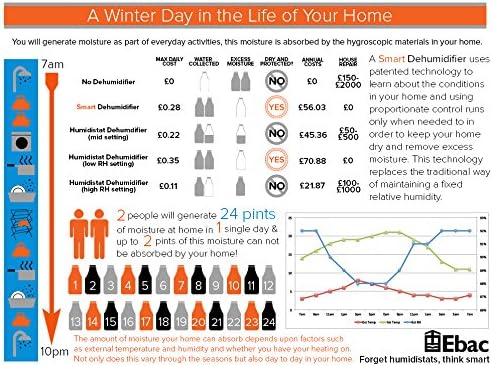
Figure 7: Infographic illustrating the benefits of Smart Control technology in managing home humidity and energy costs.
- Power On/Off: Press the Power button on the control panel to turn the unit on or off.
- Smart Control Mode: The patented Ebac Smart Control™ system automatically detects when humidity levels rise and activates the dehumidifier to remove moisture. This intelligent operation helps optimize energy consumption.
- Fan Speed Settings: The unit offers 2 fan speed settings. Press the Fan Speed button to cycle between low and high speeds. Higher fan speed results in faster dehumidification.
- Air Purification Mode: Activate the air purification mode to clean the air of dust, pollen, and smoke, creating a fresher indoor environment. Refer to the control panel for the specific button.
- Boost Setting (Laundry Drying): For faster drying of laundry indoors, select the special boost setting. This mode increases the dehumidification rate to quickly remove moisture from clothes.
- Water Tank Full Indicator & Auto-Stop: When the 4-liter water tank is full, an indicator light on the LED control panel will illuminate, and the unit will automatically shut off to prevent overflow.
- Emptying the Water Tank: Carefully remove the water tank as shown in Figures 4 and 5. Dispose of the collected water. Reinsert the empty tank firmly until it clicks into place. The unit will resume operation.
- Continuous Drainage (Optional): For continuous operation without needing to empty the tank, connect a suitable hose (not included) to the continuous drainage outlet (refer to the diagram in the full manual for location). Ensure the hose is sloped downwards to a drain.
6. Maintenance
Regular maintenance ensures the longevity and efficiency of your dehumidifier.
- Filter Cleaning/Replacement: The unit includes a removable and replaceable filter. Check the filter every 2-4 weeks, or more frequently if the unit is used in a dusty environment. Clean the filter by gently vacuuming or washing it with warm, soapy water. Ensure it is completely dry before reinserting. Replace the filter annually or as needed.
- Exterior Cleaning: Wipe the exterior of the dehumidifier with a soft, damp cloth. Do not use abrasive cleaners or solvents.
- Storage: If storing the unit for an extended period, ensure the water tank is empty and clean, and the filter is clean and dry. Store the unit upright in a cool, dry place.
7. Troubleshooting
Before contacting customer support, please refer to the following table for common issues and solutions:
| Problem | Possible Cause | Solution |
|---|---|---|
| Dehumidifier does not turn on. | No power supply. Power button not pressed. | Check if the unit is plugged in correctly. Ensure the power outlet is functional. Press the Power button firmly. |
| No water collected. | Humidity level is too low. Air filter is clogged. Room temperature is too low. | The unit will only operate when humidity is high. Clean or replace the air filter. Dehumidifiers are less effective below 5°C (41°F). |
| Unit stops operating, full tank indicator is on. | Water tank is full. | Empty the water tank and reinsert it correctly. |
| Unit is noisy. | Unit is not on a level surface. Air filter is clogged. | Place the unit on a flat, stable surface. Clean or replace the air filter. |
8. Specifications
| Feature | Detail |
|---|---|
| Model Number | DF655SS-GB |
| Dimensions (L x W x H) | 25 x 44 x 60 cm |
| Weight | 14 Kilograms |
| Extraction Capacity | 25 Liters per day |
| Water Tank Capacity | 4 Liters |
| Operating Mode | Intelligent (Smart Control) |
| Special Feature | Automatic Shut-off |
| Material | Alloy Steel |
| Color | Silver/Steel |
| Included Components | Removable Filter |
| Upper Rated Temperature | 30 Degrees Celsius |
9. Warranty and Support
The Ebac 6200 Dehumidifier comes with a 2-year warranty from the date of purchase, covering manufacturing defects. Please retain your proof of purchase for warranty claims.
For technical support, troubleshooting beyond this manual, or warranty inquiries, please contact Ebac customer service. Contact details can typically be found on the manufacturer's website or on the product packaging.


