Introduction
This manual provides essential information for the safe and efficient operation, maintenance, and troubleshooting of your De'Longhi DE 350 E dehumidifier. Please read these instructions carefully before using the appliance and keep them for future reference.
Important Safety Information
Always follow basic safety precautions when using electrical appliances to reduce the risk of fire, electric shock, and injury to persons.
- Ensure the voltage specified on the rating label matches your mains voltage.
- Do not operate the appliance with a damaged cord or plug.
- Keep the appliance away from heat sources and direct sunlight.
- Do not immerse the appliance, cord, or plug in water or other liquids.
- Always unplug the appliance before cleaning or performing maintenance.
- This appliance is for indoor use only.
- Keep children and pets away from the appliance during operation.
Product Overview
Familiarize yourself with the components of your De'Longhi DE 350 E dehumidifier.
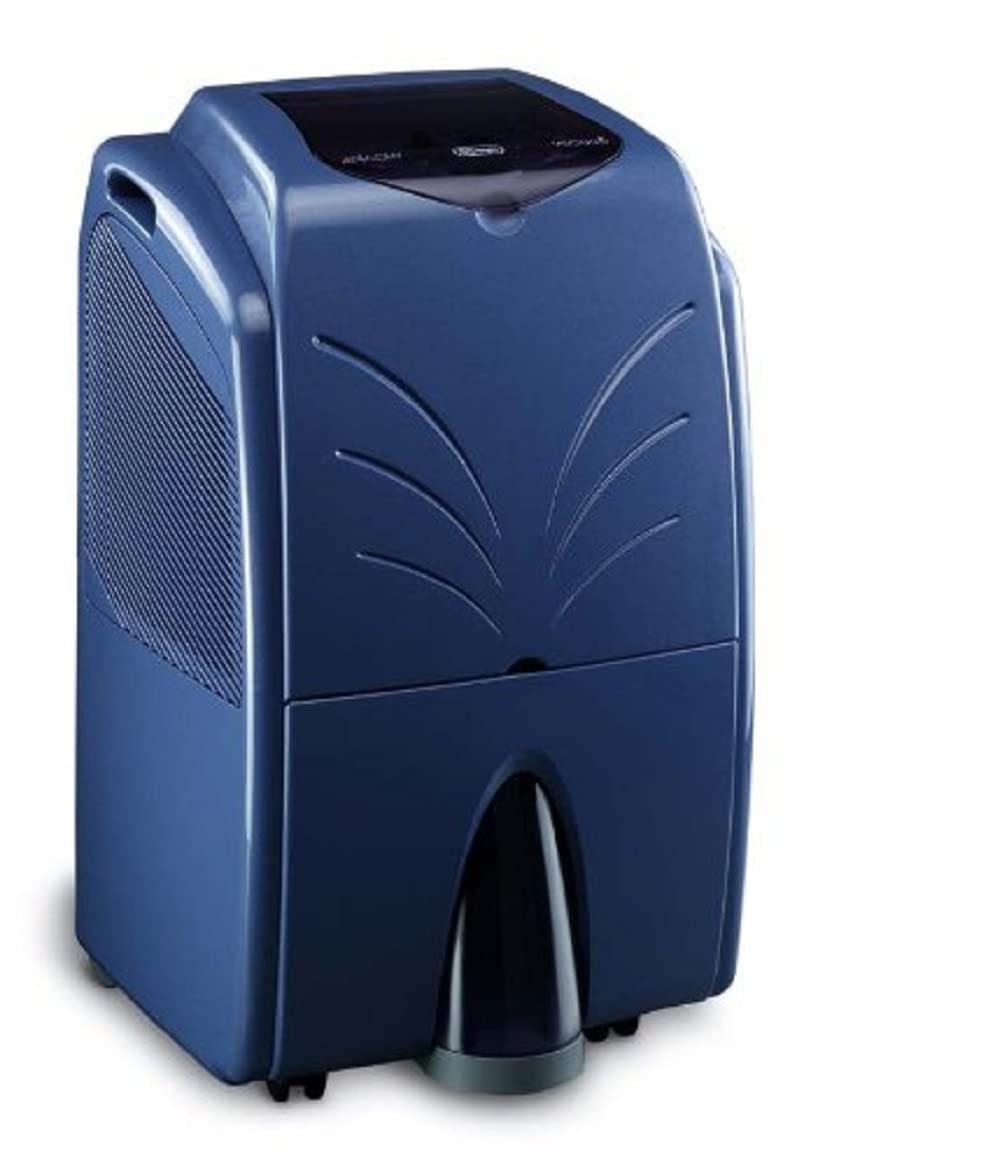
Image: Front view of the De'Longhi DE 350 E dehumidifier, showing its compact design and air outlet grille.
- Control Panel: Located on the top, for setting functions.
- Air Inlet: Where air is drawn into the unit.
- Air Outlet: Where dehumidified air is expelled.
- Water Tank: Collects condensed water.
- Continuous Drainage Outlet: For connecting a hose for continuous drainage.
- Castors: For easy movement of the unit.
Setup
1. Unpacking
Carefully remove the dehumidifier from its packaging. Retain the packaging for future storage or transport. Check for any damage during transit. If the unit appears damaged, do not operate it and contact customer support.
2. Placement
Place the dehumidifier on a stable, level surface. Ensure there is at least 20 cm (8 inches) of clear space around the unit to allow for proper airflow. Do not block the air inlet or outlet. For optimal performance, place the unit in the center of the room that requires dehumidification.
3. Power Connection
Plug the power cord into a grounded electrical outlet. Ensure the outlet voltage matches the specifications of the dehumidifier (230 V, 50 Hz).
4. Continuous Drainage (Optional)
For continuous operation without needing to empty the water tank, connect a drainage hose (not supplied) to the continuous drainage outlet. Ensure the hose is sloped downwards to allow water to drain by gravity into a suitable receptacle or drain.
Operating Instructions
The De'Longhi DE 350 E features a user-friendly control panel for managing its functions.

Image: Close-up of the De'Longhi DE 350 E control panel, showing digital display, power button, mode selection, humidity settings, and fan speed controls.
1. Power On/Off
Press the Power button (usually marked with a circle and a vertical line) to turn the unit on or off. The digital display will illuminate when the unit is on.
2. Setting Dehumidification Level
Use the Humidity Up/Down buttons (usually marked with '+' and '-' symbols) to set the desired relative humidity level. The unit will operate until the set humidity is reached, then cycle on and off to maintain it. Recommended humidity levels are between 40% and 60%.
3. Mode Selection (3-in-1 Function)
Press the MODE button to cycle through the available operating modes:
- Dehumidification: The unit removes moisture from the air.
- Heating: The unit provides a 2-speed heating function. This function is intended to assist in drying and slightly warm the air, not to serve as a primary heat source.
- Combined: The unit performs both dehumidification and heating simultaneously.
4. Fan Speed
Press the Fan Speed button to select between two fan speeds (Low/High). A higher fan speed will result in faster dehumidification and heating, but also increased noise.
5. 24-Hour Timer
The 24-hour timer allows you to program the unit to turn on or off automatically after a set period. Consult the control panel diagram for specific timer button locations and instructions.
6. Emptying the Water Tank
When the water tank is full, the unit will automatically stop operating, and an indicator light will illuminate. Carefully remove the water tank from the unit, empty the collected water, and reinsert the tank securely. The unit will resume operation once the tank is properly reinstalled.
Maintenance
Regular maintenance ensures optimal performance and extends the lifespan of your dehumidifier.
1. Cleaning the Air Filter
The air filter should be cleaned every two weeks or more frequently depending on usage and air quality. A dirty filter reduces efficiency and can cause the unit to malfunction.
- Turn off the unit and unplug it from the power outlet.
- Locate and remove the air filter (refer to your unit's specific design for filter access).
- Clean the filter using a vacuum cleaner or wash it with lukewarm water and a mild detergent.
- Rinse thoroughly and allow the filter to air dry completely before reinstalling.
- Reinsert the dry filter into the unit.
2. Cleaning the Water Tank
Clean the water tank regularly to prevent mold and mildew growth.
- Remove the water tank and empty any remaining water.
- Wash the tank with warm water and a mild detergent.
- Rinse thoroughly and dry before placing it back into the unit.
3. External Cleaning
Wipe the exterior of the dehumidifier with a soft, damp cloth. Do not use abrasive cleaners, waxes, or solvents, as these can damage the surface.
4. Storage
If storing the unit for an extended period, ensure it is clean and dry. Empty the water tank and clean the filter. Coil the power cord neatly. Store the unit upright in a cool, dry place, preferably in its original packaging.
Troubleshooting
| Problem | Possible Cause | Solution |
|---|---|---|
| Unit does not turn on. | No power supply; Power cord not plugged in; Water tank full or not properly inserted. | Check power connection; Ensure water tank is empty and correctly positioned. |
| No water collected. | Humidity level set too high; Room temperature too low; Air filter clogged. | Lower the desired humidity setting; Ensure room temperature is above 5°C (41°F); Clean the air filter. |
| Unit is noisy. | Unit not on a level surface; Air filter clogged; Internal components vibrating. | Place on a level surface; Clean the air filter; Contact customer support if noise persists. |
| Airflow is weak. | Air filter clogged; Air inlet/outlet blocked. | Clean the air filter; Ensure no obstructions around the unit. |
If you encounter issues not listed here or if problems persist, please contact De'Longhi customer support.
Specifications
| Feature | Detail |
|---|---|
| Model | DE 350 E |
| Brand | De'Longhi |
| Power Input | 350 W |
| Voltage / Frequency | 230 V / 50 Hz |
| Dehumidification Capacity | Up to 30 liters/day |
| Water Tank Capacity | 5.5 Liters |
| Recommended Room Size | Up to 150 m³ |
| Noise Level | 44 dB(A) |
| Dimensions (L x W x H) | 610 x 365 x 380 mm (61 x 36.5 x 38 cm) |
| Weight | 21.5 kg |
| Functions | Dehumidification, 2-speed heating, Combined (Dehumidification + Heating), 24-hour timer |
Warranty and Support
De'Longhi products are manufactured to the highest quality standards. For warranty information, please refer to the warranty card included with your purchase or visit the official De'Longhi website. For technical assistance, spare parts, or repairs, please contact De'Longhi customer support.
De'Longhi Customer Support:
- Website: www.delonghi.com
- Refer to your regional De'Longhi website for local contact information.


