
Introduction
This manual provides instructions for the proper use and maintenance of your Performance Tool W80151 Stainless Steel Dial Caliper. This precision instrument is designed for accurate measurement of outside, inside, step, and depth dimensions. Please read these instructions carefully before operating the caliper to ensure safe and effective use.
Product Overview
The Performance Tool W80151 is a durable stainless steel dial caliper with a 0-6 inch (0-150mm) measurement range. It features 0.001-inch (0.02mm) graduations and a 0.001-inch (2mm) range per revolution on the dial. Key components include:
- Outside Jaws: Used for measuring external dimensions.
- Inside Jaws: Used for measuring internal dimensions.
- Depth Rod: Extends from the end of the beam for depth measurements.
- Step Measuring Faces: Located at the end of the beam for step measurements.
- Main Scale (Beam): Provides the main inch/millimeter readings.
- Dial Indicator: Provides fine measurements, typically in thousandths of an inch.
- Thumb Roller: Allows for fine adjustment of the sliding jaw.
- Locking Screw: Secures the sliding jaw in position after a measurement.
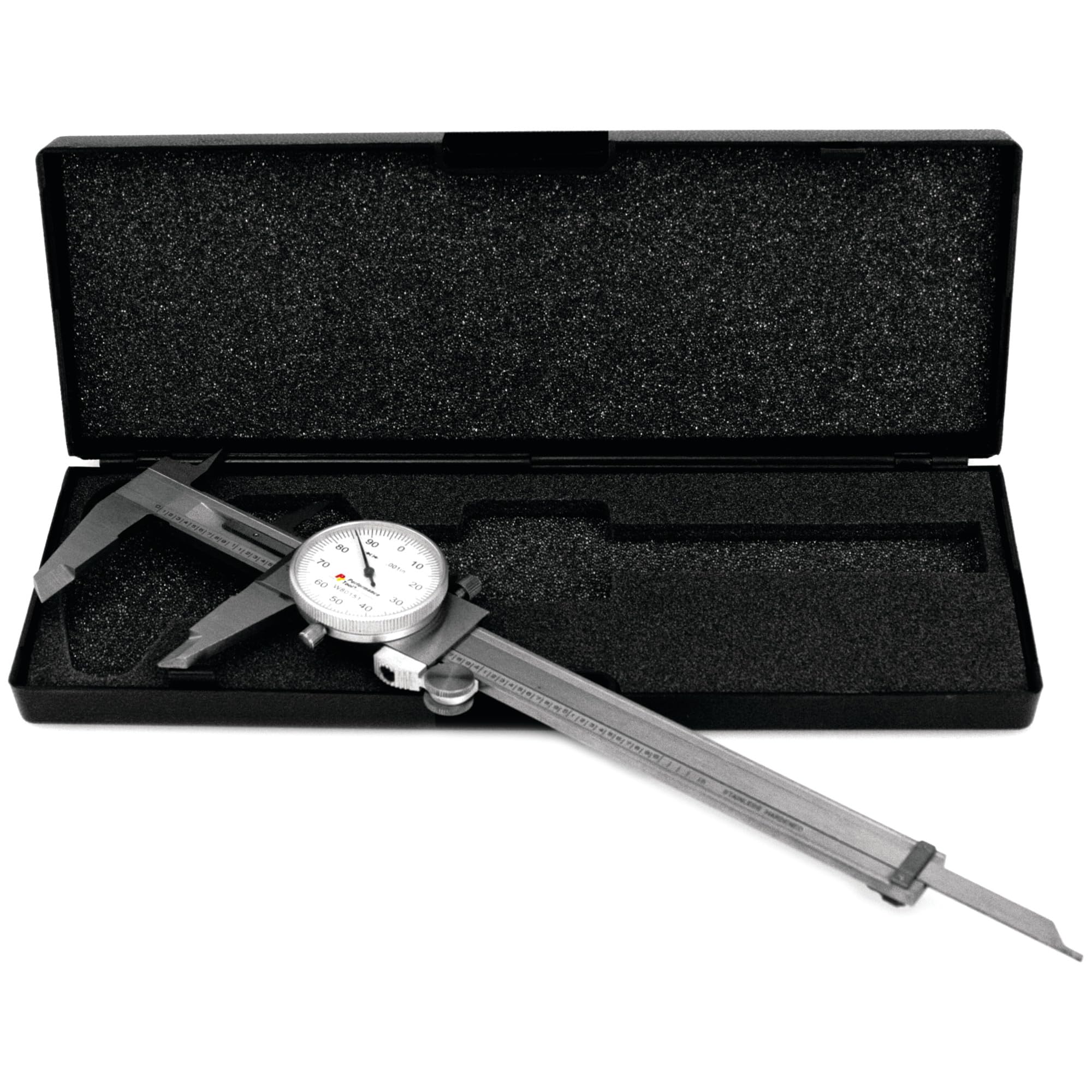
Image: The Performance Tool W80151 Stainless Steel Dial Caliper, showing its main components including jaws, dial, and beam.
Setup
- Unpacking: Carefully remove the caliper from its packaging. Inspect for any signs of damage.
- Cleaning: Before first use, wipe all measuring surfaces with a clean, lint-free cloth. Ensure no dust or debris is present on the jaws or beam, as this can affect accuracy.
- Zeroing the Caliper: Gently close the outside jaws completely. The dial indicator needle should point directly to '0'. If it does not, loosen the small screw on the dial face and rotate the dial until the '0' aligns with the needle. Retighten the screw. This ensures accurate measurements.

Image: The Performance Tool W80151 Dial Caliper in its original retail packaging, highlighting its model number and key features.
Operating Instructions
Follow these steps for accurate measurements:
Measuring Outside Dimensions
- Open the outside jaws wider than the object to be measured.
- Place the object between the outside jaws.
- Gently close the jaws using the thumb roller until they make firm contact with the object. Avoid excessive force.
- Read the measurement on the main scale and the dial indicator.
- For consistent readings, you may use the locking screw to hold the measurement before removing the caliper from the object.
Measuring Inside Dimensions
- Insert the inside jaws into the opening to be measured.
- Open the jaws using the thumb roller until they make firm contact with the inner surfaces.
- Read the measurement on the main scale and the dial indicator.
Measuring Depth
- Place the end of the main beam across the top surface of the hole or step.
- Extend the depth rod into the hole or down the step until it touches the bottom surface.
- Read the measurement on the main scale and the dial indicator.
Measuring Step
- Place the step measuring face of the fixed jaw on the higher surface.
- Slide the moving jaw until its step measuring face rests on the lower surface.
- Read the measurement on the main scale and the dial indicator.
Reading the Measurement
The main scale provides the whole inch and tenth-of-an-inch readings. The dial indicator provides the hundredths and thousandths of an inch. For example, if the main scale reads 1.2 inches and the dial reads 50, the total measurement is 1.250 inches.
Maintenance
Proper maintenance ensures the longevity and accuracy of your dial caliper.
- Cleaning: After each use, wipe the entire caliper with a clean, dry, lint-free cloth. Remove any oil, grease, or debris.
- Lubrication: Periodically apply a thin film of light machine oil to the sliding surfaces of the beam to ensure smooth operation and prevent rust. Wipe off any excess oil.
- Storage: Always store the caliper in its protective case when not in use. This protects it from dust, moisture, and physical damage. Ensure the jaws are slightly open (not fully closed) to prevent stress on the measuring surfaces.
- Avoid Dropping: Dropping the caliper can severely damage its precision components and affect its accuracy.

Image: The Performance Tool W80151 Dial Caliper stored in its protective hard case, demonstrating proper storage for maintaining accuracy and preventing damage.
Troubleshooting
If you encounter issues with your dial caliper, consider the following:
- Inaccurate Readings:
- Ensure the caliper is properly zeroed before use.
- Check that the measuring surfaces are clean and free of debris.
- Verify that the locking screw is not overtightened, which can distort readings.
- Stiff or Rough Sliding Action:
- Clean the beam and sliding surfaces thoroughly.
- Apply a small amount of light machine oil to the sliding surfaces.
- Check for any physical obstructions or damage to the beam or thumb roller.
- Rust Spots:
- While made of stainless steel, prolonged exposure to moisture or corrosive substances can cause minor surface rust. Clean immediately with a fine abrasive pad (e.g., Scotch-Brite) and apply a rust preventative oil.
- Ensure proper storage in a dry environment.
Specifications
| Feature | Specification |
|---|---|
| Model Number | W80151 |
| Brand | Performance Tool |
| Material | Stainless Steel |
| Measurement Range | 0-6 inches (0-150mm) |
| Graduations | 0.001 inches (0.02mm) |
| Range per Revolution | 0.001 inches (2mm) |
| Measurement Accuracy | +/-0.001 inches |
| Item Weight | 12 ounces |
| UPC | 767654748268, 039564801518 |
Warranty and Support
This Performance Tool W80151 Dial Caliper comes with a 1-Year Limited Warranty. For warranty claims or technical support, please refer to the contact information provided with your purchase or visit the official Performance Tool website.
You can find more information and other products from Performance Tool by visiting their official store: Performance Tool Store


