
Introduction
The Nikon Speedlight SB-400 is an intelligent and versatile external flash unit designed for Nikon Digital SLR cameras. It offers i-TTL flash operation in a compact and lightweight body, making it suitable for both beginners and experienced photographers. Key features include a powerful guide number, effortless bounce flash function, and compatibility with the Nikon Creative Lighting System.
Safety Information
To ensure safe operation and prevent damage, please observe the following precautions:
- Do not attempt to disassemble or modify the flash unit. Refer all servicing to qualified personnel.
- Keep the flash unit dry. Do not expose it to water or high humidity.
- Avoid direct eye contact with the flash light, especially at close range, as it can cause temporary vision impairment.
- Use only recommended batteries (AA-size, 1.5V). Ensure correct polarity when inserting batteries.
- Remove batteries if the flash unit will not be used for an extended period to prevent leakage.
- Do not operate the flash unit in the presence of flammable gases or liquids.
Parts Identification
Familiarize yourself with the components of your SB-400 Speedlight.

Figure 1: Front view of the Nikon SB-400 Speedlight, showing the flash head and the main body with the Nikon SB-400 branding.

Figure 2: Rear view of the Nikon SB-400 Speedlight, displaying the READY lamp, OFF/ON switch, and the LOCK mechanism for securing the flash to the camera hot shoe.
Setup
Battery Installation
The SB-400 operates on two AA-size (1.5V) batteries.
- Open the battery chamber cover located on the side of the flash unit.
- Insert two AA-size batteries, ensuring correct polarity (+/-) as indicated inside the compartment.
- Close the battery chamber cover securely until it clicks into place.
Attaching to the Camera
Attach the SB-400 to your Nikon Digital SLR camera's hot shoe.
- Ensure the flash unit is turned OFF.
- Slide the mounting foot of the SB-400 into the camera's hot shoe until it stops.
- Push the LOCK lever on the rear of the flash unit to the "LOCK" position to secure it.
- To remove, push the LOCK lever to the "UNLOCK" position and slide the flash unit out.
Operating the Flash
Power On/Off
Slide the OFF/ON switch on the rear of the flash unit to the "ON" position to power on. The READY lamp will illuminate when the flash is charged and ready to fire. Slide the switch to "OFF" to power down.
i-TTL Operation
The SB-400 is designed for i-TTL flash operation with compatible Nikon cameras. When attached, the camera automatically controls the flash output for optimal exposure. No manual adjustments are typically needed on the flash unit itself for i-TTL mode.
Bounce Flash Function
The flash head can be tilted upwards to bounce light off a ceiling or wall, creating softer, more natural-looking illumination and reducing harsh shadows. This is particularly useful indoors.
- The flash head can be tilted in 4 steps: horizontal (0 degrees), 60 degrees, 75 degrees, and 90 degrees.
- Gently push the flash head upwards until it clicks into the desired angle.
- Ensure the flash head is securely locked at the chosen angle before shooting.
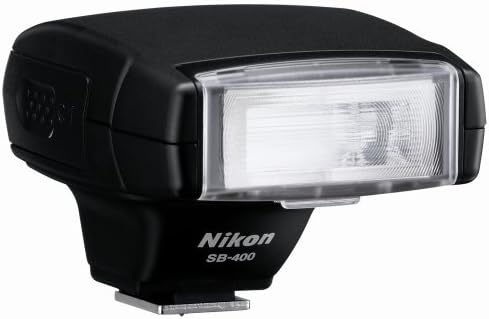
Figure 3: Angled view of the Nikon SB-400 Speedlight, demonstrating its ability to tilt the flash head upwards for bounce flash photography.
Camera Settings for Flash Modes
Various flash modes such as Slow Sync, Red-eye Reduction, and Rear-curtain Sync are controlled directly from your camera body's menu settings. Refer to your camera's instruction manual for details on how to enable these modes.
Maintenance
Proper care will ensure the longevity of your SB-400 Speedlight.
- Cleaning: Use a soft, dry cloth to clean the flash unit. For stubborn dirt, lightly dampen the cloth with water or a mild lens cleaning solution. Do not use organic solvents like paint thinner or benzene.
- Storage: When not in use, store the flash unit in a cool, dry place, away from direct sunlight and high humidity. Remove batteries if storing for extended periods.
- Handling: Avoid dropping or subjecting the flash unit to strong impacts.
Troubleshooting
If you encounter issues with your SB-400, refer to the table below for common problems and solutions.
| Problem | Possible Cause | Solution |
|---|---|---|
| Flash does not fire. | Batteries are dead or incorrectly inserted. Flash is not turned ON. Flash not securely attached to camera. | Replace batteries, ensuring correct polarity. Turn the flash ON. Re-attach flash securely and ensure LOCK lever is engaged. |
| READY lamp does not light up. | Batteries are low or dead. Flash is not turned ON. | Replace batteries. Turn the flash ON. |
| Flash output is too weak/strong. | Incorrect camera settings (ISO, aperture). Subject is too far/close. | Ensure camera is in an appropriate mode (e.g., P, A, S, M). Check camera's ISO setting. Ensure subject is within flash shooting distance range (60cm to 20m). |
| Flash head does not tilt. | Obstruction or improper handling. | Ensure no obstructions. Gently push the flash head, it should click into position. Do not force. |
Specifications
| Product Dimensions | 1 x 1 x 1 inches |
| Item Weight | 1 pounds |
| Model Number | SB-400 |
| Batteries | 2 AA batteries required |
| Manufacturer | Nikon |
| Compatible Mountings | Nikon |
| Camera Flash Type | Hotshoe |
| Flash Sync Speed | 1/200 to 1/320 seconds |
| Included Components | Soft Case SS-400 |
| Guide Number | Approx. 98.4 feet (30m) at ISO 200 (at 18mm zoom head setting) |
| Recycling Time | Approx. 2.5 seconds |
| Flash Shooting Distance Range | 60cm to 20m (depending on camera's ISO setting) |
Warranty and Support
The Nikon SB-400 AF Speedlight Flash comes with a 1-Year Nikon USA Warranty.
For technical support, service, or further information, please visit the official Nikon support website or contact Nikon customer service. You can find more details on the Nikon Brand Store on Amazon or the official Nikon website.


