
Linear ACT-34B
Linear ACT-34B 4-Channel Keychain Transmitter Instruction Manual
Model: ACT-34B
1. Product Overview
The Linear ACT-34B is a compact, four-channel keychain transmitter designed for access control systems. It features a quick-disconnect key ring for convenience and a unique 10-second time-out feature. Each transmitter is factory preprogrammed with one of over 1,000,000 unique codes, significantly reducing the possibility of code duplication. The receiver learns each specific code, preventing unauthorized access through reprogramming.
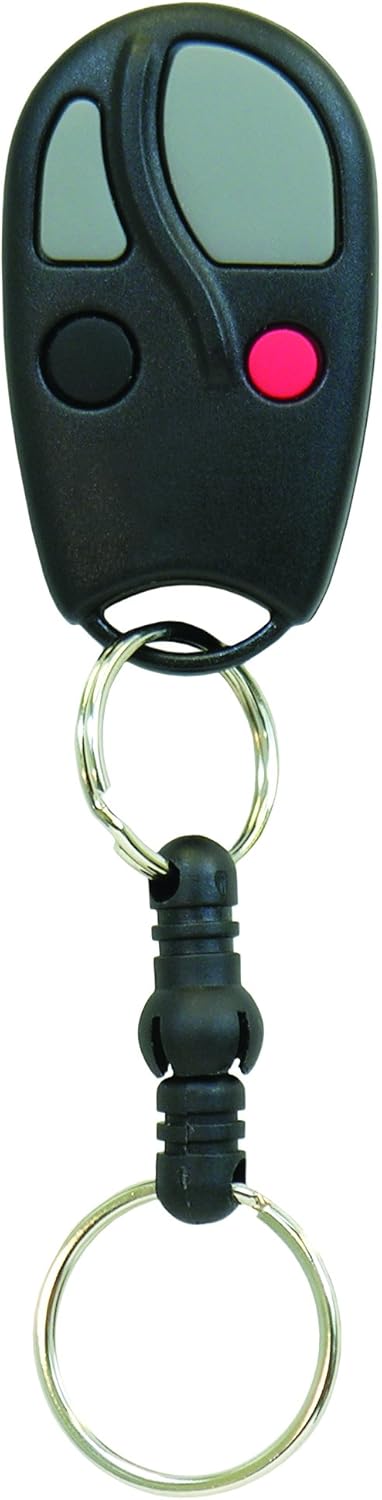
This image displays the Linear ACT-34B 4-Channel Keychain Transmitter. It is a black, oval-shaped device with four buttons: two grey oval buttons, one black circular button, and one red circular button. A quick-disconnect key ring is attached to the bottom of the transmitter.
2. Key Features
- Compatible with all Linear access receivers and controllers.
- Equipped with a quick-disconnect key ring for easy attachment and removal.
- Utilizes the factory-programmed MegaCode format, supporting over 1 million unique codes.
- Includes two 2016-type lithium batteries for immediate use.
- Operates at a frequency of 318MHz.
3. Setup and Programming
The ACT-34B transmitter is designed for simple programming with compatible Linear access receivers and controllers. Follow these steps to program your transmitter:
- Locate the Learn Button: On your Linear garage door opener or access receiver, locate the 'Learn' button. The exact location may vary by model, so consult your receiver's manual if needed.
- Activate Learn Mode: Press and release the 'Learn' button on your receiver. Do not hold it down for an extended period (e.g., 15 seconds), as this may clear existing codes. A brief press (a couple of seconds) is usually sufficient to activate the learn mode without erasing other remotes. The indicator light on the receiver will typically illuminate or flash to confirm it is in learn mode.
- Program the Transmitter: While the receiver is in learn mode, press and hold the desired button on your ACT-34B keychain transmitter. Hold the button until the receiver's indicator light changes (e.g., turns off, flashes differently, or makes a click sound) to confirm that the code has been learned.
- Test Operation: Release the button on the transmitter. Wait a few seconds, then press the programmed button again to test if the transmitter now operates your garage door or access system.
Important Note: If you hold the 'Learn' button on your receiver for too long (e.g., 15 seconds), it might clear all previously programmed remotes. If this happens, you will need to reprogram all your transmitters.
4. Operation
Once programmed, operating the Linear ACT-34B transmitter is straightforward:
- Activate Device: Press the programmed button on the transmitter to send a signal to your Linear access receiver.
- Multiple Channels: The ACT-34B is a 4-channel transmitter, meaning you can program up to four different functions or devices (e.g., multiple garage doors, gates, or access points) to its individual buttons.
- Range: Ensure you are within effective operating range of your receiver for reliable performance.
5. Maintenance
Battery Replacement
The ACT-34B transmitter uses two 2016-type lithium batteries. When the transmitter's range decreases or it stops functioning, it is likely time to replace the batteries.
- Open the Casing: Carefully open the transmitter casing. This usually involves prying it open along the seam with a small flat-head screwdriver or similar tool.
- Remove Old Batteries: Note the orientation of the existing batteries (+/-). Remove the old 2016 lithium batteries.
- Insert New Batteries: Insert two new 2016-type lithium batteries, ensuring they are placed with the correct polarity.
- Close Casing: Snap the transmitter casing back together securely.
- Test: Test the transmitter to ensure it is functioning correctly after battery replacement.
6. Troubleshooting
- Transmitter Not Working After Programming:
- Ensure the batteries are fresh and correctly installed.
- Verify that you pressed the 'Learn' button on the receiver for only a short duration (a couple of seconds) and not too long, which could clear all codes. If codes were cleared, reprogram all your remotes.
- Confirm that the transmitter button was held down until the receiver indicated successful learning.
- Reduced Operating Range:
- Replace the batteries in the transmitter.
- Check for any obstructions or sources of interference between the transmitter and the receiver.
- Multiple Remotes Not Working:
- If you attempted to program a new remote and now older remotes are not working, it is likely that the receiver's memory was cleared. You will need to reprogram all your remotes.
7. Specifications
| Feature | Specification |
|---|---|
| Model Number | ACT-34B |
| Product Dimensions | 4 x 2.25 x 0.5 inches |
| Item Weight | 0.634 ounces |
| Operating Frequency | 318MHz |
| Batteries | Two 2016-type lithium batteries (included) |
| Code Format | MegaCode (over 1 million codes) |
| Channels | 4 |
8. Warranty and Support
For specific warranty information, please refer to the documentation included with your purchase or visit the official Linear website. For technical support or further assistance, contact Linear customer service.
Related documentsACT-34B


Ask a question about this manual
Ask about setup, troubleshooting, compatibility, parts, safety, or missing instructions. Manuals+ will review the question and use this page’s manual context to help answer it.