Introduction
This manual provides essential information for the proper use and care of your Million Dollar Baby Blu-ray disc. Please read these instructions carefully to ensure optimal viewing experience and disc longevity.

Image: Front cover of the Million Dollar Baby Blu-ray disc case. The cover prominently displays the film's title, the names of the main actors (Clint Eastwood, Hilary Swank, Morgan Freeman), and highlights its achievement of 4 Academy Awards, including Best Picture, Best Director, Best Actress, and Best Supporting Actor.
Setup
To enjoy your Million Dollar Baby Blu-ray disc, follow these steps for proper setup:
- Disc Inspection: Before inserting, visually inspect the disc for any smudges, dust, or scratches. Clean if necessary using a soft, lint-free cloth, wiping from the center outwards.
- Player Compatibility: Ensure you have a Blu-ray disc player. This disc is not compatible with standard DVD players.
- Insert Disc: Gently insert the Blu-ray disc into your Blu-ray player's disc tray or slot, label side facing up.
- Connect Player to TV: Connect your Blu-ray player to your television using an HDMI cable for the best audio and video quality.
- Power On: Turn on your television and Blu-ray player. Select the correct HDMI input source on your TV.
Operating
Once the disc is loaded, you can navigate the menu and control playback:
- Main Menu: The disc will typically load to a main menu. Use your player's remote control to navigate options such as 'Play Movie', 'Scene Selection', 'Audio Settings', and 'Subtitles'.
- Playback Controls: During playback, use standard remote functions:
- Play/Pause: To start or temporarily stop the movie.
- Stop: To end playback and return to the main menu or disc start.
- Fast Forward/Rewind: To quickly scan through the movie.
- Skip: To jump to the next or previous chapter.
- Audio and Subtitle Selection: Access these options from the main menu or via your remote's dedicated 'Audio' or 'Subtitle' buttons during playback. Available languages include English (Dolby Digital 5.1) and French (Dolby Digital 5.1) for audio, and English, French, and Spanish for subtitles.
- Special Features: This Blu-ray disc includes special features. Navigate to the 'Special Features' section from the main menu to access content such as:
- James Lipton on Three: Roundtable with Clint Eastwood, Hilary Swank, Morgan Freeman and Moderator James Lipton
- Born to Fight: A Discussion with Real-Life Boxer/Actress Lucia Rijker
- Producers Round 15: Behind the Scenes
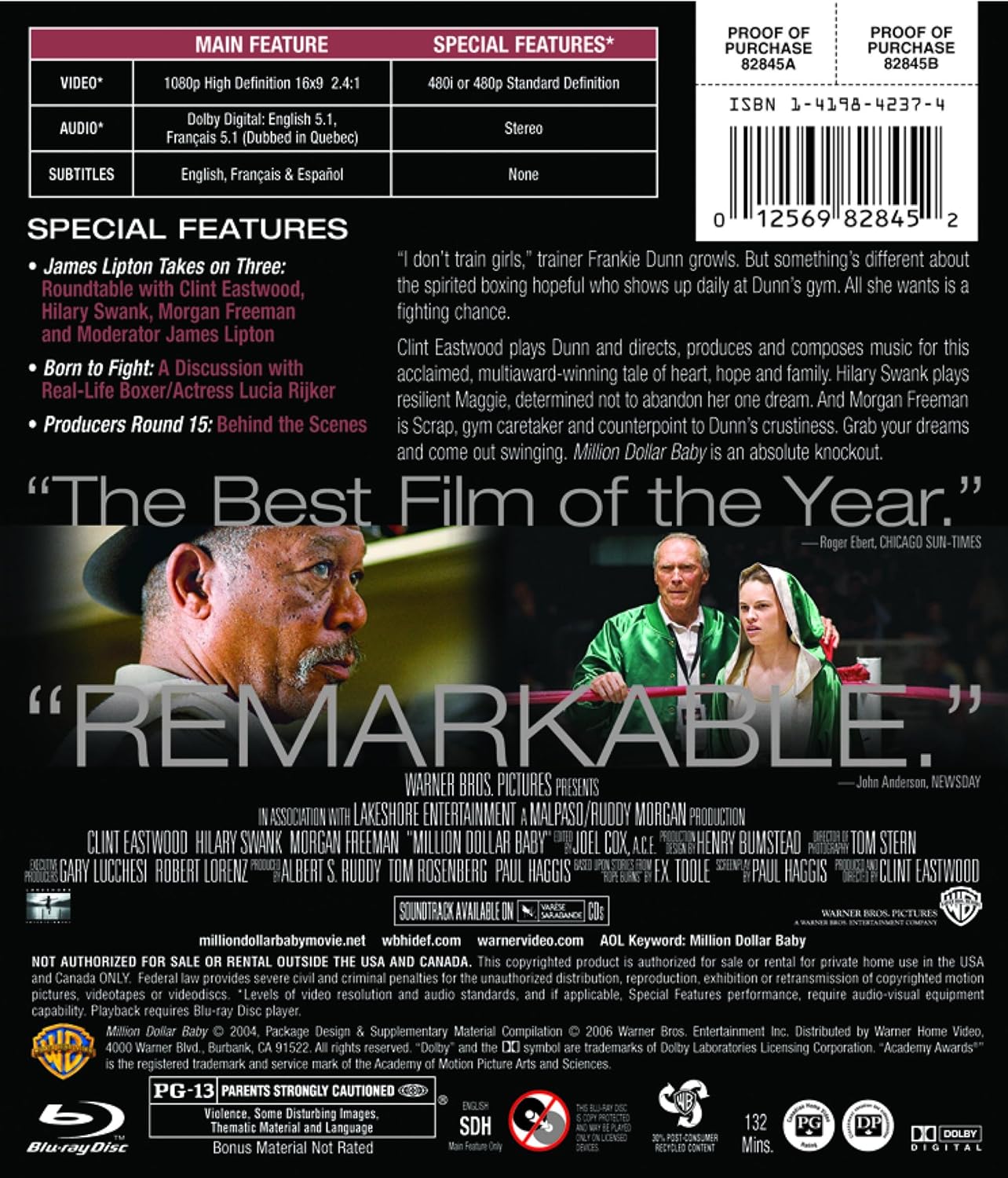
Image: Back cover of the Million Dollar Baby Blu-ray disc case. This view provides details on the disc's main features, special features, audio and video specifications, and a brief synopsis of the film. It also shows the PG-13 rating and various disc format logos.
Maintenance
Proper care of your Blu-ray disc will ensure its longevity and continued performance:
- Handling: Always hold the disc by its edges or by placing a finger through the center hole. Avoid touching the playback surface.
- Cleaning: If the disc gets dirty, gently wipe it with a soft, lint-free cloth. Use a disc cleaning solution if necessary, applying it to the cloth, not directly to the disc. Wipe from the center outwards in a straight line, not in circles.
- Storage: Store the disc in its original case when not in use. Keep it away from direct sunlight, extreme temperatures, and high humidity.
- Avoid Scratches: Do not place the disc on rough surfaces or expose it to sharp objects.
Troubleshooting
If you encounter issues while playing your Blu-ray disc, consider the following:
- Disc Not Playing/Loading:
- Ensure the disc is inserted correctly (label side up).
- Verify your player is a Blu-ray player, not a standard DVD player.
- Check the disc for smudges or scratches and clean it carefully.
- Try restarting your Blu-ray player.
- Skipping/Freezing Playback:
- Clean the disc thoroughly.
- Ensure the disc is not warped or severely scratched.
- Check for firmware updates for your Blu-ray player, as outdated firmware can sometimes cause playback issues.
- No Audio/Video:
- Confirm your HDMI cable is securely connected to both the player and the TV.
- Ensure your TV is set to the correct HDMI input.
- Check your player's audio settings to ensure the correct output format is selected.
Specifications
Detailed technical specifications for the Million Dollar Baby Blu-ray disc:
| Feature | Detail |
|---|---|
| Format | Blu-ray, AC-3, Closed-captioned, Color, Dolby, Dubbed, Multiple Formats, NTSC, Subtitled, Widescreen |
| Aspect Ratio | 2.40:1 |
| Run Time | 2 hours and 12 minutes |
| Release Date | November 14, 2006 |
| MPAA Rating | PG-13 (Parents Strongly Cautioned) |
| Audio Languages | English (Dolby Digital 5.1), French (Dolby Digital 5.1) |
| Subtitles | English, French, Spanish |
| Number of Discs | 1 |
| Product Dimensions | 6.75 x 5.25 x 0.25 inches; 3.2 ounces |
| Item Model Number | 82845 |
| ASIN | B000JUB7LM |
Warranty and Support
This Blu-ray disc is produced by Studio Distribution Services. While physical media generally does not come with an explicit manufacturer's warranty beyond initial functionality, consumers are typically protected by standard retail return policies for defective products.
- Defective Disc: If your disc is found to be defective upon purchase (e.g., unplayable due to manufacturing defect), please contact the retailer from whom you purchased the disc within their specified return period.
- General Support: For issues related to Blu-ray player compatibility or general playback, refer to your Blu-ray player's user manual or the manufacturer's support resources.
- Online Resources: For additional information about the film or Blu-ray format, you may visit relevant online movie databases or the official product page on Amazon.com.


