

1. Introduction
The AUTO METER 5335 Shift Light is an essential accessory designed to provide a visual indication of the optimal engine RPM for shifting gears. This unit features an incandescent bulb with an amber lens and a yellow boot, ensuring clear visibility. It is engineered for compatibility with external, non-LED based shift light tachometers, including Sport-Comp Playback Tachometers and DPSS Controllers. The shift light is built with a silver finish for enhanced durability and a stylish appearance.

Image 1: The AUTO METER 5335 Shift Light, featuring its incandescent bulb, amber lens, and yellow boot.
2. Safety Information
Please read and understand all instructions before installation and operation. Improper installation or use can lead to vehicle damage or personal injury. Always disconnect the vehicle's battery before performing any electrical work. Ensure all wiring connections are secure and properly insulated to prevent short circuits. This product is designed for 12-volt automotive electrical systems. Do not exceed the specified voltage.
3. Package Contents
Upon opening the package, verify that all components are present and undamaged:
- AUTO METER 5335 Shift Light unit
4. Installation
The 5335 Shift Light is an accessory designed to work in conjunction with a compatible tachometer or DPSS controller. Detailed installation instructions for the shift light are typically provided with the main tachometer unit or controller. Professional installation is recommended for optimal performance and safety.
General Installation Guidelines:
- Mounting: Select a suitable location for the shift light that is clearly visible to the driver but does not obstruct the view of the road or other critical instruments. Secure the shift light using appropriate mounting hardware (not included, typically supplied with the tachometer).
- Wiring Connections: The shift light requires electrical connections to a compatible tachometer or controller. Typically, this involves connecting the shift light's wires to the designated output terminals on the tachometer/controller. Refer to your tachometer's manual for specific wiring diagrams.
- Power: Ensure the tachometer/controller providing the signal to the shift light is properly connected to a 12-volt power source and ground.
- Testing: After installation, test the shift light's functionality according to your tachometer's instructions. This usually involves setting the desired RPM threshold and verifying the light illuminates at that point.
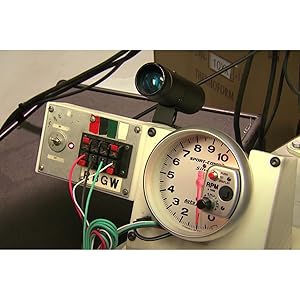
Image 2: Example of a shift light connected to a tachometer, illustrating a typical installation setup.
5. Operating Instructions
The AUTO METER 5335 Shift Light operates as a visual indicator, illuminating when the engine RPM reaches a pre-set threshold. This threshold is typically configured on the compatible tachometer or DPSS controller to which the shift light is connected.
Functionality:
- Once the engine RPM reaches the programmed shift point, the incandescent bulb within the 5335 Shift Light will illuminate brightly.
- The amber lens and yellow boot are designed to enhance visibility, even in varying light conditions, signaling the driver to shift gears for optimal performance.
- The shift light itself does not have user-adjustable settings; all adjustments for the RPM threshold are made via the connected tachometer or controller.
6. Maintenance
The AUTO METER 5335 Shift Light is designed for durability and requires minimal maintenance.
- Cleaning: Keep the lens and exterior housing clean using a soft, damp cloth. Avoid abrasive cleaners or solvents that could damage the finish or lens.
- Connections: Periodically check all electrical connections to ensure they remain secure and free from corrosion. Loose connections can lead to intermittent operation or failure.
- Bulb Replacement: As the unit uses an incandescent bulb, it may eventually require replacement. Refer to your tachometer's manual or AUTO METER's support resources for information on compatible replacement bulbs and procedures.
7. Troubleshooting
If your AUTO METER 5335 Shift Light is not functioning as expected, consider the following troubleshooting steps:
- Shift Light Does Not Illuminate:
- Check all wiring connections for proper contact and insulation.
- Verify that the compatible tachometer or controller is receiving power and functioning correctly.
- Ensure the RPM threshold on your tachometer/controller is set appropriately and that the engine is reaching that RPM.
- Inspect the incandescent bulb for damage or burnout.
- Shift Light Illuminates at Incorrect RPM:
- Re-check the RPM threshold setting on your compatible tachometer or controller.
- Ensure the tachometer itself is calibrated correctly and providing an accurate RPM reading.
If issues persist after performing these checks, contact AUTO METER customer support or consult a qualified automotive technician.
8. Specifications
| Feature | Specification |
|---|---|
| Brand | AUTO METER |
| Model Number | 5335 |
| Bulb Type | Incandescent |
| Lens Color | Amber |
| Boot Color | Yellow |
| Compatibility | External, non-LED based shift light tachometers, Sport-Comp Playback Tachometers, DPSS Controllers |
| Voltage | 12 volts |
| Item Weight | 5.1 ounces |
| Product Dimensions | 12 x 6 x 1 inches |
| Exterior Finish | Painted (Silver) |
| ASIN | B000JJHHAI |
| Date First Available | October 19, 2006 |
9. Warranty Information
Specific warranty details for the AUTO METER 5335 Shift Light are typically provided with the product at the time of purchase or can be obtained directly from AUTO METER. Please retain your proof of purchase for warranty claims. For the most current warranty policy, visit the official AUTO METER website or contact their customer service department.
10. Customer Support
For technical assistance, product inquiries, or support, please contact AUTO METER directly:
- Website: Visit the official AUTO METER website for FAQs, product documentation, and contact information.
- Contact: Refer to the contact section on the AUTO METER website for phone numbers or email support.


