1. Product Overview
The Weller PTE8 is a screwdriver-shaped soldering tip designed for use with compatible Weller soldering irons, specifically the TC201 model. This tip is engineered to provide efficient heat transfer and durability for various soldering applications. Key characteristics include its specific tip width, length, and thickness, which are crucial for proper sizing and performance.
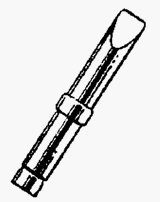
This image displays a line drawing of the Weller PTE8 screwdriver soldering tip, illustrating its tapered shaft and flat, chisel-like tip.
2. Setup Instructions
- Compatibility Check: Ensure the PTE8 soldering tip is compatible with your soldering iron. This tip is specifically designed for the Weller TC201 soldering iron.
- Power Off: Always ensure your soldering station or iron is powered off and unplugged before installing or removing tips.
- Cool Down: Allow the soldering iron to cool completely if a tip was previously in use.
- Installation: Carefully insert the PTE8 tip into the heating element or barrel of the soldering iron. Ensure it is seated firmly and correctly according to your soldering iron's specific design. Do not force the tip.
- Secure Connection: If your soldering iron uses a retaining nut or screw, tighten it gently to secure the tip. Avoid over-tightening, which can damage the tip or heating element.
3. Operating Instructions
- Pre-tinning: Before first use, and periodically during operation, pre-tin the tip by applying a small amount of solder to the heated tip. This helps prevent oxidation and ensures efficient heat transfer.
- Temperature Setting: Set your soldering station to the appropriate temperature for your specific solder and components. The PTE8 tip is rated for 800°F (427°C) operation.
- Application: Apply the heated and tinned tip to the joint to be soldered, ensuring good contact with both the component lead and the PCB pad.
- Solder Application: Feed solder into the joint, allowing it to flow evenly around the connection. Remove the solder wire, then remove the soldering iron tip once a good joint is formed.
- Cleaning During Use: Wipe the tip frequently on a damp sponge or brass wool tip cleaner to remove excess solder and flux residue.
4. Maintenance
- Regular Cleaning: Clean the tip regularly during use with a damp cellulose sponge or brass wool. This removes oxidation and ensures optimal performance.
- Tip Tinning: Always re-tin the tip with fresh solder after cleaning and before storing the iron. This protects the tip from oxidation.
- Inspection: Periodically inspect the tip for signs of wear, pitting, or excessive oxidation that cannot be removed by cleaning. A severely worn tip should be replaced.
- Storage: Store the soldering iron with a tinned tip in a dry, clean environment when not in use.
- Avoid Abrasives: Do not use abrasive materials or files to clean the tip, as this can damage the plating and shorten tip life.
5. Troubleshooting
- Poor Heat Transfer: If the tip is not heating effectively, ensure it is properly seated in the soldering iron. Check for excessive oxidation on the tip, which can impede heat transfer. Clean and re-tin the tip.
- Solder Not Sticking to Tip: This is typically due to tip oxidation. Clean the tip thoroughly with a damp sponge or brass wool and immediately re-tin it with fresh solder. If severe, a tip tinner compound may be used.
- Tip Pitting or Erosion: This indicates normal wear over time, or potentially using too high a temperature, or aggressive cleaning methods. Replace the tip if pitting affects performance.
- Tip Not Fitting: Verify that the tip model (PTE8) is correct for your soldering iron (TC201). Do not force the tip into the iron.
6. Specifications
| Specification | Detail |
|---|---|
| Brand | Weller |
| Model Number | PTE8 |
| Tip Series | PT |
| Tip Shape | Screwdriver |
| Tip Width | 0.234 inches (15/64") |
| Tip Length | 0.62 inches |
| Tip Thickness | 0.042 inches |
| Material | Copper |
| Color | Copper |
| Product Dimensions (L x W x H) | 1.5 x 0.3 x 0.3 inches |
| Weight | 1.5 Pounds (for the package, tip weight is negligible) |
| Compatible Soldering Iron | Weller TC201 |
7. Warranty Information
Specific warranty details for the Weller PTE8 Soldering Tip are typically provided with the product packaging or can be found on the official Weller website. Please refer to these sources for the most accurate and up-to-date warranty terms and conditions.
8. Customer Support
For further assistance, technical support, or inquiries regarding the Weller PTE8 Soldering Tip, please contact Weller customer service. You can typically find contact information on the official Weller website or through your product retailer.
You may also visit the official Weller Store on Amazon for additional product information and resources.


