
1. Introduction
This manual provides detailed instructions for the setup, operation, and maintenance of your Howard Miller 645-600 World Travel Alarm Clock. Please read this manual thoroughly before using your clock to ensure proper function and longevity.
2. Product Overview
The Howard Miller 645-600 is a compact and versatile travel alarm clock designed for convenience. It features a brushed silver folding cover that protects the clock face and doubles as a stand when open. The clock offers a dual-time display, allowing you to view both local time and the time in one of 24 major world cities. It includes a selectable 12- or 24-hour time format and a snooze function.

Figure 2.1: Howard Miller 645-600 World Travel Alarm Clock in closed position. The clock features a brushed silver cover and a dark gray base.
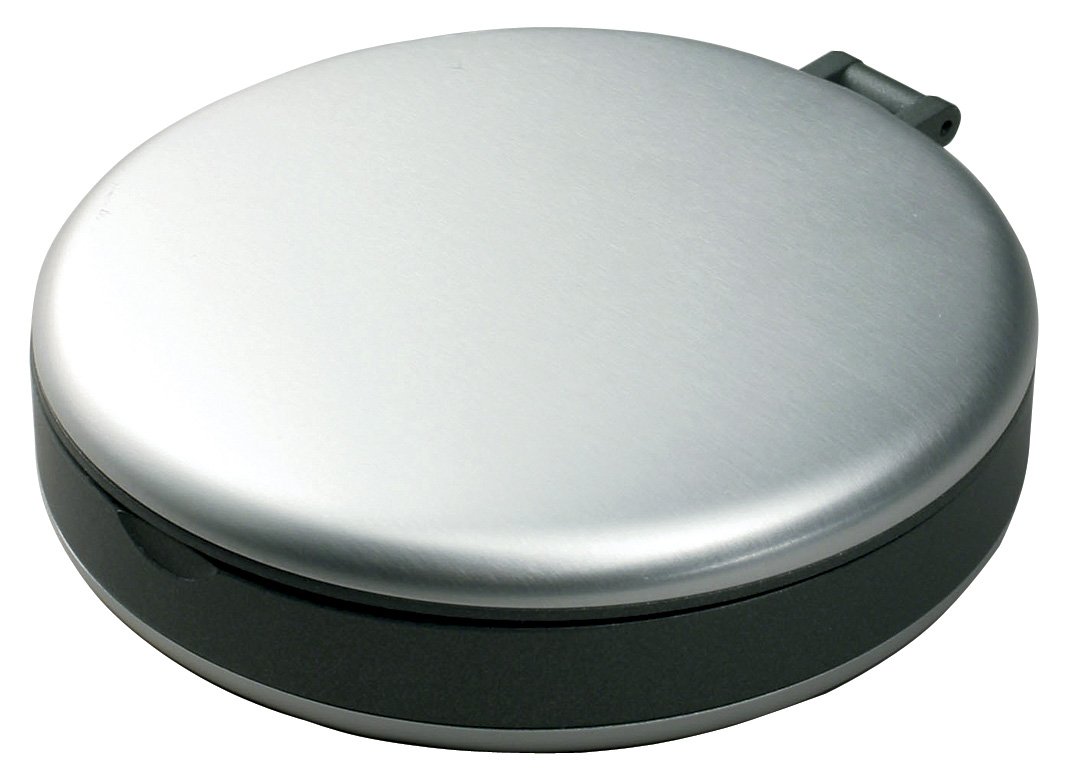
Figure 2.2: Howard Miller 645-600 World Travel Alarm Clock with its cover open, serving as a stand. The clock face is visible, displaying time and world city information.
3. Setup
3.1 Battery Installation
The Howard Miller 645-600 operates on a single battery (type not specified in product details, typically a button cell or AAA). A battery is required for the clock's operation and is not included with the product. Please ensure you have the correct battery before proceeding.
- Locate the battery compartment on the back or bottom of the clock.
- Open the battery compartment cover. This may require a small screwdriver or a coin.
- Insert the new battery, ensuring the correct polarity (+ and -) as indicated inside the compartment.
- Close the battery compartment cover securely.
3.2 Initial Time Setting
After installing the battery, the clock will power on. You will need to set the local time and potentially select your desired world city.
- Refer to the controls on the clock (buttons or dials, typically on the side or back).
- Identify the "SET" or "MODE" button. Press it to enter time setting mode.
- Use the "ADJUST" or arrow buttons to set the hour, then the minute.
- Confirm your selection by pressing "SET" or "MODE" again, or wait for the clock to exit setting mode automatically.
4. Operating Instructions
4.1 Setting Local Time
To adjust the local time after initial setup:
- Press the "TIME SET" or "MODE" button until the local time display flashes.
- Use the "HOUR" and "MINUTE" buttons (or similar adjustment buttons) to set the correct local time.
- Press "TIME SET" or "MODE" again to confirm and exit.
4.2 Setting World Time (24 Cities)
The clock can display the time for one of 24 major world cities. To select a city:
- Locate the "WORLD TIME" or "CITY" button.
- Press this button repeatedly to cycle through the available cities. The display will show the city name and its corresponding time.
- Stop pressing when your desired city is displayed. The clock will automatically save this selection.
4.3 Using the Alarm Function
To set and activate the alarm:
- Press the "ALARM SET" button. The alarm time display will flash.
- Use the "HOUR" and "MINUTE" buttons to set your desired alarm time.
- Press "ALARM SET" again to confirm.
- To activate or deactivate the alarm, locate the "ALARM ON/OFF" switch or button. Ensure it is in the "ON" position for the alarm to sound. An alarm icon typically appears on the display when active.
4.4 Snooze Function
When the alarm sounds, press the "SNOOZE" button (often a large button on top or front of the clock). The alarm will temporarily stop and sound again after a few minutes (typically 5-10 minutes, depending on the model).
4.5 12-Hour / 24-Hour Format
To switch between 12-hour (AM/PM) and 24-hour (military) time formats:
- Locate the "12/24H" or "FORMAT" button.
- Press this button to toggle between the two display formats.
5. Maintenance
5.1 Cleaning
To clean your clock, gently wipe the surfaces with a soft, dry cloth. Do not use abrasive cleaners, solvents, or chemical sprays, as these can damage the finish and internal components.
5.2 Battery Replacement
When the display dims or the clock functions become erratic, it is time to replace the battery. Follow the steps outlined in Section 3.1 Battery Installation. Dispose of old batteries according to local regulations.
6. Troubleshooting
| Problem | Possible Cause | Solution |
|---|---|---|
| Clock display is blank or dim. | Low or dead battery. | Replace the battery (refer to Section 3.1). |
| Alarm does not sound. | Alarm is not activated or set incorrectly. | Ensure the alarm is set and the "ALARM ON/OFF" switch is in the "ON" position (refer to Section 4.3). |
| Time is incorrect. | Time was not set properly or battery is low. | Reset the local time (refer to Section 4.1). If the problem persists, replace the battery. |
7. Specifications
- Model: Howard Miller 645-600
- Display Type: Digital
- Special Features: Alarm, Snooze, Dual Time Display (Local & 24 World Cities), 12/24-Hour Format
- Power Source: Battery Powered (Battery not included)
- Movement: Quartz
- Item Weight: 113 g (0.25 lbs)
- Item Dimensions (LxWxH): 25 x 76 x 83 mm (approximately 1 x 3 x 3.25 inches)
- UPC: 020867456000
8. Warranty and Support
For warranty information or technical support, please refer to the documentation included with your purchase or contact Howard Miller customer service directly. Contact details can typically be found on the manufacturer's official website.
