
1. Introduction
This manual provides essential instructions for the safe and effective use of your Minolta 500mm F/8 Auto Focus Mirror Lens. This prime telephoto lens is designed for exceptional reach and clarity, featuring a fixed focal length of 500 millimeters. It is compatible with select Minolta AF SLR cameras, including the Maxxum 7xi, 5000i, 7000i, and 8000i, offering auto focus functionality. The lens incorporates a mirror coating for enhanced light reflection and operates at a fixed aperture of f/8. Please read this manual thoroughly before using the lens.

Figure 1: Side view of the Minolta 500mm F/8 Auto Focus Mirror Lens.
2. Safety Information
- Do not look directly at the sun or other intense light sources through the lens, as this can cause severe eye damage.
- Keep the lens away from direct sunlight when not in use to prevent fire hazards, as the lens can concentrate sunlight.
- Avoid exposing the lens to extreme temperatures, high humidity, or dust.
- Handle the lens with care to prevent drops or impacts, which can damage optical elements or internal mechanisms.
- Keep out of reach of children.
3. Package Contents
Verify that all items are present in the package:
- Minolta 500mm F/8 Auto Focus Mirror Lens
- Front Lens Cap
- Rear Lens Cap
- Lens Hood (if included)
4. Setup
4.1 Attaching the Lens to Your Camera
- Ensure both the camera and the lens are powered off.
- Remove the rear lens cap from the lens and the body cap from your camera. Avoid touching the lens elements or the camera's sensor.
- Align the mounting index (red dot) on the lens with the corresponding mounting index on your camera body.
- Insert the lens into the camera's mount and rotate it clockwise until it clicks securely into place. Do not force the lens.

Figure 2: Rear view of the lens, illustrating the camera mount for attachment.
4.2 Detaching the Lens from Your Camera
- Power off your camera.
- While pressing the lens release button on the camera body, rotate the lens counter-clockwise until it detaches.
- Immediately attach the rear lens cap to the lens and the body cap to your camera to protect the internal components from dust and damage.
5. Operating the Lens
5.1 Auto Focus Functionality
This lens supports auto focus when used with compatible Minolta AF SLR cameras, specifically the Maxxum 7xi, 5000i, 7000i, and 8000i. Ensure your camera's focus mode is set to AF (Auto Focus). The camera will automatically adjust the lens focus when the shutter button is half-pressed.
5.2 Manual Focus Operation
For other Minolta AF SLRs or specific shooting situations, the lens can be operated in manual focus mode. Set your camera's focus mode to MF (Manual Focus). Rotate the focus ring on the lens to achieve sharp focus. Use your camera's viewfinder or LCD screen to confirm focus.

Figure 3: Side view of the lens, showing the focus distance scale.
5.3 Fixed Focal Length and Aperture
- Fixed Focal Length: This is a prime lens with a fixed focal length of 500mm. It does not have zoom capability. To change your field of view, you must physically move closer to or further from your subject.
- Fixed Aperture: The lens operates at a fixed aperture of f/8. This means the aperture cannot be adjusted. Exposure control will primarily be managed through shutter speed and ISO settings on your camera.
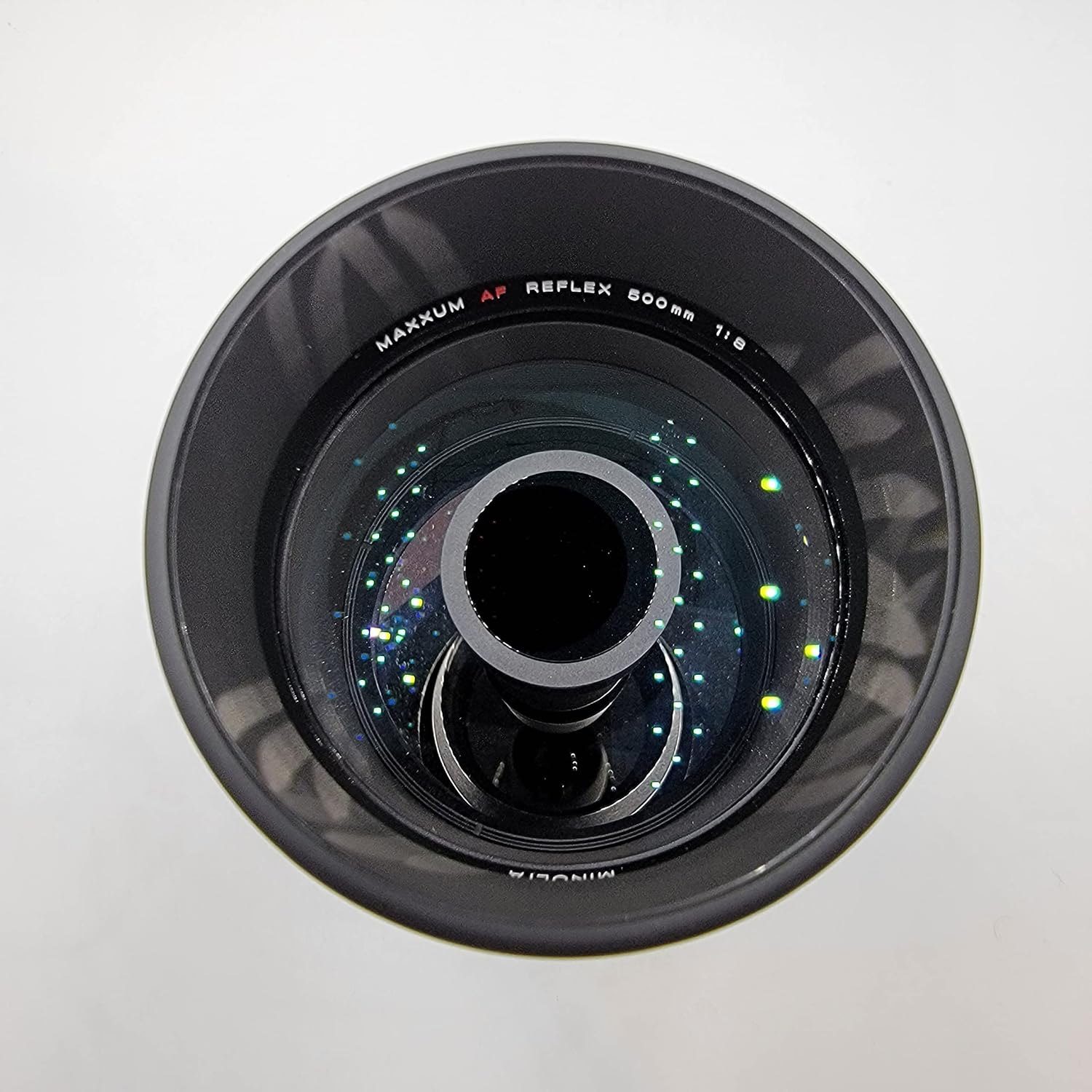
Figure 4: Front view of the lens, revealing the mirror optical design.
6. Maintenance
6.1 Cleaning the Lens
- Use a blower brush to remove dust from the lens surfaces.
- For smudges or fingerprints, use a clean, soft microfiber cloth specifically designed for optics, along with a small amount of lens cleaning solution. Apply the solution to the cloth, not directly to the lens.
- Clean the lens body with a soft, dry cloth. Do not use organic solvents.
6.2 Storage
- Always attach both front and rear lens caps when the lens is not in use.
- Store the lens in a cool, dry, and well-ventilated place, away from direct sunlight and chemicals.
- If storing for extended periods, consider using a dehumidifying agent to prevent mold growth.
7. Troubleshooting
| Problem | Possible Cause | Solution |
|---|---|---|
| Lens not attaching securely | Incorrect alignment; obstruction on mount. | Ensure red dots are aligned. Check for debris on lens or camera mount. Do not force. |
| Auto focus not working | Camera not compatible; camera set to manual focus; insufficient light; dirty contacts. | Verify camera compatibility (Maxxum 7xi, 5000i, 7000i, 8000i). Set camera to AF mode. Ensure adequate lighting. Clean lens and camera electrical contacts. |
| Images are blurry | Incorrect focus; camera shake; dirty lens elements. | Confirm focus (manual or auto). Use a tripod or faster shutter speed to prevent camera shake. Clean lens elements as per maintenance section. |
| Dark or underexposed images | Fixed f/8 aperture requires more light; incorrect camera exposure settings. | Increase ISO sensitivity or use a slower shutter speed. Consider shooting in brighter conditions or using external lighting. |
If problems persist, consult your camera's instruction manual or contact Minolta customer support.
8. Specifications
| Brand | Minolta |
| Model Name | 500mm F/8 (AF Reflex 500MM F8) |
| Focal Length | 500 mm (Fixed) |
| Lens Type | Telephoto, Prime, Mirror Lens |
| Maximum Aperture | f/8 (Fixed) |
| Focus Type | Auto Focus |
| Compatible Mountings | Minolta Alpha, Sony A |
| Compatible Camera Models | Maxxum 7xi, 5000i, 7000i, 8000i |
| Zoom Ratio | 1:1 (Not zoomable) |
| Lens Coating | Mirror Coating |
| UPC / GTIN | 043325236747 |
9. Warranty Information
Minolta products are manufactured to high-quality standards. For specific warranty terms and conditions applicable to your Minolta 500mm F/8 Auto Focus Mirror Lens, please refer to the warranty card included with your purchase or visit the official Minolta website. Keep your proof of purchase for warranty claims.
10. Customer Support
For technical assistance, service, or inquiries regarding your Minolta 500mm F/8 Auto Focus Mirror Lens, please contact Minolta customer support. Contact information can typically be found on the official Minolta website or in the documentation provided with your product.
You may also visit the Minolta Store on Amazon for additional product information and resources.