1. Introduction
The Metra 99-5812 Single-DIN Radio Installation Dash Kit is designed to facilitate the installation of a 2-inch tall (Single-DIN or ISO Single-DIN) aftermarket radio into the original dashboard of select 2004-2019 Ford, Lincoln, and Mercury vehicles. This kit ensures a seamless and integrated appearance, matching the vehicle's interior aesthetics. It includes a storage pocket to fill any remaining space below the radio.
2. Product Features
- Designed for standard 2-inch tall aftermarket radios.
- Utilizes a patented quick-release, snap-in ISO mount system with a custom trim ring.
- Constructed from high-quality ABS plastic for a factory-like fit and finish.
- Includes all necessary brackets and hardware.
- Detailed installation instructions are provided.
- Manufactured in the USA.
3. Vehicle Compatibility
This dash kit is compatible with select Ford, Lincoln, and Mercury vehicles manufactured between 2004 and 2019. For specific vehicle compatibility, it is recommended to consult the official Metra website or the detailed instructions included with the kit.
4. Package Contents
Upon opening the package, verify that all components are present:
- Metra 99-5812 Installation Kit (includes dash panel, brackets, and hardware)
- Detailed Installation Instructions
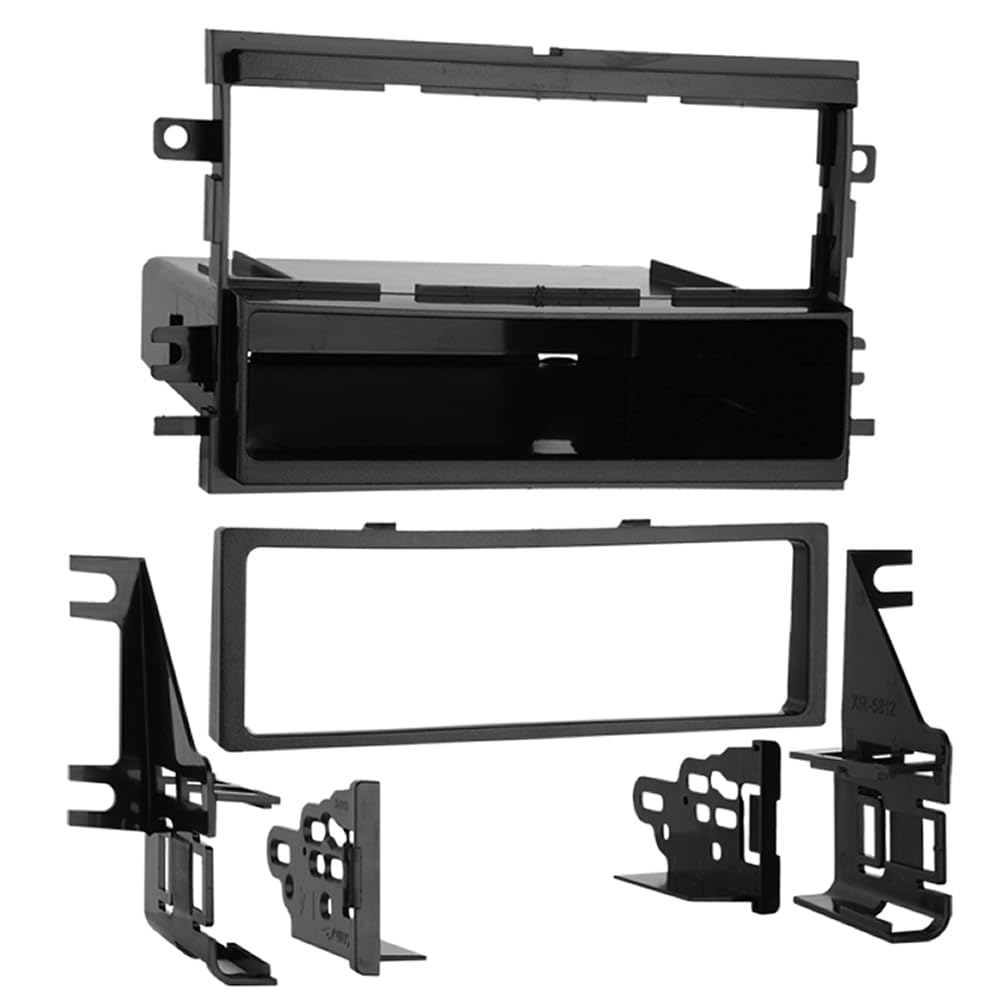
Image: The Metra 99-5812 Single-DIN Radio Installation Dash Kit, showing the main dash panel, mounting brackets, and associated hardware.
5. Installation Instructions
Before beginning installation, ensure the vehicle's battery is disconnected to prevent electrical shorts. Refer to your vehicle's service manual for specific dashboard disassembly procedures.
- Prepare the Vehicle: Carefully remove the factory radio and any associated trim panels from the dashboard. Store all removed components safely.
- Assemble the Dash Kit:
- Attach the provided mounting brackets to the aftermarket Single-DIN radio using the screws supplied with the radio or the kit.
- Slide the assembled radio and brackets into the Metra 99-5812 dash panel opening. Ensure a secure fit using the patented quick-release, snap-in ISO mount system.
- Install the custom trim ring around the radio for a finished appearance. Ensure it is flush and securely seated. Note: Some users have reported the trim ring may become loose if not properly secured. Consider using the trim ring supplied with your aftermarket head unit if it offers a more secure fit.
- If applicable, install the storage pocket below the radio to fill the remaining space in the dash opening.
- Connect Wiring: Connect the aftermarket radio's wiring harness to the vehicle's wiring harness. Ensure all connections are secure and properly insulated. (Wiring harness sold separately, if not included with radio).
- Test Functionality: Before fully reassembling the dashboard, reconnect the vehicle battery and test the aftermarket radio's functionality (power, audio, tuner, etc.).
- Final Assembly: Once functionality is confirmed, carefully reinstall the dash kit assembly into the vehicle's dashboard. Secure it using the original vehicle fasteners or those provided with the kit. Reattach any removed trim panels.
Important: Always perform a trial fit of components before final installation. For detailed, vehicle-specific instructions, refer to the Metra website or the instructions included in your kit. Some vehicles may require specific bracket configurations or spacers.
6. Operating Instructions
The Metra 99-5812 dash kit is an installation accessory and does not have operational functions itself. Once installed, operate your aftermarket Single-DIN radio according to its manufacturer's instructions.
7. Maintenance
The dash kit is made from durable ABS plastic and requires minimal maintenance. Clean the surface with a soft, damp cloth. Avoid using harsh chemicals or abrasive cleaners, as these may damage the finish.
8. Troubleshooting
- Radio feels loose after installation: Ensure all mounting brackets are securely fastened to both the radio and the dash kit. Verify that the dash kit itself is firmly seated in the vehicle's dashboard opening.
- Trim ring is not flush or falls out: Re-seat the trim ring firmly. If the issue persists, consider using the trim ring provided with your aftermarket radio, as some users have found it to offer a more secure fit.
- Kit does not fit vehicle: Double-check the vehicle compatibility list. Ensure you have the correct Metra kit for your specific year, make, and model. Refer to the Metra website for precise fitment information.
9. Specifications
| Brand | Metra |
| Model Number | 99-5812 |
| Material | ABS plastic |
| Dimensions (L x W x H) | 16 x 12 x 4.75 inches |
| Item Weight | 0.5 Pounds (approx. 8 ounces) |
| Connector Type | ISO |
| Manufacturer | Metra Electronics Corp |
10. Warranty Information
This Metra product is covered by a 1-year limited manufacturer warranty. Please retain your proof of purchase for warranty claims. For full warranty terms and conditions, refer to the documentation included with your product or visit the Metra website.
11. Technical Support
For installation assistance or technical inquiries, a dedicated tech support number is available 7 days a week. Please refer to the contact information provided in your product packaging or on the official Metra website for the most current support details.


