
1. Introduction
The Canon EF 50mm f/1.2L USM Lens is a high-performance, weather-resistant standard prime lens designed for Canon EF mount cameras. As part of Canon's prestigious L-series, it features superior optical quality and robust construction. Its wide f/1.2 maximum aperture excels in low-light conditions and provides exceptional control over depth of field, producing stunning bokeh. This manual provides essential information for setting up, operating, and maintaining your lens to ensure optimal performance and longevity.
2. What's in the Box
- Canon EF 50mm f/1.2L USM Lens
- E-72U 72mm Snap-On Lens Cap
- Lens Dust Cap E (Rear)
- ES-78 Lens Hood
- Lens Case LP1214
- Warranty Card (1-year warranty)

Image: The LP1214 lens case, a soft gray pouch with a black leather-like base and drawstring closure, designed to protect the lens during transport.
3. Key Features
- Focal Length: 50mm prime lens, offering a natural perspective similar to human vision.
- Maximum Aperture: f/1.2, providing exceptional low-light performance and shallow depth of field.
- Ultrasonic Motor (USM): Ensures fast, quiet, and precise autofocus, with full-time manual focus override.
- L-Series Quality: Denoted by the red ring, signifying Canon's highest standard of optical and mechanical construction.
- Weather-Resistant: Designed with seals to protect against dust and moisture, enhancing durability in various shooting conditions.
- Filter Size: 72mm, allowing for the use of various filters.

Image: A front-angled view of the Canon EF 50mm f/1.2L USM Lens, showcasing its black barrel, red L-series ring, and the 50mm focal length marking.
4. Setup
- Attaching the Lens:
- Remove the rear lens cap and the camera body cap.
- Align the red dot on the lens with the red dot on your Canon EF mount camera body.
- Rotate the lens clockwise until it clicks into place.
- Attaching the Lens Hood (ES-78):
- Align the red dot on the lens hood with the red dot on the front of the lens.
- Rotate the hood clockwise until it locks securely.
- Attaching the Front Lens Cap (E-72U):
- Simply snap the 72mm front lens cap onto the front element of the lens or the lens hood.
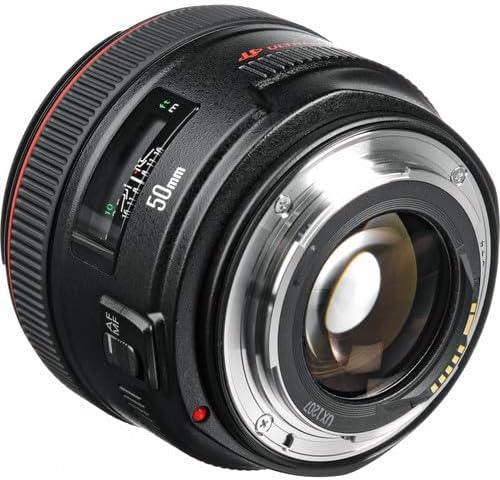
Image: A rear-angled view of the Canon EF 50mm f/1.2L USM Lens, showing the EF mount and the red alignment dot for attaching to the camera body.
5. Operating the Lens
- Autofocus (AF) / Manual Focus (MF) Switch:
Locate the AF/MF switch on the side of the lens barrel. Slide the switch to 'AF' for automatic focusing or 'MF' for manual focusing. In AF mode, full-time manual focus is available by rotating the focusing ring.
- Focusing Ring:
In MF mode, rotate the focusing ring to adjust focus. The distance scale on the lens barrel indicates the current focus distance.
- Aperture Control:
The f/1.2 maximum aperture allows for significant light gathering and shallow depth of field. Adjust the aperture through your camera's settings to control exposure and the amount of background blur (bokeh).
- Prime Lens Characteristics:
This is a prime lens, meaning it has a fixed focal length of 50mm. There is no zoom function. To change your composition, you must physically move closer to or further from your subject.
Video: An overview of the Canon EF 50mm f/1.2L USM Lens, highlighting its features and design. This video provides a general introduction to the lens's capabilities and physical attributes.
Video: A demonstration showcasing the impressive bokeh capabilities of the Canon 50mm f/1.2 lens, illustrating its shallow depth of field and creamy background blur.
6. Maintenance and Care
- Cleaning the Lens:
Use a lens blower to remove dust, then a soft lens brush. For smudges, use a lens cleaning solution and a microfiber cloth, wiping gently from the center outwards.
- Storage:
Always store the lens with both front and rear caps attached. Use the provided lens case for added protection. Store in a cool, dry place away from direct sunlight and extreme temperatures.
- Protection:
Consider using a 72mm UV filter to protect the front element from scratches and dust. The lens hood helps prevent flare and offers physical protection.

Image: The Canon E-72U 72mm snap-on front lens cap, featuring the Canon logo and "ULTRASONIC" text, used to protect the front element of the lens.

Image: The Canon Lens Dust Cap E, a black cap with the Canon logo, designed to protect the rear element and mount of the lens when not attached to a camera body.
7. Troubleshooting
- Autofocus Not Working:
- Ensure the AF/MF switch on the lens is set to 'AF'.
- Check your camera's focus mode settings.
- Verify the lens is securely attached to the camera body.
- Blurry Images:
- Check your shutter speed; it might be too slow for handheld shooting, especially in low light.
- Ensure your subject is within the lens's minimum focusing distance (0.45m / 1.48 ft).
- Verify that the lens elements are clean and free from smudges.
- Lens Not Recognized by Camera:
- Remove and reattach the lens, ensuring a firm connection.
- Clean the electrical contacts on both the lens and camera body with a clean, dry cloth.
Video: A short video demonstrating the Canon 5D Mark IV with the 50mm f/1.2 lens, showcasing its bokeh capabilities and overall performance for photography.
8. Specifications
| Product Dimensions | 7.28 x 5.51 x 5.79 inches |
| Item Weight | 1.8 pounds |
| Item Model Number | 1257B002 |
| Brand | Canon |
| Focal Length Description | 50mm prime lens |
| Lens Type | Standard |
| Compatible Mountings | Canon EF |
| Camera Lens Description | Canon EF 50mm f/1.2L USM |
9. Warranty and Support
The Canon EF 50mm f/1.2L USM Lens comes with a 1-year manufacturer's warranty. This warranty covers defects in materials and workmanship under normal use. Please note that the warranty does not cover misuse of the product.
For detailed warranty information, product registration, or technical support, please visit the official Canon website or contact Canon customer service.
- Protection Plans: Additional protection plans are available for purchase, including 3-Year Protection Plan and NEW Complete Protect options. Refer to your retailer for details.