
Introduction
This manual provides essential information for setting up, operating, and enjoying your SEGA Genesis Collection for the Sony PSP. This collection features 28 classic SEGA Genesis games, along with bonus content and features, designed for portable entertainment.

Image: Front cover of the SEGA Genesis Collection UMD for Sony PSP, featuring various game characters.
Setup
Inserting the UMD
- Ensure your Sony PSP system is powered off.
- Locate the UMD (Universal Media Disc) slot on the back of your PSP.
- Open the UMD drive cover.
- Carefully insert the SEGA Genesis Collection UMD disc into the slot, ensuring the label faces upwards.
- Close the UMD drive cover until it clicks securely into place.
Memory Stick Duo Requirements
To save game progress and access certain features, a Memory Stick Duo is required. The game utilizes approximately 386 KB for save data. Ensure a Memory Stick Duo is inserted into your PSP's Memory Stick slot before starting gameplay to enable saving.
Operating Instructions
Starting the Game
- Power on your Sony PSP system.
- Navigate to the Game menu on the PSP XMB (XrossMediaBar).
- Select the 'UMD' icon, then choose 'SEGA Genesis Collection' to launch the game.
Game Selection and In-Game Menu
From the main menu, you can browse and select any of the 28 classic games included in the collection. During gameplay, you can access the in-game options menu by pressing the SELECT button. This menu provides the following options:
- Controls: Customize or view the game's control scheme.
- Video: Adjust screen size and position settings.
- Save/Load Game: Save your current game progress or load a previously saved game.
- Reset/Exit Game: Reset the current game or exit back to the main collection menu.
Multiplayer Functionality
The SEGA Genesis Collection supports 1-2 players via Wi-Fi Compatible (Ad Hoc) mode. Refer to your PSP system's manual for instructions on setting up an Ad Hoc connection for local multiplayer gaming.
Unlockable Content
The collection includes various unlockable bonus content such as additional arcade games, developer interviews, and artwork. Specific unlock conditions include:
- Zaxxon: Collect one Chaos Emerald in Sonic the Hedgehog (achieve 50 rings in a stage and jump through the giant ring).
- Phantasy Star IV Sound Test: Beat Phantasy Star IV, then press the B button at the title screen.
- Tac-Scan: Reach the bonus stage in the first level of Ristar.
- Altered Beast Arcade: Play every game on the list, including other arcade titles.
- Phantasy Star Universe Trailer: Play Phantasy Star II, III, and IV.
- Virtual Fighter 5 Trailer: Play Virtual Fighter 2.
Game List
The SEGA Genesis Collection features 28 classic titles. A selection of these games includes:
- Alex Kidd in the Enchanted Castle
- Altered Beast
- Bonanza Bros.
- Columns
- Comix Zone
- Decap Attack
- Ecco the Dolphin
- Ecco: The Tides of Time
- Ecco Jr.
- Flicky
- Gain Ground
- Golden Axe
- Golden Axe II
- Golden Axe III
- Kid Chameleon
- Phantasy Star II
- Phantasy Star III: Generations of Doom
- Phantasy Star IV: The End of the Millennium
- Ristar
- Shadow Dancer: The Secret of Shinobi
- Shinobi III: Return of the Ninja Master
- Sonic The Hedgehog
- Sonic The Hedgehog 2
- Super Thunder Blade
- Sword of Vermilion
- VectorMan
- VectorMan 2
- Virtua Fighter 2
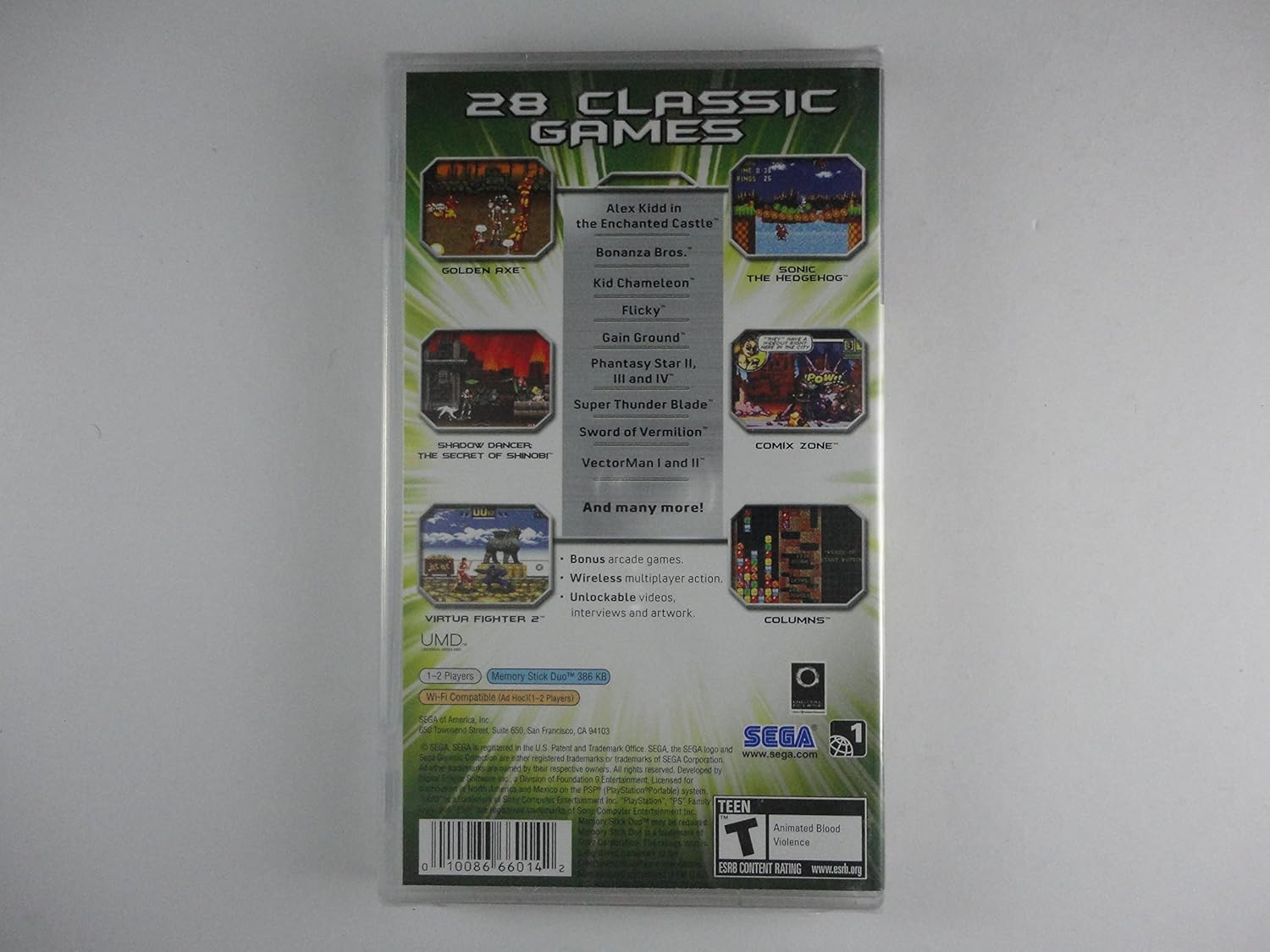
Image: Back cover of the SEGA Genesis Collection UMD, displaying a partial list of included games and key features.
Maintenance
UMD Care
- Handle the UMD by its edges to avoid touching the disc surface.
- Keep the UMD clean and free from dust, fingerprints, and scratches. Use a soft, dry cloth to gently wipe the disc if necessary.
- Store the UMD in its protective case when not in use.
- Avoid exposing the UMD to extreme temperatures, direct sunlight, or high humidity.
PSP System Care
- Keep your PSP system clean and free from dust.
- Avoid dropping the system or subjecting it to strong impacts.
- Do not attempt to disassemble or repair the PSP system yourself. Refer to authorized service centers for repairs.
Troubleshooting
Game Not Loading
- Ensure the UMD is correctly inserted into the PSP's UMD drive.
- Check the UMD for any visible damage, scratches, or dirt. Clean gently if needed.
- Restart your PSP system.
- Verify that your PSP's firmware is up to date.
Save Game Issues
- Ensure a Memory Stick Duo is properly inserted and has sufficient free space.
- If experiencing issues with loading saved games, try saving to a different slot or re-saving your progress. Some users have reported intermittent save game loading issues; ensure your Memory Stick Duo is genuine and functioning correctly.
- Do not remove the Memory Stick Duo during a save operation.
Controls Not Responding
- Check the in-game control settings via the SELECT menu to ensure they are configured as expected.
- Ensure no external peripherals are interfering with the PSP's controls.
- Restart the game and/or the PSP system.
Specifications
| Platform | Sony PSP (PlayStation Portable) |
| Item Type | Video Game |
| Model Number | 010086660142 |
| UPC | 010086660142 |
| Release Date | November 16, 2006 |
| ESRB Rating | Teen (Animated Blood, Violence) |
| Players | 1-2 Player (Wi-Fi Compatible Ad Hoc) |
| Memory Stick Duo Usage | Approximately 386 KB |
| Product Dimensions | 7.7 x 4.4 x 0.8 inches |
| Item Weight | 5.6 ounces |
| Manufacturer | Sega of America, Inc. |
Warranty and Support
Limited Warranty
SEGA of America, Inc. warrants to the original consumer purchaser that the UMD shall be free from defects in material and workmanship for a period of ninety (90) days from the date of purchase. If a defect covered by this limited warranty occurs during this 90-day period, SEGA will repair or replace the UMD, at its option, free of charge.
Customer Support
For technical assistance or further inquiries, please visit the official SEGA website at www.sega.com. You may also refer to your Sony PSP system's documentation for hardware-related support.